---
title: "How to create a food truck website with AI"
date: "2026-10-21T09:33:00"
url: "https://www.godaddy.com/resources/skills/how-to-create-a-food-truck-website-with-ai"
---
# How to create a food truck website with AI
Food trucks live and die by visibility. Customers need to know where you are, what you serve, and how to order before they’ll track you down. A website gives your food truck a permanent home online, even when your business is always on the move.
If you’re still planning your business, start with this guide on [how to start a food truck business](https://www.godaddy.com/resources/skills/how-to-start-a-food-truck-business). Once you’re ready to get online, an AI website builder can help you create a professional site without coding or design experience.
GoDaddy Airo AI Builder
Describe your idea. We'll build your live website in minutes.
With a few prompts, Airo AI Builder generates your website, web app,
pages, databases and logic in minutes — no coding required.
Start for free with 50 AI credits a month. No credit card required.
[Build for Free](https://www.godaddy.com/airo/ai-builder)
## **What you need before building a website**
Before you start building, it’s worth getting a few things organized. A clear description of your food truck, some good photos and an idea of the pages you need will help you create a more useful website from the beginning.
### **Make a plan**
A little planning goes a long way. Before you open an AI website builder, prepare the basic information customers will want to see.
You should have three things ready:
1. A detailed description of your food truck
2. A list of the pages or sections your website needs
3. Photos of your food, truck, and events
### **Write a description of your food truck**
Your description is the starting point for your AI-generated website. The more specific you are, the easier it is for Airo AI Builder to create a site that feels like your brand.
Include details such as:
- **What you serve:** tacos, barbecue, fusion food, vegan meals, wood-fired pizza, or another specialty
- **Where you operate:** your city, region, regular locations, festivals, markets, and private events
- **What makes you different:** family recipes, locally sourced ingredients, an unusual concept, or award-winning dishes
- **Your personality and vibe:** fun and loud, craft and artisan, fast and no-frills, playful or community-focused
- **What customers should do:** view the menu, find your location, order ahead, book catering, or follow you on social media
Here’s the difference between a vague description and a useful one:
**Vague:******“I have a food truck.”
**Specific:******“I run a Korean-Mexican fusion food truck called KoMex. We’re known for kimchi quesadillas, bulgogi tacos and spicy gochujang fries. We visit farmers' markets, breweries and weekend festivals around Portland. Our brand is energetic, colorful and casual, with a focus on bold flavors and quick service.”
The second description gives your AI builder much more to work with. It includes the cuisine, menu highlights, location, audience and visual personality.
### **Decide what pages you need**
Food truck websites are usually leaner than full restaurant websites. You may not need dozens of pages, but customers should still be able to find the information they need quickly.
Consider including:
- **Homepage:** Introduce your food truck and highlight what customers should do next.
- **Menu:** List your dishes, descriptions, prices, and dietary information.
- **Schedule or locations:** Show where customers can find you today and throughout the week.
- **About:** Share your story, background and approach to food.
- **Catering or event booking:** Explain how customers can hire your truck.
- **Contact:** Include your email, phone number and social media links.
You can put all of this on one well-organized page or divide it into separate pages. A single-page site may work well for a truck with a simple menu and regular route. Separate pages may be more useful if you offer catering, private events, merchandise, or online ordering.
### **Take photos of your food and truck**
Food truck customers often eat with their eyes first, especially when they’re scrolling on a phone and deciding whether to visit you. Use real photos of your business rather than stock photography or AI-generated food images. Customers want to see what they’ll actually receive.
Take photos of:
- **Your food:** Show your best dishes from different angles, including close-ups of popular menu items.
- **Your truck:** Photograph the exterior, serving window, signage, branding, and wrap.
- **Your truck in action:** Capture markets, festivals, busy service periods, and lines of happy customers.
You don’t need a professional photographer. Well-lit phone photos can work very well. Just avoid images that are blurry, too dark, or heavily filtered. Natural light and a clean background can make a significant difference.
### **Register a domain name**
Your food truck may change locations every day, but your website address should stay the same. A custom domain gives customers one permanent place to find your menu, schedule, ordering links, and event information.
Find your perfect domain name today
SEARCH
When choosing a domain:
- Use your food truck’s name whenever possible.
- Keep it short and easy to type on a phone.
- Choose a [.com](https://www.godaddy.com/tlds/design-domain) if it’s available and suits your audience.
- Consider a food-related extension such as [.food](https://www.godaddy.com/tlds/food-domain) if it fits your brand.
- Consider a city-based domain extension if your business serves a specific local area.
- Avoid unnecessary hyphens and numbers.
- Choose a name that’s easy to say, spell, and remember.
Eligible paid [Airo AI Builder plans](https://www.godaddy.com/airo/ai-builder) include a free custom domain, so you will be able to build and publish your website without purchasing your domain separately.
## **Prompting tips to make your food truck website stand out**

When you use Airo AI Builder, your prompt is the foundation of your website. The more useful information you provide, the more relevant the first version is likely to be.
Here’s how to talk to Airo about your food truck:
1. **Lead with your cuisine and concept.******Say “wood-fired pizza truck” or “vegan soul food truck” instead of simply saying “mobile food business.”
2. **Describe your personality.******Food trucks often have more character than traditional restaurants. Mention quirky names, bold flavors, street culture, family traditions, or a playful atmosphere.
3. **Explain your location model.******Tell Airo whether you rotate between several locations, attend festivals, operate from one regular spot, or take private bookings only.
4. **Be specific about what visitors should do.******Ask Airo to help customers order online, find your location, book catering, view your menu, or follow you on social media.
5. **Share your existing branding.******Include your truck wrap colors, logo, fonts, and visual style. You can also attach a logo or truck photo if the experience supports file uploads.
Try prompts like these:
“Create a bold, colorful website for a wood-fired pizza truck called Ember Wheels. We serve Neapolitan-style pizzas at breweries, farmers markets and private events around Austin. Make the homepage highlight our weekly schedule, menu and catering options. Use burnt orange, charcoal, and cream to match our truck wrap.”
“Build a friendly website for Green Route, a vegan food truck serving plant-based burgers, loaded fries, and fresh juices in the Denver area. We rotate between five locations and post our schedule every Monday. Make it easy for visitors to find us, view the menu, and follow us on Instagram.”
“Create a modern, playful website for a Caribbean barbecue truck called Island Smoke. We cater weddings, corporate lunches and festivals across Atlanta. Include our story, catering packages, inquiry form, menu, and links to online ordering.”
## **Food truck website checklist**
Use this checklist while building your website and as a final review before you publish. The goal is to make it easy for customers to decide what to order, where to find you, and how to take the next step.
Page
Why It Matters
Menu with prices
Your menu is one of the first things customers will look for. List every item with a short description and current price, and include useful dietary information where relevant. Keep the design simple and make sure the menu is easy to read on a phone.
Location schedule or route map
Your location schedule is what makes a food truck website different from a typical restaurant website. Customers need to know where they can find you today.
Put your weekly rotation, upcoming events, or route map somewhere prominent on the homepage. Update it regularly — an outdated schedule can quickly make your website useless to customers.
Online ordering for pickup
Online ordering lets customers place an order before they reach the truck. This can reduce wait times and help you serve more people during busy lunch periods, markets, and events.
If you're choosing a point-of-sale system or payment setup, review this guide to [quick-service restaurant POS systems](https://www.godaddy.com/resources/quick-service-restaurant-pos-system). Even a simple ordering page can make a noticeable difference during busy service periods.
Catering and event booking info
Catering and private events can become an important source of revenue for a food truck. Explain whether you cater weddings, corporate lunches, festivals, birthday parties, block parties, or other events.
Include details such as: catering packages, minimum guest counts, travel radius, available dates, setup requirements, and how customers can submit an inquiry. A simple form asking for the event date, event type, location, and estimated guest count is enough to start the conversation.
Photos of food and the truck
Strong photos help customers decide whether they want to visit. Feature your best dishes, your truck, and your branding, especially the exterior and serving window.
Photos from busy events are particularly useful. A line of customers, a crowded market, or a popular festival can provide social proof without requiring a separate testimonial.
Reviews and testimonials
Positive reviews can turn curiosity into a visit. Display reviews from Google, Yelp or social media, and consider adding short testimonials from catering customers.
Screenshots of enthusiastic Instagram comments can also work well, as long as you have permission to use them and the text is easy to read.
Social media feed
For many food trucks, social media is the daily marketing channel. It's where customers find today's location, see new menu items, and keep up with schedule changes.
Link to or embed your Instagram, TikTok, or other social media feed on your website. This helps your site feel current, even when you don't update the main pages every day.
Contact information
Make it easy for customers to reach you. Include your email address, phone number if you take calls, and the best contact method for catering or event inquiries.
Put your contact information in an obvious place, such as the header, footer, and catering page. Don't make customers search for it.
Gift cards
Gift cards are a simple way to generate additional revenue and introduce new customers to your food truck. Loyal customers can buy them as gifts, while recipients get a reason to visit for the first time.
Airo AI Builder supports gift card and store credit functionality, so you can ask it to help create a gift card feature for your website.
## **Build a food truck website: Step by step with Airo AI Builder**
Once you have your plan, photos, and domain ready, it’s time to build. [Build a food truck website with Airo AI Builder](https://www.godaddy.com/airo/ai-builder/solutions/food-and-beverage) by describing your business in a conversation.
Airo AI Builder can help create food and beverage websites with pages, menus, forms, online ordering features, payment options, and other tools. You don’t need design skills or coding experience to get started.
GoDaddy Airo AI Builder
Describe your idea. We'll build your live website in minutes.
With a few prompts, Airo AI Builder generates your website, web app,
pages, databases and logic in minutes — no coding required.
Start for free with 50 AI credits a month. No credit card required.
[Build for Free](https://www.godaddy.com/airo/ai-builder)
### **Step 1: Describe your food truck to Airo AI Builder**
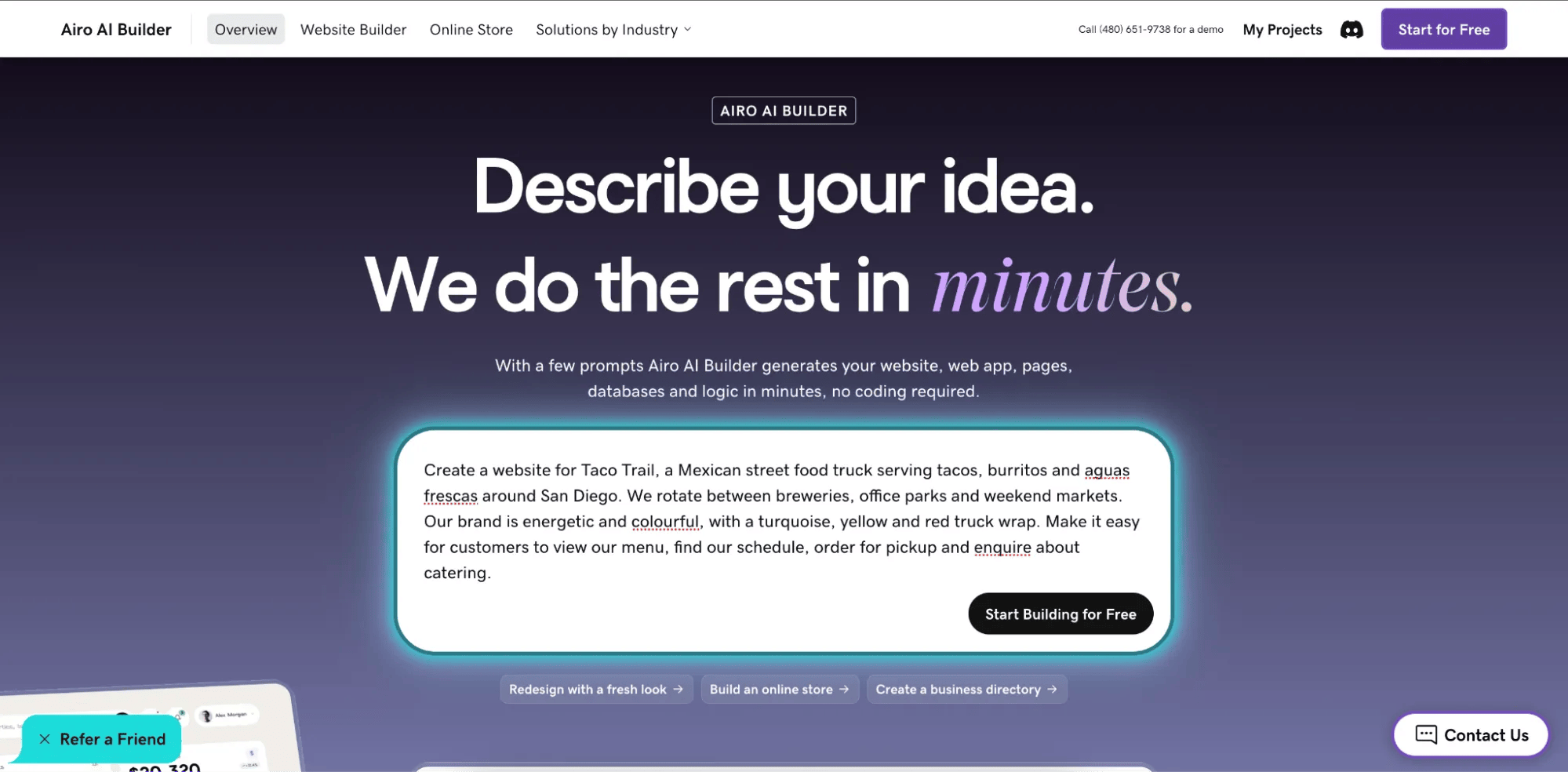
Airo AI Builder starts by asking you to describe your business. This is where the description you prepared earlier becomes useful.
Include:
- Your cuisine and food truck concept
- Your business name
- Your service area
- Your regular locations or event model
- Your menu highlights
- Your brand personality
- The actions you want visitors to take
For example:
“Create a website for Taco Trail, a Mexican street food truck serving tacos, burritos and aguas frescas around San Diego. We rotate between breweries, office parks and weekend markets. Our brand is energetic and colorful, with a turquoise, yellow and red truck wrap. Make it easy for customers to view our menu, find our schedule, order for pickup, and enquire about catering.”You may also be able to attach files such as your logo, menu, or a photo of your truck. If you already have a website or social media profile, you can point Airo towards it as a reference for your branding and business information.
### **Step 2: Answer a few questions**
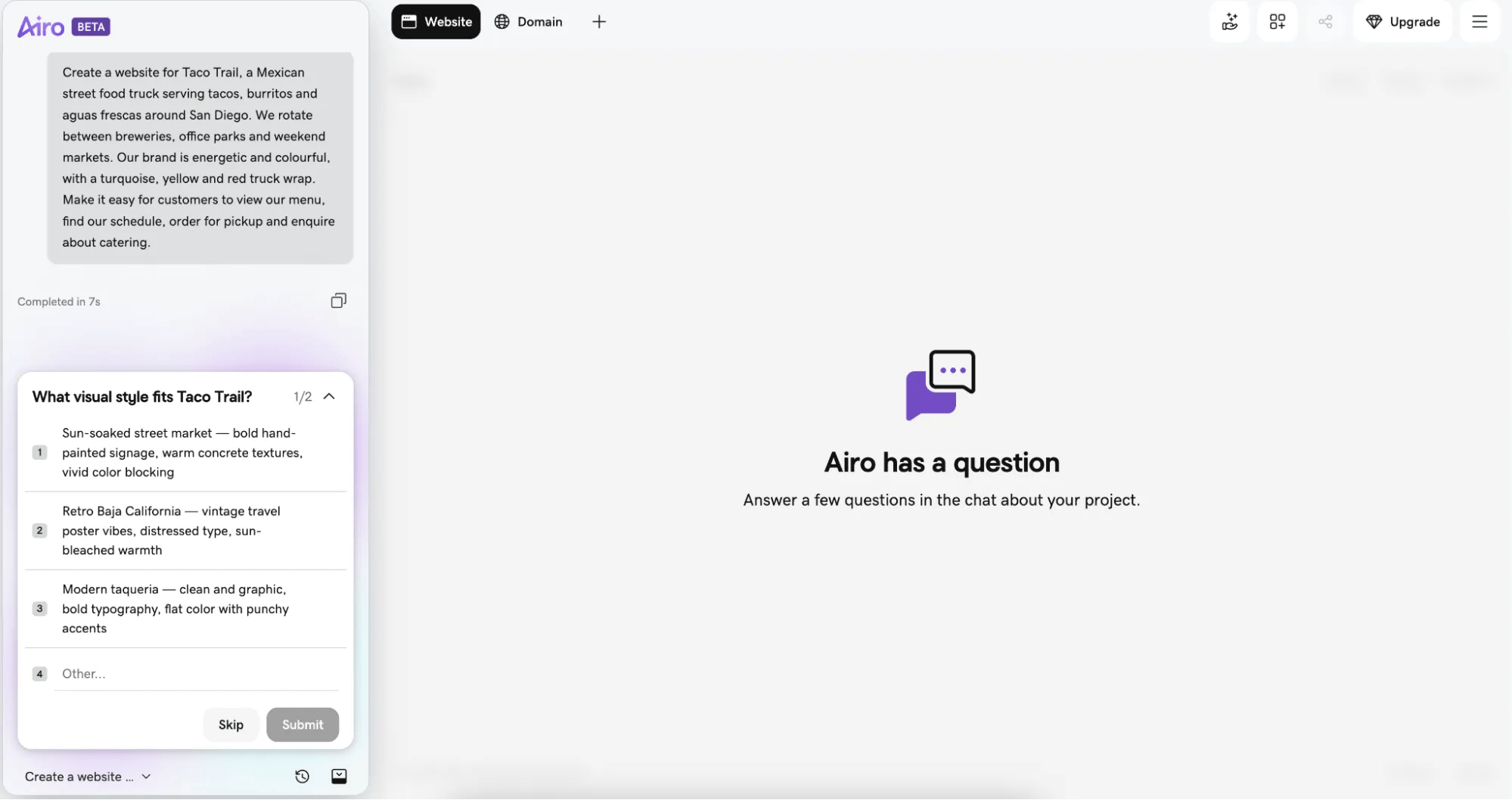
After your initial description, Airo may ask follow-up questions to refine the website. It might ask which pages you want, whether you offer online ordering or catering, which colors to use, or what type of tone you prefer.
This should be a quick back-and-forth rather than a lengthy questionnaire. Answer as specifically as you can. If you’re unsure about something, you can always change it later.
### **Step 3: Shape your site with follow-up prompts**

Airo AI Builder generates a complete site draft, which you can refine through conversation. Instead of dragging blocks around or searching through complicated menus, tell Airo what you want to change. And for quick updates like this week's schedule or a price change, you can edit text directly in the editor.
As you converse, you could ask Airo to:
- “Make the menu the first thing people see on the homepage.”
- “Add a section at the top showing where I’ll be this week.”
- “Change the colors to match my truck — red and black.”
- “Add a catering page with an inquiry form.”
- “Add dietary labels for vegetarian, vegan and gluten-free items.”
- “Make the schedule easier to read on mobile.”
- “Add a button that says ‘Order ahead’ next to each location.”
Keep refining the site until the content, layout, and branding feel right for your business. Focus on one or two changes at a time so you can easily see the effect of each prompt.
### **Step 4: Link to your ordering and delivery tools**

If you already use online ordering, delivery, or restaurant management tools, Airo AI Builder can help you link them to your website. Available options depend on your provider, account, and setup.
Relevant food and beverage platforms may include:
- **DoorDash:** Link customers to delivery or online ordering options.
- **Uber Eats:** Connect customers with your delivery menu.
- **Toast:** Link to your ordering and restaurant management tools.
- **ChowNow:** Add online ordering for pickup or delivery.
- **Fantuan:** Connect with a delivery platform used in selected markets.
- **Chowbus:** Link customers to food ordering and delivery.
- **ezCater:** Help customers enquire about business catering.
- **GoDaddy Payments, Stripe, Square, or another supported payment gateway:** Accept payments through your website or ordering experience, depending on your setup.
If you don’t use any of these platforms, you can ask Airo to create basic online ordering and payment functionality for your site. Before publishing, test the ordering process from a customer’s perspective to make sure prices, pickup details, and payment steps are clear.
For more information about payment processing and POS options, see this guide to [quick-service restaurant POS system](https://www.godaddy.com/resources/quick-service-restaurant-pos-system).
### **Step 5: Connect your domain and launch**
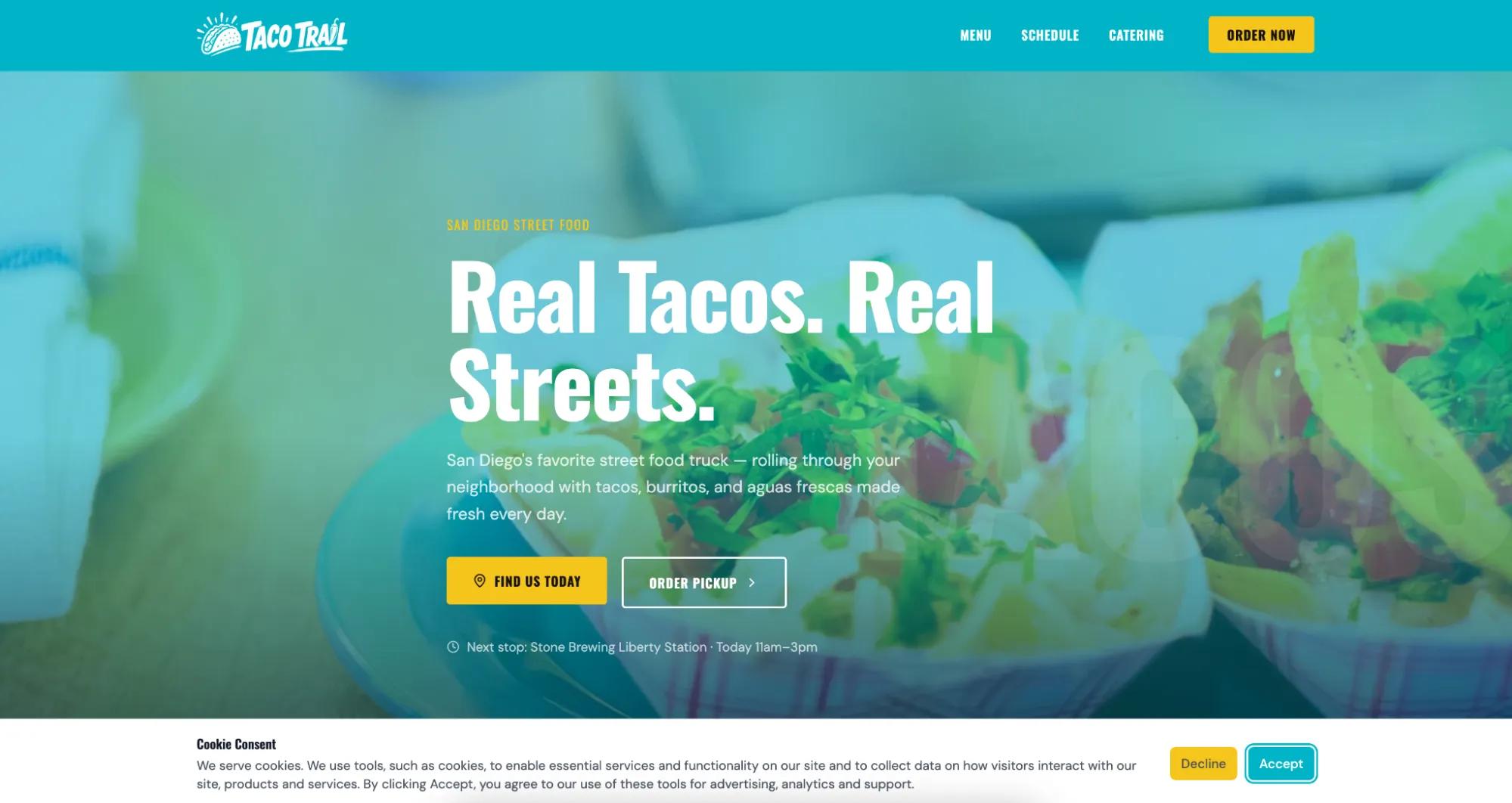
When your website looks ready, connect the domain you registered earlier and publish it. If your domain is registered with GoDaddy, Airo AI Builder will connect it and configure the DNS automatically, saving you the extra work.
**Important note:** If your domain is registered in the same GoDaddy account as Airo AI Builder, then your domain's DNS settings will be configured automatically when publishing. If your domain is registered in a different GoDaddy account, or at a different domain registrar, then additional steps will be required before your site can be live online. See our help guide on [how to connect a domain to Airo AI Builder](https://www.godaddy.com/help/connect-a-domain-to-airo-ai-builder-42956) for the steps needed for each domain scenario.
Once the domain is connected, your site can go live. Just keep in mind, you can build and preview your site for free, but publishing requires a paid Airo AI Builder plan. Airo can also help with essentials such as mobile responsiveness and includes built-in SEO and AEO capabilities, such as page titles and meta descriptions.
Before you share the link, check your site on a phone and desktop. Confirm that:
- Your current schedule is correct.
- Menu prices are up to date.
- Ordering and payment links work.
- Catering forms send inquiries to the right inbox.
- Your phone number and email address are correct.
- Your social media links open properly.
- Your domain loads securely.
## **Get your food truck website live today**
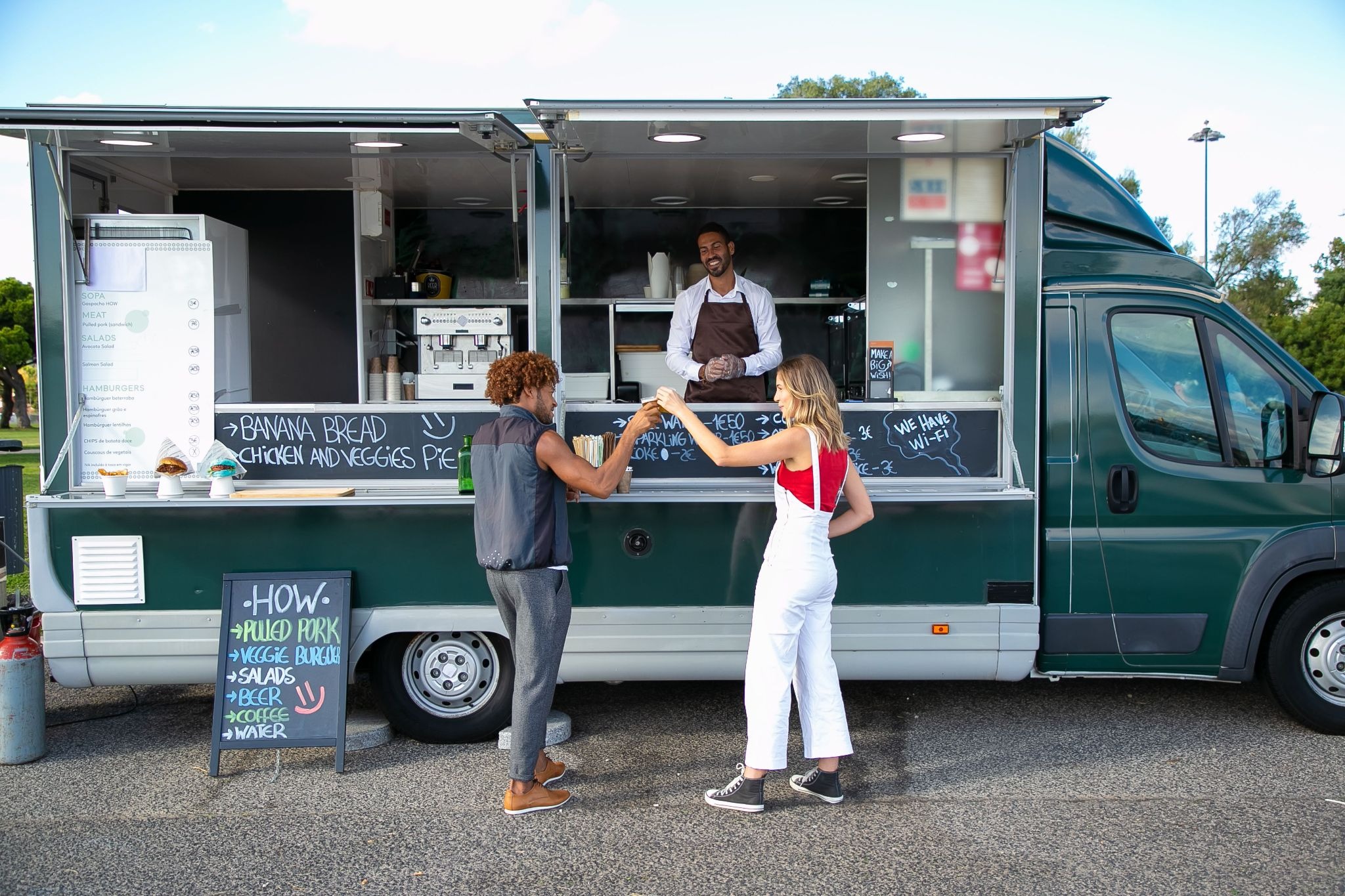
Your food truck website doesn’t need to be complicated. Start with a clear description, a focused menu, an accurate schedule, and photos that show your food and brand at their best.
With Airo AI Builder, you can create your site through a conversation, refine the design with follow-up prompts, connect ordering and payment tools, and leverage built-in SEO and AEO capabilities, such as page titles and meta descriptions. That gives your business a permanent online home, even when your physical location changes from day to day.
GoDaddy Airo AI Builder
Describe your idea. We'll build your live website in minutes.
With a few prompts, Airo AI Builder generates your website, web app,
pages, databases and logic in minutes — no coding required.
Start for free with 50 AI credits a month. No credit card required.
[Build for Free](https://www.godaddy.com/airo/ai-builder)
## **Food truck website FAQ**
**Does a food truck need a website?**
A food truck can operate using only social media, but a website gives your business a permanent online home. It gives customers one reliable place to find your menu, schedule, location, ordering links, catering information, and contact details.
Your website can also help people discover your business through search engines and make your food truck look more established when customers are considering a booking.
**How do I show my food truck’s schedule on my website?**
Add a schedule section to your homepage and list your regular locations, dates, times, and upcoming events. If your route changes frequently, include a prominent link to your latest schedule on social media.
You can also use a calendar, route map, or location table. Whatever format you choose, update it regularly and show the date it was last changed.
**Can I take online orders from my food truck website?**
Yes. You can link your website to ordering platforms such as DoorDash, Uber Eats, Toast or other providers you already use. Depending on your setup, Airo AI Builder can also help you create a basic online ordering and payment experience directly on your website.
Test the process before launch to make sure customers can choose pickup times, see accurate prices, and complete payment successfully.
**How much does a food truck website cost?**
The cost depends on the tools and features you choose. A basic website may only need a domain*, hosting, and a few pages. Additional costs may apply for features such as online ordering, payment processing, premium website plans, custom photography or third-party delivery services.
Airo AI Builder plans and included features can change, so check the current product page for the latest pricing and plan details.
**Do I need coding skills to build a food truck website?**
No. Airo AI Builder is designed to help you create a website by describing what you want in plain language. You can ask it to create pages, add sections, update colors, include forms, and connect relevant tools without writing code.
Basic planning, accurate business information, and good photos will still help you create a better website.
****One free available domain with new purchase of an annual Airo AI Builder plan. Plus annual ICANN fee per domain. Domain name must be added to cart before purchase, and selected term must be equal to or less than term of selected plan to qualify for free domain. Additional years billed at current rates. Offer valid for 1st year only; renews at current prices. Invalid with other offers.***