---
title: "How to make a game app in 6 steps in 2026 (with AI)"
date: "2026-07-03T06:30:00"
url: "https://www.godaddy.com/resources/skills/how-to-make-a-game-app"
---
# How to make a game app in 6 steps in 2026 (with AI)
Got an idea for a game that people can’t stop playing? You no longer need a team of developers or years of coding experience to bring it to life. AI-powered tools and no-code platforms have made game creation more accessible than ever, helping creators turn concepts into playable experiences in a fraction of the time.
Ready to press start on your game development journey? Use these six steps to learn how to create a game app in 2026 with tools like [Airo AI Builder](https://www.godaddy.com/airo/ai-builder) from idea to launch.
## What type of game should you build?
One of the biggest mistakes new creators make is starting too big. That massive open-world multiplayer game might sound exciting, but it can quickly become overwhelming if you're building your first game.
A better approach is to choose a concept that fits your current skills, resources, and timeline. You can always add new features or create a more ambitious sequel later.
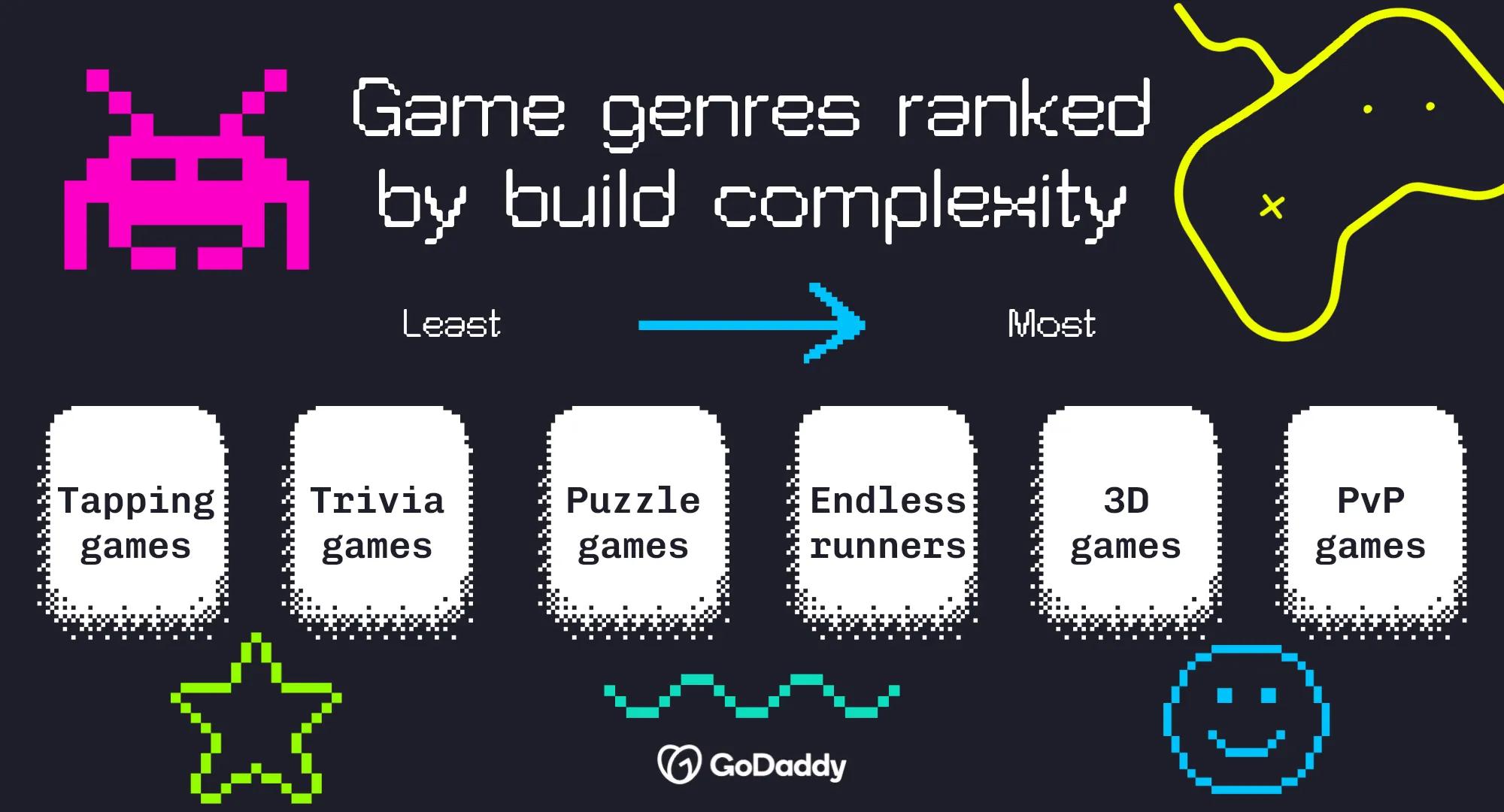
Here are a few common game types, ranked roughly from simplest to most complex:
- **Tapping games:** Simple gameplay built around clicks, taps, and upgrades.
- **Trivia games:** Question-and-answer experiences that are easy to build and customize.
- **Puzzle games:** Challenge players with logic, strategy, or pattern-solving mechanics.
- **Endless runners:** Fast-paced games where players avoid obstacles and chase high scores.
- **Platformers:** Level-based games that require more design, animation, and testing.
- **Simulation games:** Digital versions of real-world activities, businesses, or systems.
- **3D games:** More immersive experiences that typically require additional assets and technical expertise.
- **Multiplayer/PvP games:** Games that connect players online and often demand the largest investment of time and resources.
For your first project, simplicity is a competitive advantage. The faster you can turn an idea into a playable game, the faster you can gather feedback and start growing an audience. And, if you’re a gamer who has been looking for [different ways to make money with AI](https://www.godaddy.com/resources/skills/how-to-make-money-with-ai), this is a great place to start.
## Step 1: Define your game concept and core mechanic
It’s tempting to jump straight into game app development, but the strongest games start with a clear concept and a simple core mechanic.
Your game concept is the experience you're creating. Your core mechanic is the action players will repeat again and again. Take Tetris, for example. The concept is arranging falling blocks to clear lines. The core mechanic is rotating and placing pieces. In Flappy Bird, the concept is navigating obstacles, while the core mechanic is tapping to keep the bird airborne.
Before you open a single tool, define what players do, what their goal is, and what makes the experience fun. A clear core mechanic will guide every decision that follows.
**Core mechanic checklist:**
- What action will players repeat most often?
- What is the player's main objective?
- How do players succeed or fail?
- Can you explain the gameplay in one sentence?
- Does the idea still sound fun after five minutes of play?## Step 2: Choose the right platform for your project
Now that you have a game concept, it's time to decide how you'll build it.
The right platform depends on your goals, technical experience, and the type of game you're creating. Traditional game engines offer extensive customization but often come with a steeper learning curve. AI-powered builders and no-code tools can help you move much faster, making them a great fit for first-time creators and entrepreneurs who want to validate an idea quickly.
Think about how much time you want to spend learning development tools versus building and testing your game.
### How GoDaddy Airo AI Builder lets you build a game or app without coding
If your goal is to create a simple web-based game without learning how to code, GoDaddy Airo AI Builder can help you get started quickly. Describe what you want to create in plain language, and Airo AI Builder generates a working web app based on your prompt. Instead of building every screen and interaction manually, you can start with an AI-generated foundation and customize it from there.
Check out this learning game that was built in Airo AI Builder to give you an idea of how our [AI app builder](https://www.godaddy.com/airo/ai-builder) works:
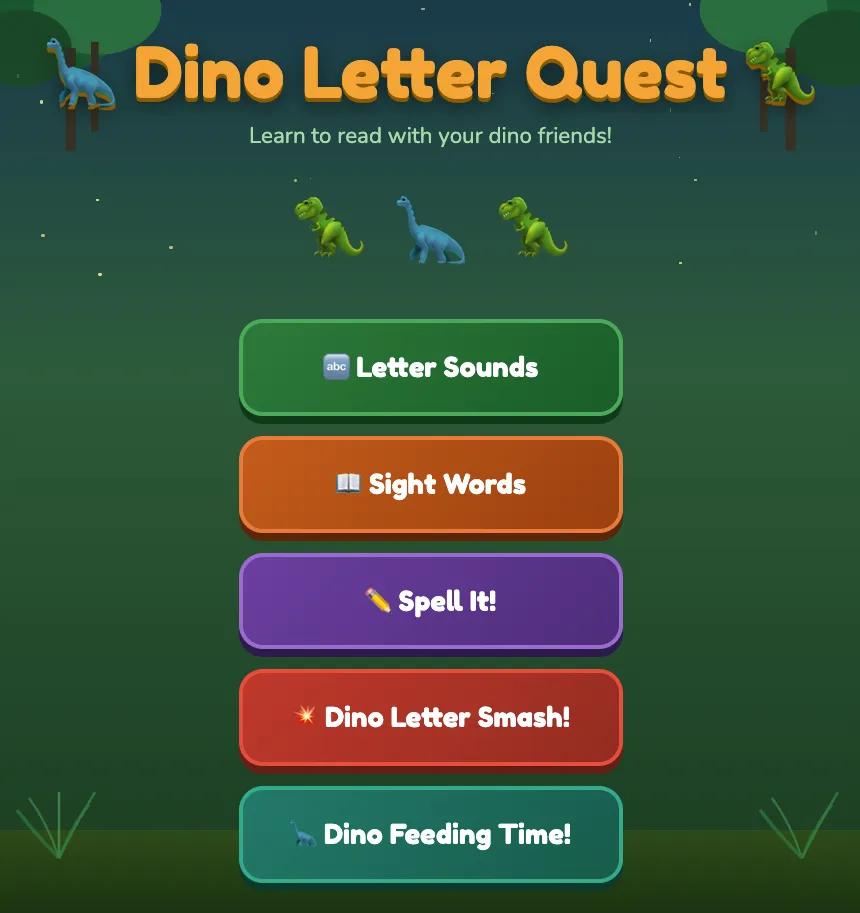
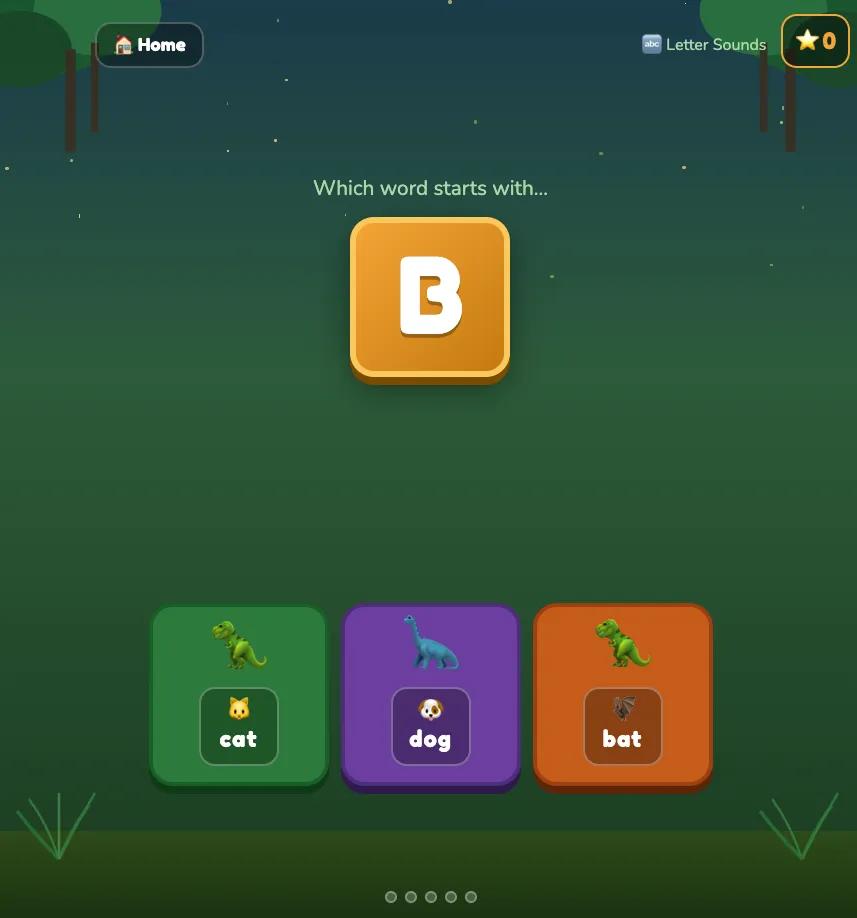
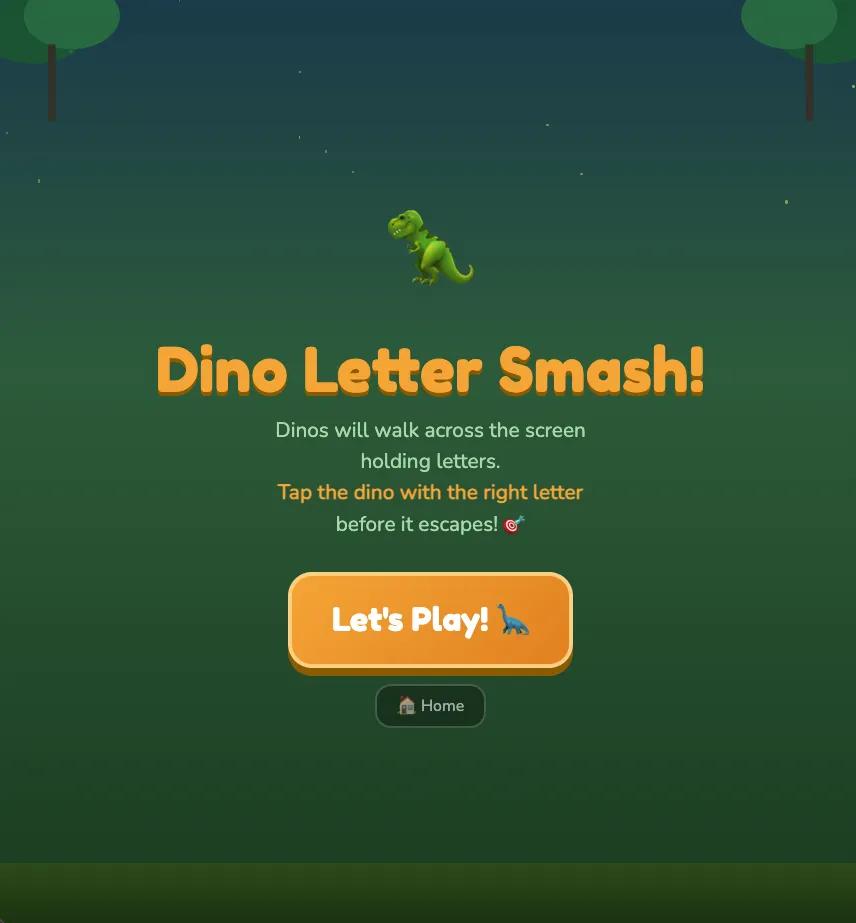
Airo AI Builder generated a playable web-based experience that could then be refined and expanded.
It's important to note that Airo AI Builder creates web apps and web games, not native mobile apps. That makes it a great option for testing ideas and sharing your game online without the complexity of traditional game app development. You can [learn more about what Airo AI Builder offers in this article](https://www.godaddy.com/resources/news/launch-your-web-app-and-site-with-godaddy-airo-ai-builder).
GoDaddy Airo AI Builder
Describe your idea. We'll build your live website in minutes.
With a few prompts, Airo AI Builder generates your website, web app,
pages, databases and logic in minutes — no coding required.
Start for free with 50 AI credits a month. No credit card required.
Build for Free
## Step 3: Get your tools ready
A little preparation makes game app development much easier. Before you start creating levels, characters, or gameplay mechanics, gather the tools, assets, and accounts you'll need to keep the process moving.
### What you need before writing a single line (or no line) of code
Use this checklist to guide your quest:
- A clear game concept and core mechanic
- A target audience and player goal
- Your chosen platform or game-building tool
- A basic art style or visual direction
- Sound and music requirements
- A game title (working titles are fine)
- Accounts created for any tools you'll use
- A place to publish or share your game
- A domain name for your game's website### Free asset resources (art, sound, UI)
Not every game developer is an artist, musician, and designer rolled into one. The good news is that you don't have to be. Plenty of free resources can help you create a polished game without building every asset from scratch.
**Art**
- [**Kenney**](https://kenney.nl/): Free collections of sprites, icons, characters, and game environments.
- [**OpenGameArt**](https://opengameart.org/): Community-created artwork, animations, and textures for a wide range of game styles.
- [**itch.io**](http://itch.io): Thousands of free asset packs created by independent artists.
**Sound**
- [**Freesound**](https://freesound.org/): User-generated sound effects for everything from footsteps to explosions.
- [**Pixabay**](https://pixabay.com/sound-effects/): Royalty-free music tracks and audio effects.
- [**ZapSplat**](https://www.zapsplat.com/): Large library of free sound effects for games and apps.
**UI**
- [**Kenney UI Packs**](https://kenney.nl/assets/ui-pack): Ready-made menus, buttons, and interface elements.
- [**itch.io UI Assets**](https://itch.io/game-assets/tag-user-interface): Free user interface kits for different game genres.
- [**Figma Community**](https://www.figma.com/community/ui-kits?resource_type=files&editor_type=figma): Free design resources that can be adapted into game interfaces.
**Pro tip:** pick a visual style and stick with it. Pixel art characters, realistic backgrounds, and cartoon menus rarely look like they belong in the same game.
### Set up a domain for your game
Because your game lives online, players need a reliable way to find it. A dedicated domain gives your project a professional home where players can learn about your game, sign up for updates, and share it with friends. It also helps establish your brand early, even if your game is still a work in progress.
When choosing a domain, keep it short, memorable, and closely tied to your game's name. A .com extension is often the easiest for players to remember, but there are plenty of options out there.
To [get your domain](https://www.godaddy.com/domains):
1. Brainstorm a few domain names based on your game title.
2. Check availability through GoDaddy.
3. Register the best option before someone else claims it.
4. Connect your domain to your game's website or landing page.
5. Start sharing it everywhere you promote your game.
Find your perfect domain name today
SEARCH
If you’ve never done something like this before, check out this article on how to [start a website](https://www.godaddy.com/resources/skills/how-to-start-a-website-from-a-to-z).
## Step 4: Build your MVP and core game loop
It’s best to resist the urge to build every level, character, and feature right away. Start with an MVP (minimum viable product), which is the smallest playable version of your game that proves your core mechanic is fun.
If you're building a puzzle game, your MVP might be a single level. If you're creating an endless runner, it could be one character, one obstacle type, and a score counter.
Focus on your core game loop, meaning the sequence of actions players repeat throughout the game. Once players can understand and play the loop, you're ready to gather feedback and build on the experience.
## Step 5: Test your game (on real devices)
Your game might work perfectly on the device you built it on, but that doesn't mean it will work perfectly for everyone else. Testing it across multiple real devices helps uncover issues that are easy to miss during development, such as slow load times, confusing gameplay, broken interactions, and layout problems.
The goal isn't to make your game perfect. It's to catch the biggest frustrations before your players encounter them.
### Device testing and performance checklist
Don’t share your game with the world until you’ve run through this checklist:
- Test your game on both iPhone and Android devices.
- Check that the game loads quickly on mobile and desktop.
- Play through every level, screen, and game mode.
- Test every button, menu, and interactive element.
- Verify that scores, progress, and game states work as expected.
- Check that the text is readable on smaller screens.
- Confirm that images, animations, and sound effects load correctly.
- Test your game's web link on multiple browsers.
- Ask at least a few people who haven't seen the game before to play it.### Common beginner mistakes to fix before publishing
Even great game ideas can lose players because of a few avoidable mistakes.
- **Skipping real-world testing:** Get feedback from actual players, not just friends who helped build the game.
- **Ignoring load times:** Faster experiences tend to keep players engaged longer.
- **Making onboarding too complicated:** Players should understand how to play within the first minute.
- **Overloading the first version with features:** Focus on a great core experience before expanding.
- **Using inconsistent visuals:** Stick to a cohesive art style and interface design.
- **Hiding important buttons or instructions:** Make navigation and gameplay goals obvious.
- **Waiting too long to collect feedback:** Early player input can save weeks of unnecessary work.
Remember, testing isn't the final level; it's part of the game development loop. The more feedback you gather now, the stronger your launch will be.
## Step 6: Plan your monetization strategy
If your goal is to make money from your game, don't wait until launch day to think about monetization. The best monetization strategies feel like a natural part of the player experience, not a surprise that appears after the game is finished. As you build your game, think about how it will generate revenue and where those opportunities fit into the experience.
For web-based games, monetization often happens on the website where the game is published. Depending on your audience and goals, that could include advertising, memberships, sponsorships, donations, affiliate partnerships, or selling digital products related to your game.
### How to implement monetization without killing user experience
Players don't mind monetization nearly as much as they mind interruptions. The key is creating value first and monetizing second.
- **Earn attention before asking for anything.** Let players experience the game before presenting offers or promotions.
- **Keep ads out of core gameplay.** Avoid disrupting active play sessions with intrusive placements.
- **Offer optional upgrades**. Bonus content, extra levels, or cosmetic enhancements often feel better than paywalls.
- **Use your website strategically.** Place ads, newsletter signups, or offers around the game rather than inside critical gameplay moments.
- **Test player feedback regularly.** If monetization causes players to leave, adjust before scaling traffic.
A good example is Wordle. The game became wildly popular because the experience remained simple and enjoyable. Monetization and growth opportunities never overshadowed the core gameplay, which helped keep players coming back day after day.
## Build your game today with GoDaddy Airo AI Builder
You've got the roadmap. Now it's time to start building.
GoDaddy Airo AI Builder helps you move from concept to playable web game faster, using simple prompts instead of complex coding. Create, customize, and launch your game today.
GoDaddy Airo AI Builder
Describe your idea. We'll build your live website in minutes.
With a few prompts, Airo AI Builder generates your website, web app,
pages, databases and logic in minutes — no coding required.
Start for free with 50 AI credits a month. No credit card required.
Build for Free
## Frequently asked questions
Do I need coding experience to develop a game app?
No. Modern AI-powered and no-code tools have made game creation much more accessible. If you're building a simple web-based game, tools like GoDaddy Airo AI Builder can help you create a playable experience without writing code. A basic understanding of game design and user experience is still helpful, but coding is no longer a requirement for getting started.
How long does it take to build a game app?
The timeline depends on the complexity of your project. A simple trivia game, puzzle game, or web-based game can be created in a matter of hours or days, especially with AI-assisted tools. More advanced games with custom artwork, multiple levels, and complex mechanics can take weeks or months.
Can I build a game app for free?
Yes. Many game development tools, asset libraries, and AI platforms offer free plans or free resources. You can find free artwork, sound effects, and UI kits online, then use those assets to build your game. Keep in mind that publishing, premium features, custom domains, or advanced functionality may involve additional costs as your project grows.
What's the easiest game to build as a beginner?
Trivia games, tapping games, simple puzzle games, and basic endless runners are often the easiest options for first-time creators. These game types typically require fewer mechanics, assets, and development resources than multiplayer or 3D games. Starting with a simple concept allows you to learn the process, launch faster, and build confidence before tackling more ambitious projects.