---
title: "How to make a photography website with AI"
date: "2026-09-23T10:24:27"
url: "https://www.godaddy.com/resources/skills/how-to-make-a-photography-website"
---
# How to make a photography website with AI
For photographers, having a dedicated space to share your portfolio is well-understood as a necessity for attracting more customers. Your portfolio allows potential clients to view your past work, as well as the services that you offer now, giving them a full picture of your business and helping them to decide whether to book a project with you.
In the past, building a photography website meant either hiring a developer or struggling with templates that never quite met your needs. Now, with AI website builders, photographers can describe what they’re looking for and have a professional website built in minutes.
*If you’re a skilled photographer looking to become professional, check out our guide on* [*how to start a photography business*](https://www.godaddy.com/resources/skills/how-to-start-a-photography-business) *to get your business off the ground. *
GoDaddy Airo AI Builder
Describe your idea. We'll build your live website in minutes.
With a few prompts, Airo AI Builder generates your website, web app,
pages, databases and logic in minutes — no coding required.
Start for free with 50 AI credits a month. No credit card required.
Build for Free
## What you need before building a website
Building your photography website with AI speeds up the production process significantly, but doing a bit of prep work ahead of time will make for a smoother process later. Let’s go over the steps you’ll want to take before you start on your website.
### Make a plan
A good plan can help clarify what your photography website needs, so creating a plan now will save time down the road.
#### Write a description of your photography business
This first step is one of the most important steps to take before starting your website build. How you describe your photography business will impact the structure and design of your site, so you’ll want to be detailed here. Some information to include would be:
- What type of photography you do (weddings, portraits, events, products, real estate, etc.)
- Who your ideal client is
- What makes your style or approach different
- What feeling/experience you want clients to have
Instead of describing your business as “I’m a photographer,” you’ll want to describe your business with descriptive details like “I’m a sports photographer in New York City, NY, specializing in capturing candid live-action photos during fast-paced sporting events, both indoors and outside.” This lets potential clients (and the AI website builder) know a bit more about your business, which is key for attracting the right customers and building the correct website type for your photography business.
#### Decide what pages you need
Many photography websites have similar pages, but the pages you’ll need will depend on the type of photography that you specialize in. Some of the common pages for a photography website would include:
- Home
- Portfolio/gallery
- About
- Services and pricing
- Contact
- Blog
- FAQ
- Testimonials
You don’t have to make all of these pages at once; they can be added over time or later in the site-building process. But it does help to know the general wireframe that you’re aiming for when you’re planning out your website needs.
#### Add a great portfolio to showcase your work
A photography website is going to be inherently visuals-heavy, so you’ll want to be sure that you curate a killer portfolio to show off your skills. Here are some quick tips to get the best possible portfolio page:
- **Be selective:** Don’t put every image you’ve ever taken on your website. Choose the best representations of your skill and style.
- **Organize by type:** If you offer different types of photography services, group your images by niche.
- **Optimize your images:** Use high-resolution images, but make sure they’re optimized for fast loading.
### Find a domain name
If you don’t already have one, you’ll want to choose a domain before you get started with your website. A good domain is key to proving professionalism, helps with business branding, and allows potential clients to find your site.
If you still need to [find a domain name](https://www.godaddy.com/domains), here are some ideas to get you started:
- Use your business name or personal name.
- Make sure it’s easy to spell.
- Consider using [.photo](https://www.godaddy.com/tlds/photo-domain), [.photos](https://www.godaddy.com/tlds/photos-domain), or [.photography](https://www.godaddy.com/tlds/photography-domain) domain extensions.
- Avoid hyphens and numbers.
Want to see if the domain you have in mind is available? Give it a shot here:
Find your perfect domain name today
SEARCH
> GoDaddy Airo AI Builder includes a free domain name, so you can register your domain at the same time as publishing your website.
## Prompting tips to make your photography website stand out
When building a website with tools like Airo AI Builder, the quality of the output will heavily depend on the quality of the prompts you include. For a photography website, here are some suggestions on how to format your prompts to get the best out of an AI website builder:
1. Be specific about your style and niche.
2. Include your ideal client in the prompt.
3. Describe the aesthetic of your photography business.
4. Specify what you want to see on each page.
5. Don’t try to build your whole site in a single prompt.
Good prompts don’t have to be long, they just need to be specific. For example, instead of saying, “I’m a portrait photographer that needs a website,” tell Airo AI Builder: “I’m a portrait photographer with a moody and dark aesthetic that specializes in romantic couples’ photos. I need a website that appeals to couples looking for dark and moody engagement or anniversary photos.”
Your goal for prompting should be to iterate conversationally with the AI builder and to be specific about what you’d like to see. You can always change features and designs as you go, so don’t worry about making it perfect on the first pass.
## Photography website checklist
With all of your pre-work in hand, it’s time to start working on your website. Here’s a quick checklist that you can use before publishing to be sure that your site is ready for business.
### Portfolio/gallery (organized by niche, if applicable)
Your gallery is the most important page on your website. Choose the photos that represent your style best, and if you specialize in multiple photography types, sort those photos into different galleries.
### Services and packages with pricing
Showing what services you offer helps to qualify leads. Potential clients are able to see what you offer before reaching out. Pricing is a nice touch, but since not all photography niches can offer general pricing, be descriptive about what your packages include and offer a call-to-action to contact you for a quote.
### About page with your story and photography style
Potential clients want to know who they’re going to be working with, as well as the approach that’ll be taken with their pictures. Include your background, your shooting style, personality, and how working with you will go.
### Online booking/inquiry form
Make it easy for clients to reach out to you. If you offer set packages and pricing, then it’s a good idea to have a booking form on your site. However, if more information will be needed from the potential client, an inquiry form will be the better route.
### Client testimonials
Social proof in the form of customer testimonials can be an excellent way to market your photography business. You can make testimonials a separate page, or you can include it on your Services page.
### Contact information
Your potential clients need a way to contact you. You can either collect contacts through your contact form, or you can include your email address and/or phone number on your website. Make either option easy to find, your customers shouldn’t have to hunt down your contact information.
### Blog
Having a blog page serves a couple of purposes: it keeps your website updated for SEO and allows you to showcase your recent work, behind-the-scenes stories, or tips/tricks for your clients to get the most out of a photo session.
### Social media links
Social media is another place where photographers thrive, especially on the visuals-based platforms like Instagram and Pinterest. Include links to any relevant platforms so your potential customers can get to know your style better.
### FAQ page
Having an FAQ page saves you time if you tend to get the same questions over and over. Consider including answers to questions about average turnaround times, what to expect at a photo session, usage rights, cancellation policies, travel fees, etc.
## Build a photography website step-by-step with Airo AI Builder
Let’s get started with the building process for your website. You can [create a photography website with Airo AI Builder](https://www.godaddy.com/airo/ai-builder/solutions/creative-portfolios) fast, using a conversational builder, no coding or web design skills needed.
GoDaddy Airo AI Builder
Describe your idea. We'll build your live website in minutes.
With a few prompts, Airo AI Builder generates your website, web app,
pages, databases and logic in minutes — no coding required.
Start for free with 50 AI credits a month. No credit card required.
Build for Free
### Step 1: Describe your photography business to Airo AI Builder
The first step is to describe your business and what you’re looking for Airo AI Builder to create for you. Be specific and conversational, the builder will help iterate as you go.
**Pro tip:** If you have an example website that you want to base your website on, you can attach files or provide the URL of an existing website for Airo AI Builder to use.
If you’re starting from scratch and need a general prompt format for your website, here’s a prompt template that you can use:
> Create a [type] app for [Name], a [wedding / commercial / portrait / fine art] photographer based in [city].
Here’s my prompt:
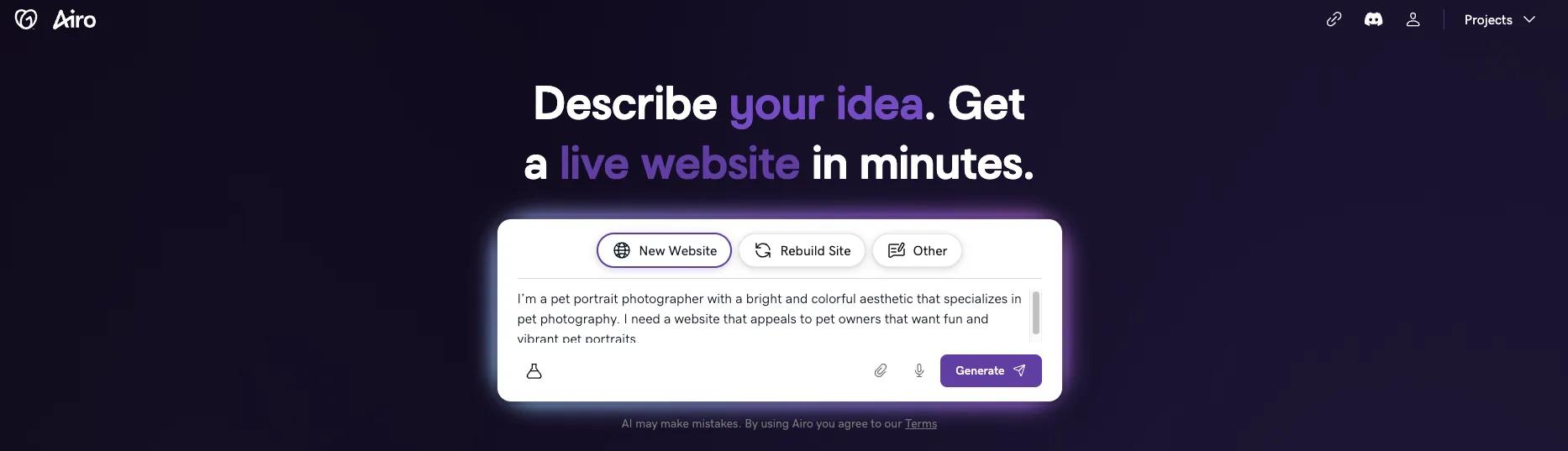
*I’m a pet portrait photographer with a bright and colorful aesthetic that specializes in pet photography. I need a website that appeals to pet owners that want fun and vibrant pet portraits.*
### Step 2: Answer a few questions
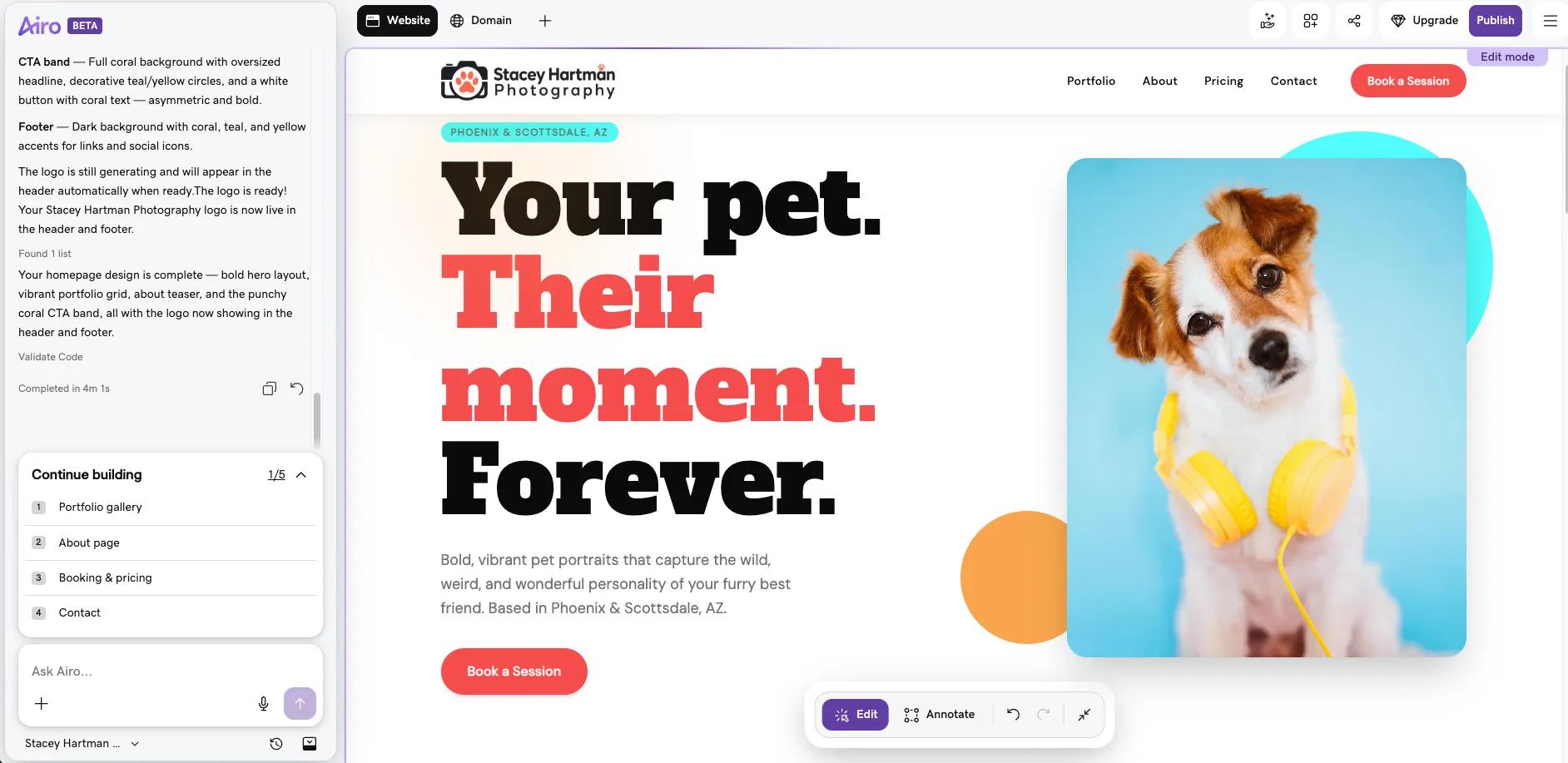
Airo AI Builder immediately went to work once I submitted my prompt, but it had a few questions before it finished its initial build. First, it wanted to know my business name and offered to generate some ideas if I didn’t have one yet. Next, it wanted me to confirm where I’d be offering my services. And last, it asked what tone I wanted for my website.
This is what the first draft of my website looks like after answering those first few questions:
### Step 3: Refine through conversation
Airo AI Builder creates a full wireframe for your website at the start, but you’re able to easily change anything that you’re not happy with.
Here are some examples of some of the things you can ask Airo AI Builder to change (you’re not limited to only these, but be specific when asking for changes for best results):
- "Make the portfolio section larger and move it to the top of the homepage"
- "Change the color palette to something warmer"
- "Rewrite the about section to sound more casual"
- "Add three packages to my Pricing page: Starter, Intermediate, Full"
You can continue to refine your website as many times as you need.
### Step 4: Set up booking and payments
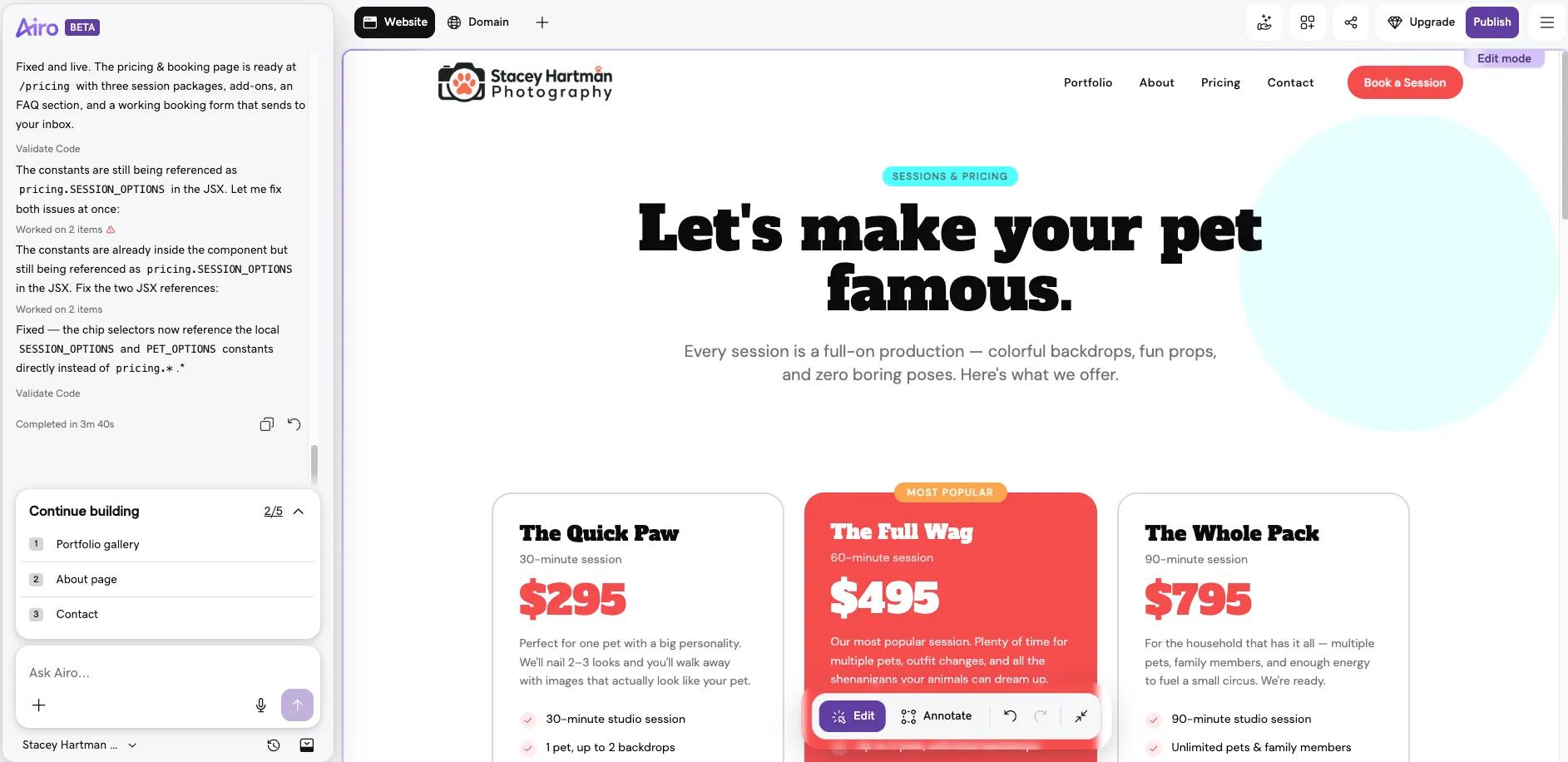
With Airo AI Builder, you can set up appointments, bookings, accept payments, and even create a storefront, all under the same project. Some of the options that you can add include:
- Online booking or appointment (with or without deposits) for sessions (mini sessions, full shoots, events, etc.)
- Payment processing for invoices and session fees
- An online store to sell prints, digital downloads, or albums
### Step 5: Connect your domain and launch
Once you’re happy with your website and booking options, it’s time to connect your domain and publish your website. Airo AI Builder makes this process painless by handling your DNS and SSL configuration for you. Additionally, you can publish with confidence knowing that your site was built with SEO and mobile responsiveness from the start.
To get your site online, click the **Publish** button at the top right and follow the prompts to push your site live.
Note: You will need to have a paid Airo AI Builder plan to publish your site.
## Publish your photography website today
With only five steps needed, you can get your photography website online fast with Airo AI Builder. And, not only is the build process simple, Airo AI Builder provides a domain, web hosting, booking, payment options, and search engine optimization built in, without any coding or complicated configurations required on your end. So if you want to get your photography website built quickly, [Airo AI Builder](https://www.godaddy.com/airo/ai-builder/solutions/creative-portfolios) can handle the heavy lifting for you.
GoDaddy Airo AI Builder
Describe your idea. We'll build your live website in minutes.
With a few prompts, Airo AI Builder generates your website, web app,
pages, databases and logic in minutes — no coding required.
Start for free with 50 AI credits a month. No credit card required.
Build for Free
## Photography website FAQ
How do I display my portfolio on my website?
Your portfolio should be a separate page on your website that showcases your skills and style for potential customers. GoDaddy Airo's AI Builder automatically generates a portfolio-ready website based on your photography niche. Simply tell Airo AI Builder that you need a portfolio page, then upload your best images to the designated gallery section, organize them into categories or albums if needed, and the builder will display them in a clean, professional format.
How can a beginner sell photos online?
GoDaddy Airo AI Builder can create an online store on your website where you can list your photos as digital downloads or prints. Just add your images, set your prices, and configure a payment method. GoDaddy Airo AI Builder guides you through each step, so no technical experience is required.
How much does a photography website cost?
A photography website can range between $10 to $50 per month, depending on the complexity of your website.
Do I need technical skills to build a photography website?
No technical skills are needed. GoDaddy Airo AI Builder does the heavy lifting for you. Simply answer a few questions about your photography business, and Airo AI Builder will automatically generate a professional website complete with layouts, design elements, and suggested content. The intuitive chat interface makes it easy for anyone to customize and launch their site with confidence.
Which platform is better for photographers?
While there are many website builders available, GoDaddy Airo AI Builder stands out for photographers thanks to its AI-powered design tools that create visually stunning, photography-focused websites in minutes. It combines ease of use with professional results, offering built-in gallery displays, ecommerce capabilities for selling photos, and a seamless setup process, making it an excellent choice for both beginner and experienced photographers looking to establish a strong online presence.