Tambahkan atau tingkatkan paket Domain Protection saya
Tambahkan atau tingkatkan Domain Protection untuk meningkatkan keamanan domain Anda. Domain Protection menawarkan keamanan yang ditingkatkan terhadap ancaman online dengan mengirimkan peringatan bila ada perubahan pada domain Anda dan mencegah kedaluwarsa yang tidak disengaja. Beberapa ekstensi domain tidak memenuhi syarat untuk fitur Domain Protection tertentu.
- Masuk ke Portofolio Domain GoDaddy Anda. (Perlu bantuan untuk masuk? Temukan nama pengguna atau kata sandi Anda.)
- Centang kotak di samping domain yang akan Anda perbarui. Atau, centang kotak di samping Nama Domain , lalu pilih Pilih Semua .
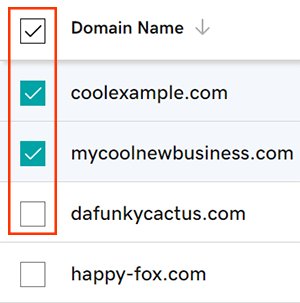
- Dari menu tindakan, pilih Paket Perlindungan , lalu pilih Tingkatkan Paket Perlindungan .
- Tergantung pada ukuran layar, Anda mungkin perlu memilih menu Lainnya, lalu gulir ke bawah untuk melihat Paket Perlindungan.
- Pilih paket Domain Protection yang Anda inginkan dari opsi yang tersedia.
- Pilih Checkout untuk menyelesaikan pesanan Anda.
Perpanjangan otomatis akan diaktifkan secara otomatis saat Anda menambahkan atau meningkatkan versi Domain Protection.
Langkah-langkah terkait
- Ubah pengaturan Domain Privacy untuk domain Anda.
- Tinjau info kontak domain untuk memastikan detail tersebut akurat dan selalu terbaru.
Info selengkapnya
- Siapkan verifikasi 2 langkah untuk keamanan terbaik di domain dan akun Anda.