Beralih di antara kotak masuk Conversations GoDaddy saya yang berbeda
Jika Anda memiliki lebih dari satu usaha yang terhubung ke GoDaddy Conversations, Anda dapat dengan mudah beralih di antara kotak masuk gabungan Conversations yang berbeda untuk membaca pesan untuk usaha tersebut.
Note: The GoDaddy mobile app is not available with free Conversations plans.
- Any time a customer sends a message through any of the channels you’ve connected to GoDaddy Conversations, you’ll receive a notification on your mobile phone. The notification will tell you which business it’s for and who it’s from.

- Tap the notification to be taken directly to the conversation thread in the GoDaddy mobile app, from where you can respond to the message.
- To switch to an inbox for a different venture, from your inbox, tap your business name at the top of the screen. A list of your businesses will show.
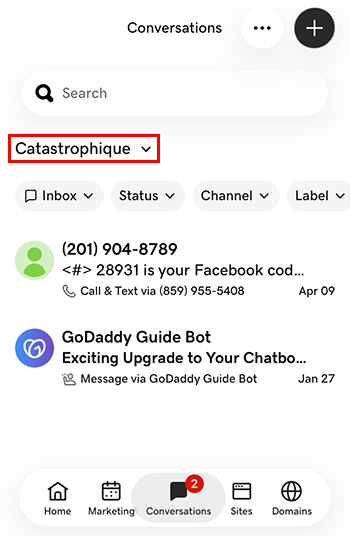
- Ketuk usaha tempat Anda ingin beralih. Anda akan diarahkan ke kotak masuk untuk usaha tersebut.
- Di browser web, buka halaman produk GoDaddy Anda.
Jika Anda memiliki versi mandiri Conversations, perluas Conversations Unified Inbox . Di sebelah kanan paket Conversations, pilih Kotak Masuk Web .
ATAU
Jika Anda memiliki paket Websites + Marketing, gulir ke Websites + Marketing , lalu pilih Kelola di samping situs Anda. Di menu sebelah kiri, luaskan Conversations .
- Pilih Kotak Masuk . Daftar percakapan Anda yang tidak diarsipkan akan ditampilkan.
- Pilih pesan yang akan diarahkan langsung ke utas percakapan, tempat Anda dapat membalas pesan tersebut.
- To switch to an inbox for a different venture, on the far left of your screen, select the venture you want to switch to. You’ll be taken to the dashboard for that venture.
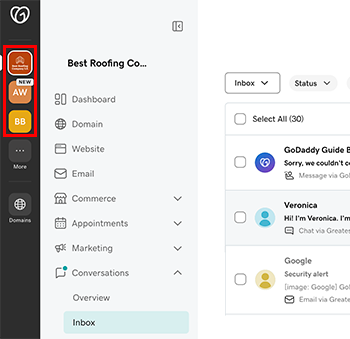
- Pada menu di sebelah kiri, luaskan Percakapan , lalu pilih Kotak masuk untuk diarahkan ke kotak masuk usaha tersebut.