Hubungkan Conversations ke Microsoft 365 saya dari alamat email GoDaddy
Link your Microsoft 365 email address to Conversations to get your emails directly in your Conversations unified inbox. If you’re a Websites + Marketing subscriber and you’re using a chat widget or web forms on your website, messages from those sources will also show in your Conversations box, through this email address.
- Masuk ke aplikasi seluler GoDaddy Anda.
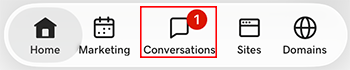
- At the bottom of the screen, tap Conversations to see a list of all your unarchived conversations.
- In the top-right corner, tap
 more, and then tap Settings.
- Tap Email. You may be asked to sign in to your GoDaddy account.
- Expand Email, and then tap Connect.
- Tap Microsoft 365, and then tap Next.
- Jika Anda telah memiliki alamat email Microsoft 365, alamat tersebut akan ditampilkan di layar. Jika tidak, Anda akan diminta untuk mendapatkannya sebelum melanjutkan dengan langkah-langkah ini.
Pilih alamat email yang ingin Anda hubungkan ke Conversations, lalu ketuk Lanjutkan .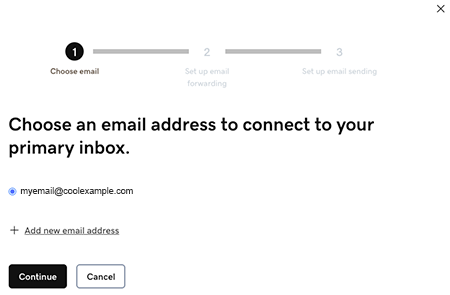
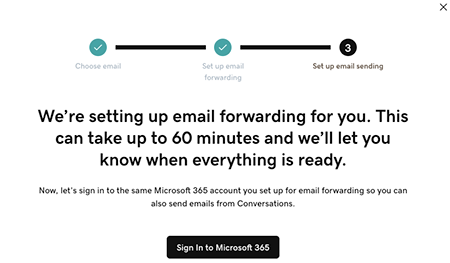
- Email forwarding will be set up for you. This could take up to 60 minutes, but you can continue setting up your email and we’ll let you know when forwarding is ready.
Sign in to the Microsoft 365 account you’re linking to Conversations. This must be the same account you used in Step 7.
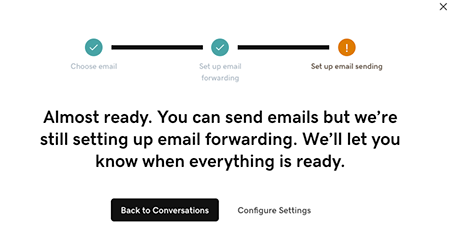
- Anda akan melihat layar yang menjelaskan bahwa email Anda masih disiapkan.
- Masuk ke aplikasi seluler GoDaddy Anda.
- At the bottom of the screen, tap Conversations to see a list of all your unarchived conversations.
- In the top-right corner, tap
 settings.
- Tap Email. You may be asked to sign in to your GoDaddy account.
- Expand Email, and then tap Connect.
- Tap Microsoft 365, and then tap Next.
- Jika Anda telah memiliki alamat email Microsoft 365, alamat tersebut akan ditampilkan di layar. Jika tidak, Anda akan diminta untuk mendapatkannya sebelum melanjutkan dengan langkah-langkah ini.
Pilih alamat email yang ingin Anda hubungkan ke Conversations, lalu ketuk Lanjutkan . - Email forwarding will be set up for you. This could take up to 60 minutes, but you can continue setting up your email and we’ll let you know when forwarding is ready.
Sign in to the Microsoft 365 account you’re linking to Conversations. This must be the same account you used in Step 7.
- Anda akan melihat layar yang menjelaskan bahwa email Anda masih disiapkan.
- Di browser web, buka halaman produk GoDaddy Anda.
Jika Anda memiliki versi mandiri Conversations, perluas Conversations Unified Inbox . Di sebelah kanan paket Conversations, pilih Kotak Masuk Web .
ATAU
Jika Anda memiliki paket Websites + Marketing, gulir ke Websites + Marketing , lalu pilih Kelola di samping situs Anda. Di menu sebelah kiri, luaskan Conversations .
- Pilih Pengaturan.
- Select Channels.
- Expand Email, and then tap Connect.
- Select Microsoft 365, and then tap Next.
- Jika Anda telah memiliki alamat email Microsoft 365, alamat tersebut akan ditampilkan di layar. Jika tidak, Anda akan diminta untuk mendapatkannya sebelum melanjutkan dengan langkah-langkah ini.
Pilih alamat email yang ingin Anda hubungkan ke Conversations, lalu ketuk Lanjutkan . - Email forwarding will be set up for you. This could take up to 60 minutes, but you can continue setting up your email and we’ll let you know when forwarding is ready.
Sign in to the Microsoft 365 account you’re linking to Conversations. This must be the same account you used in Step 7.
- Anda akan melihat layar yang menjelaskan bahwa email Anda masih disiapkan.
Selamat! Anda telah berhasil menghubungkan alamat email Anda ke GoDaddy Conversations. Setelah penerusan diselesaikan, Anda akan mulai mendapatkan pesan email langsung di kotak masuk Conversations.