เปลี่ยนชื่อผู้ใช้บัญชี GoDaddy ของฉัน
คุณสามารถเปลี่ยนชื่อผู้ใช้ของคุณได้หลังจากที่คุณลงชื่อเข้าใช้บัญชี GoDaddy ของคุณ
- ไปที่ล็อกอิน ความ ปลอดภัยของ GoDaddy หน้า คุณอาจได้รับแจ้งให้ลงชื่อเข้าใช้
- ในรายการ การรักษาความปลอดภัย ด้านล่าง ข้อมูลบัญชี ให้เลือก ชื่อผู้ใช้
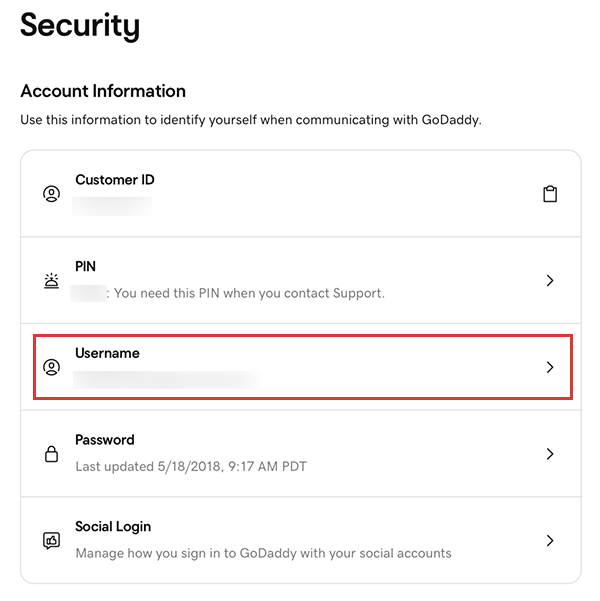
- ป้อน ชื่อผู้ใช้ใหม่ 5 ถึง 50 อักขระ จำเป็น: ต้องมีตัวอักษรอย่างน้อยหนึ่งตัวในชื่อผู้ใช้
- เลือก เปลี่ยนชื่อผู้ใช้
หมายเหตุ: หากคุณเห็นข้อความแสดงข้อผิดพลาดชื่อผู้ใช้ที่คุณสร้างขึ้นอาจสั้นเกินไปยาวเกินไปหรือมีการใช้งานไปแล้ว ลองอีกครั้งด้วยชื่อผู้ใช้อื่น
ข้อมูลเพิ่มเติม
- หากคุณลืมชื่อผู้ใช้คุณสามารถ เรียกคืนได้
- หากคุณไม่สามารถลงชื่อเข้าใช้บัญชี GoDaddy ของคุณได้ให้ลองทำตาม ขั้นตอนการแก้ปัญหา ของเรา