สลับไปมาระหว่างกล่องขาเข้า Conversations ของ GoDaddy
หากคุณมีธุรกิจที่เชื่อมต่อกับ GoDaddy Conversations มากกว่าหนึ่งรายการคุณสามารถสลับระหว่างกล่องขาเข้าแบบรวม Conversations ต่างๆเพื่ออ่านข้อความ สำหรับการร่วมทุนดังกล่าว
Note: The GoDaddy mobile app is not available with free Conversations plans.
- Any time a customer sends a message through any of the channels you’ve connected to GoDaddy Conversations, you’ll receive a notification on your mobile phone. The notification will tell you which business it’s for and who it’s from.

- Tap the notification to be taken directly to the conversation thread in the GoDaddy mobile app, from where you can respond to the message.
- To switch to an inbox for a different venture, from your inbox, tap your business name at the top of the screen. A list of your businesses will show.
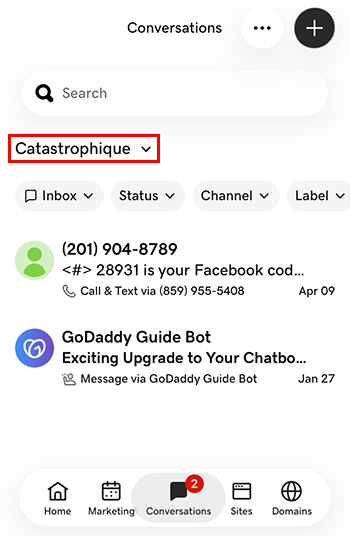
- แตะการลงทุนที่คุณต้องการเปลี่ยนไปใช้ คุณจะถูกนำไปที่กล่องขาเข้าของการลงทุนดังกล่าว
- ในเว็บเบราว์เซอร์ให้ไปที่ ผลิตภัณฑ์ ของ GoDaddy
หากคุณมี Conversations เวอร์ชันสแตนด์อโลนให้ขยาย Conversations Unified Inbox ทางด้านขวาของแผน Conversations ให้เลือก กล่องจดหมายทางเว็บ
หรือ
หากคุณมีแผน Websites + Marketing ให้เลื่อนไปที่ Websites + Marketing แล้วเลือก จัดการ ถัดจากเว็บไซต์ของคุณ ในเมนูด้านซ้ายให้ขยาย Conversations
- เลือก กล่องขาเข้า รายการการสนทนาที่ไม่ได้จัดเก็บไว้จะปรากฏขึ้น
- เลือกข้อความที่จะนำไปยังชุดข้อความการสนทนาโดยตรงจากจุดที่คุณสามารถตอบกลับข้อความได้
- To switch to an inbox for a different venture, on the far left of your screen, select the venture you want to switch to. You’ll be taken to the dashboard for that venture.
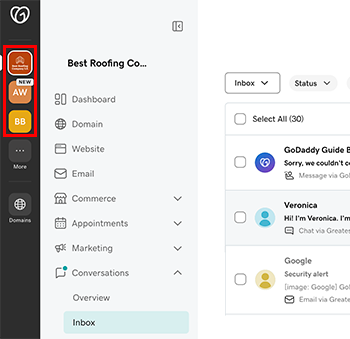
- ในเมนูทางด้านซ้ายให้ขยาย การสนทนา แล้วเลือก กล่องขาเข้า ที่จะนำไปยังกล่องขาเข้าของธุรกิจดังกล่าว