Wechseln zwischen meinen verschiedenen GoDaddy Conversations-Postfächern
Wenn mehrere Unternehmen mit GoDaddy Conversations verbunden sind, können Sie ganz einfach zwischen den verschiedenen Conversations Unified-Postfächern wechseln, um Nachrichten zu lesen .
Note: The GoDaddy mobile app is not available with free Conversations plans.
- Any time a customer sends a message through any of the channels you’ve connected to GoDaddy Conversations, you’ll receive a notification on your mobile phone. The notification will tell you which business it’s for and who it’s from.

- Tap the notification to be taken directly to the conversation thread in the GoDaddy mobile app, from where you can respond to the message.
- To switch to an inbox for a different venture, from your inbox, tap your business name at the top of the screen. A list of your businesses will show.
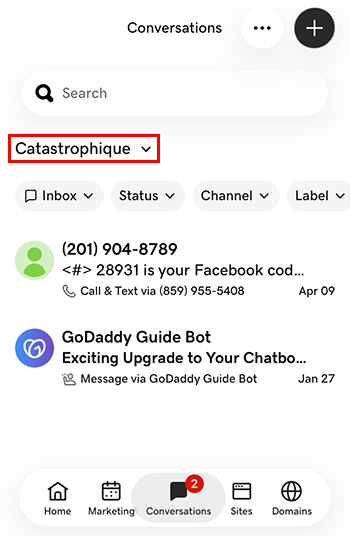
- Tippen Sie auf das Unternehmen, zu dem Sie wechseln möchten. Sie werden zum entsprechenden Posteingang weitergeleitet.
- Rufen Sie in einem Webbrowser Ihrer GoDaddy -Produktseite auf.
Wenn Sie die eigenständige Version von Conversations haben, erweitern Sie Conversations Unified Inbox . Wählen Sie rechts von Ihrem Conversations-Paket die Option Web-Posteingang aus.
ODER
Wenn Sie ein Websites + Marketing-Paket haben, scrollen Sie zu Websites + Marketing und wählen Sie neben Ihrer Website die Option Verwalten . Erweitern Sie im linken Menü Conversations .
- Wählen Sie Posteingang . Eine Liste Ihrer nicht archivierten Unterhaltungen wird angezeigt.
- Wählen Sie eine Nachricht aus, die direkt zum Konversationsthread geleitet werden soll, von wo aus Sie auf die Nachricht antworten können.
- To switch to an inbox for a different venture, on the far left of your screen, select the venture you want to switch to. You’ll be taken to the dashboard for that venture.
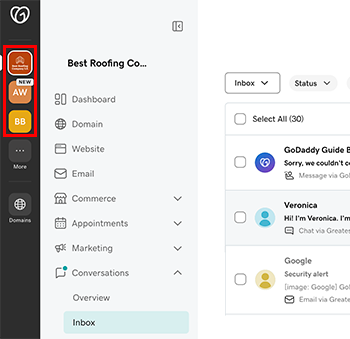
- Erweitern Sie im Menü auf der linken Seite Konversationen und wählen Sie dann Posteingang , der zum Posteingang für dieses Vorhaben geleitet wird.