Add shipping weight and dimensions to my online store products
Weight-based and carrier-based shipping methods require the product's weight and dimensions to determine shipping costs. Measure the product itself, not the box you use to ship it. When customers order multiple items, shipping calculations combine the items' weight and size to determine the ideal box size, ensuring they ship together in a single package with accurate shipping rates at checkout.
- Ve a la página de tu producto GoDaddy.
- Desplázate hacia abajo, expande Websites + Marketing y selecciona Administrar al lado de tu sitio.
- Desde tu panel de control, expande Tienda y selecciona Productos.
- Selecciona el nombre o imagen de un producto para abrirlo.
- Select Shipping and enter the package weight and dimensions.
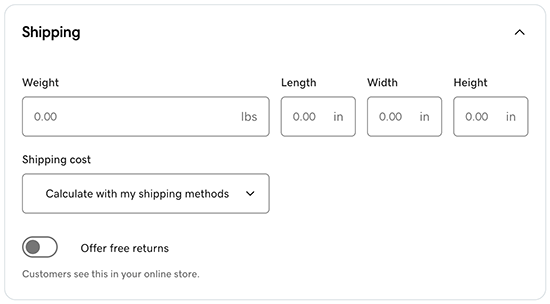 Note: To change between metric and imperial, go to
Store and select Settings. Under Regional Info, change the details for Measurement System. - Selecciona cómo quieres determinar los gastos de envío.
- Calcular con mis métodos de envío: los clientes elegirán el envío según los métodos que establezcas cuando agregues o cambies los métodos de envío.
- Ninguno (envío gratuito) o Especifica un monto fijo: estas opciones se aplicarán a cualquier persona en el mundo, independientemente de las restricciones de envío que agregues en los métodos de envío.
- Selecciona Guardar o Guardar y agregar otro para terminar. Tus cambios aparecerán ahora en tu tienda.