Cambiar entre mis diferentes bandejas de entrada de GoDaddy Conversations
Si tienes más de una empresa conectada a GoDaddy Conversations, puedes cambiar fácilmente entre tus diferentes bandejas de entrada unificadas de Conversations para leer mensajes y escuchar llamadas para esa empresa.
Note: The GoDaddy mobile app is not available with free Conversations plans.
- Any time a customer sends a message through any of the channels you’ve connected to GoDaddy Conversations, you’ll receive a notification on your mobile phone. The notification will tell you which business it’s for and who it’s from.

- Tap the notification to be taken directly to the conversation thread in the GoDaddy mobile app, from where you can respond to the message.
- To switch to an inbox for a different venture, from your inbox, tap your business name at the top of the screen. A list of your businesses will show.
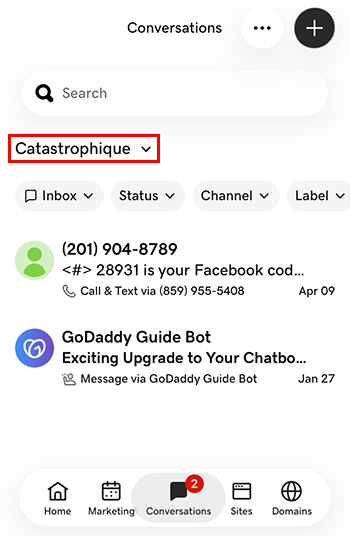
- Toca la empresa a la que quieres cambiar. Serás dirigido a la bandeja de entrada para esa empresa.
- En un navegador web, ve a tu de producto de GoDaddy.
Si tienes la versión independiente de Conversations, expande la bandeja de entrada unificada de Conversations . A la derecha de tu plan Conversations, selecciona Bandeja de entrada web .
O
Si tienes un plan Websites + Marketing, desplázate hasta Websites + Marketing y selecciona Administrar al lado de tu sitio. En el menú de la izquierda, expande Conversations .
- Selecciona Bandeja de entrada . Se mostrará una lista de tus conversaciones no archivadas.
- Selecciona un mensaje para llevarlo directamente al hilo de la conversación, desde donde puedes responder al mensaje.
- To switch to an inbox for a different venture, on the far left of your screen, select the venture you want to switch to. You’ll be taken to the dashboard for that venture.
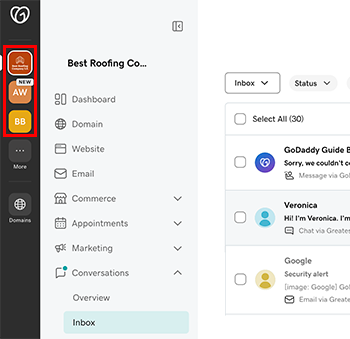
- En el menú de la izquierda, expande Conversaciones y luego selecciona Bandeja de entrada para ir a la bandeja de entrada de esa empresa.