Responder a mis mensajes de GoDaddy Conversations
When customers send you a message through any of the communication channels linked to GoDaddy Conversations, you can respond from the web app or from the GoDaddy mobile app on Android or iOS .
Note: The GoDaddy mobile app is not available with free Conversations plans.
- En un navegador web, ve a tu de producto de GoDaddy.
Si tienes la versión independiente de Conversations, expande la bandeja de entrada unificada de Conversations . A la derecha de tu plan Conversations, selecciona Bandeja de entrada web .
O
Si tienes un plan Websites + Marketing, desplázate hasta Websites + Marketing y selecciona Administrar al lado de tu sitio. En el menú de la izquierda, expande Conversations .
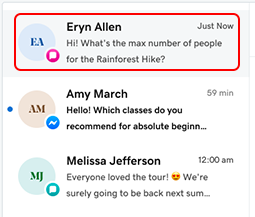
- Select Inbox. A list of all your unarchived conversations will show.
Note: If you're on a paid Conversations plan and you've not yet set up the GoDaddy mobile app, you'll be prompted to do so. Follow the steps if you'd like to use the app, or skip this step if you prefer.
- Selecciona una conversación de la lista.
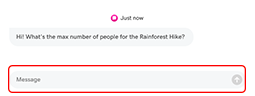
- Type a response in the Message field, and then select Send to send your message.
- Inicia sesión en tu aplicación móvil GoDaddy.
- At the bottom of the screen, tap Conversations to see a list of all your unarchived conversations.

- Toca la conversación a la que quieres responder. Se mostrará el historial de chat completo.
- Para responder, escribe un mensaje en el cuadro proporcionado y toca
 Enviar