Déballer le GoDaddy terminal intelligent Flex
Étape 1 de la série de mise en route de GoDaddy terminal intelligent Flex .
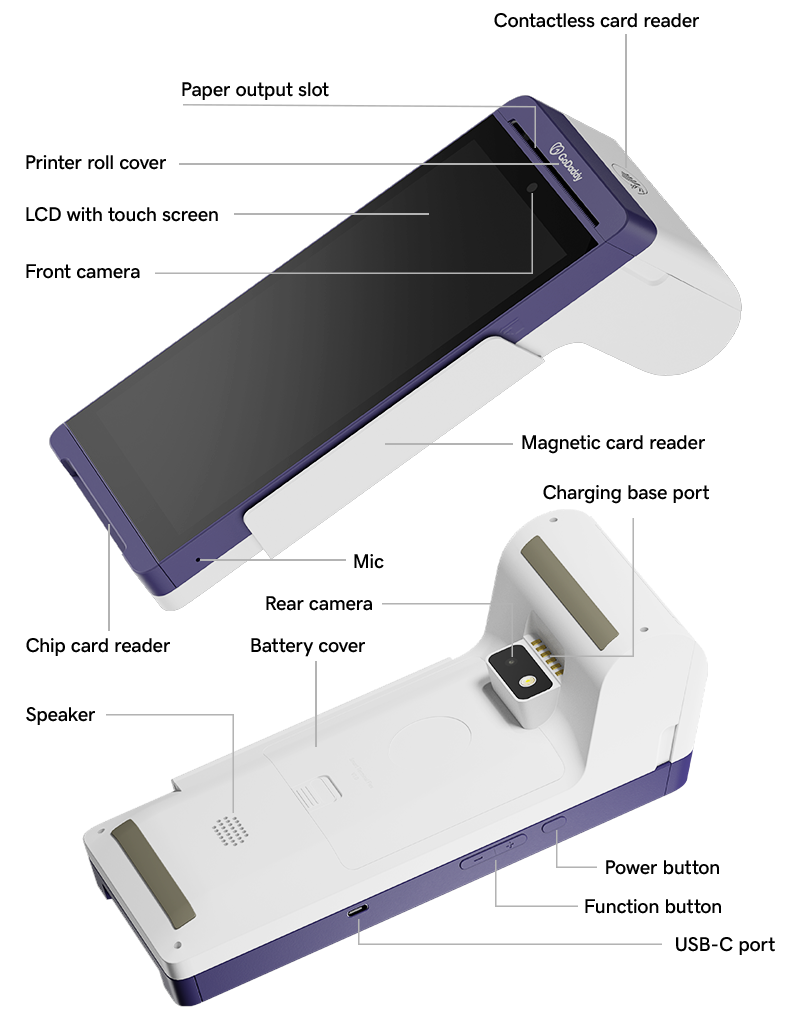
Votre GoDaddy terminal intelligent Flex est livrée avec un adaptateur secteur USB-C et un rouleau de papier pour imprimantes de reçus. Ouvrez la boîte et familiarisez-vous avec les composants Smart Terminal Flex.
- Ouvrez la boîte et vérifiez que tous les éléments inclus sont comptabilisés.
- Retirez le cache de protection de l'écran.
- Passez en revue les différents ports et composants de votre Smart Terminal Flex. Remarque: les clients peuvent glisser ou insérer leur carte de crédit dans les fentes du lecteur de carte ou appuyer sur leur carte ou appareil sur l'icône NFC pour les paiements sans contact. Le schéma ci-dessous inclut le placement des trois méthodes.