Cambiar mi contraseña de FTP principal en Web Hosting (cPanel)
Necesitas tu nombre de usuario y contraseña de FTP para cargar archivos a tu cuenta de Web Hosting (cPanel) con una aplicación de FTP. Este nombre de usuario y contraseña son los mismos que tu nombre de usuario y contraseña de cPanel.
Cuando configuramos tu cuenta de Web Hosting (cPanel) (también conocido como "aprovisionamiento"), generamos un nombre de usuario y contraseña de cPanel para configurar cPanel para tu cuenta. No puedes cambiar tu nombre de inicio de sesión de cPanel y no te mostramos la contraseña por razones de seguridad. Sigue estos pasos para cambiar tu contraseña de cPanel por una que conozcas.
Nota: Estos pasos cambiarán la contraseña del usuario FTP "principal", que es usted como propietario de la cuenta. Si agregaste otros usuarios de FTP, como tu diseñador/desarrollador web, puedes editar sus credenciales de usuario .
- Ve a tu de GoDaddy.
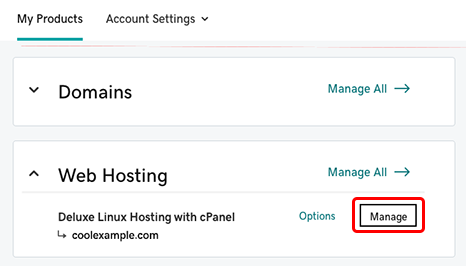
- En Web Hosting , al lado de la cuenta Web Hosting (cPanel) que quieres usar, selecciona Administrar .
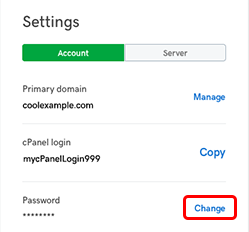
- En el Panel de control de la cuenta, en Configuración , junto a tu Contraseña, selecciona Cambiar .
- Ingresa una nueva contraseña , confírmala y luego selecciona Cambiar contraseña .
Pasos relacionados
- Cambiar el nombre de usuario y la contraseña de FTP para otros usuarios de FTP (no principales) es un poco diferente. Para obtener más información, consultaEditar usuarios de FTP en mi cuenta de Web Hosting (cPanel) .
Siguientes pasos
- Para iniciar sesión directamente en cPanel, ve a https: // myDomainName /cpanel , donde "myDomainName" es tu dominio con su .tld, como coolexample.com. Necesitará su inicio de sesión de cPanel y una nueva contraseña.
- Puedes usar una aplicación de FTP (como FileZilla) para conectarte a tu cuenta de hosting con este nombre de usuario y contraseña.