Memperpanjang produk atau layanan saya secara manual
Perpanjang produk Anda secara manual kapan saja, meskipun produk tersebut diatur ke perpanjangan otomatis.
Catatan: Jika Anda ingin memperpanjang domain kedaluwarsa, langkah-langkahnya berbeda.
- Buka halaman Perpanjangan dan Penagihan Anda dan pilih Kelola Langganan.
- Dalam daftar Langganan, pilih produk, lalu pilih Perpanjang Jangka Waktu.
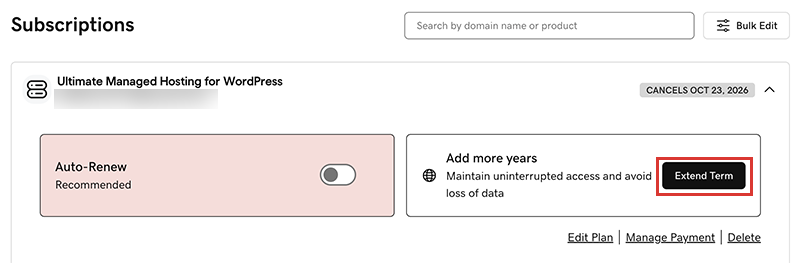
Kami akan mengarahkan Anda ke Keranjang, tempat Anda dapat melihat harga perpanjangan.Catatan: Jika Anda melihat Perbarui Sekarang alih-alih Perpanjang Paket, pilih Perbarui Sekarang untuk mengonfirmasi metode pembayaran yang akan digunakan untuk perpanjangan. - Ikuti petunjuk untuk menyelesaikan pembelian perpanjangan Anda.
Catatan: Produk diperpanjang secara otomatis untuk jangka waktu yang sama seperti perpanjangan manual terakhir, bukan dengan jangka waktu pendaftaran awalnya. Ketentuan ini juga berlaku untuk domain yang diperpanjang secara manual setelah 16 Juli 2020. Misalnya, jika domain diperpanjang secara manual setelah 16 Juli 2020 untuk masa berlaku tiga tahun, domain tersebut akan diperpanjang secara otomatis untuk masa berlaku tiga tahun yang sama saat waktu perpanjangan tiba. Untuk detail lengkapnya, lihat Perjanjian Pendaftaran Nama Domain kami.
Langkah-langkah terkait
- Berikut adalah cara memperpanjang domain kedaluwarsa.
- Aktifkan perpanjangan otomatis agar Anda tidak perlu memperpanjang produk secara manual.
- Atau, batalkan langganan untuk menonaktifkan perpanjangan otomatis.
Info selengkapnya
- Memperbarui informasi metode pembayaran Anda: Ubah tanggal kedaluwarsa kartu kredit atau alamat penagihan Anda.