เพิ่มหรืออัพเกรดแผน Domain Protection ของฉัน
เพิ่มหรืออัพเกรด Domain Protection เพื่อเพิ่มความปลอดภัยให้กับโดเมนของคุณ Domain Protection มอบการรักษาความปลอดภัยที่เพิ่มขึ้น จากภัยคุกคามออนไลน์ด้วยการส่งการแจ้งเตือนเมื่อมีการเปลี่ยนแปลงโดเมนของคุณและป้องกันการหมดอายุโดยไม่ได้ตั้งใจ ส่วนขยายโดเมนบางรายการไม่มีคุณสมบัติ สำหรับคุณสมบัติบางอย่างของ Domain Protection
- ลงชื่อเข้าใช้พอร์ตโครงการโดเมน GoDaddy ของคุณ (ต้องการความช่วยเหลือในการเข้าสู่ระบบใช่ไหม ให้ค้นหาชื่อผู้ใช้หรือรหัสผ่านของคุณ)
- เลือกช่องทำเครื่องหมายถัดจากโดเมนที่คุณจะอัปเดต หรือเลือกกล่องกาเครื่องหมายถัดจาก ชื่อโดเมน แล้วเลือก เลือกทั้งหมด
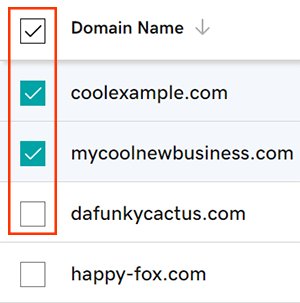
- จากเมนูการดำเนินการให้เลือก แผนคุ้มครอง จากนั้นเลือก อัพเกรดแผนคุ้มครอง
- คุณอาจต้องเลือกเมนูเพิ่มเติม และเลื่อนลงเพื่อให้เห็น “แผนการคุ้มครอง” ทั้งนี้ขึ้นอยู่กับขนาดหน้าจอของคุณ
- เลือกแผน Domain Protection ที่คุณต้องการจากตัวเลือกที่มี
- เลือก ชำระเงิน เพื่อดำเนินการสั่งซื้อให้เสร็จสมบูรณ์
การต่ออายุอัตโนมัติจะเปิดโดยอัตโนมัติ เมื่อคุณเพิ่มหรืออัพเกรด Domain Protection
ขั้นตอนที่เกี่ยวข้อง
- เปลี่ยนการตั้งค่า Domain Privacy สำหรับโดเมนของคุณ
- ตรวจสอบข้อมูลติดต่อสำหรับโดเมนของคุณเพื่อให้แน่ใจว่ารายละเอียดของคุณถูกต้องและเป็นปัจจุบัน
ข้อมูลเพิ่มเติม
- ตั้งค่าการยืนยันตัวตนแบบ 2 ขั้นตอน เพื่อความปลอดภัยสูงสุดในโดเมนและบัญชีของคุณ