ต่ออายุผลิตภัณฑ์หรือบริการด้วยตนเอง
วิธีต่อไปนี้เป็นวิธีต่ออายุผลิตภัณฑ์ด้วยตนเองได้ทุกเมื่อ แม้ว่ามีการตั้งค่าให้ต่ออายุอัตโนมัติไว้แล้วก็ตาม
Note: If you're looking to renew an expired domain, the steps are different.
- ไปที่หน้า การต่ออายุและการเรียกเก็บเงิน แล้วเลือก จัดการการสมัครใช้งาน
- In the Subscriptions list, select the product and then select Extend Term.
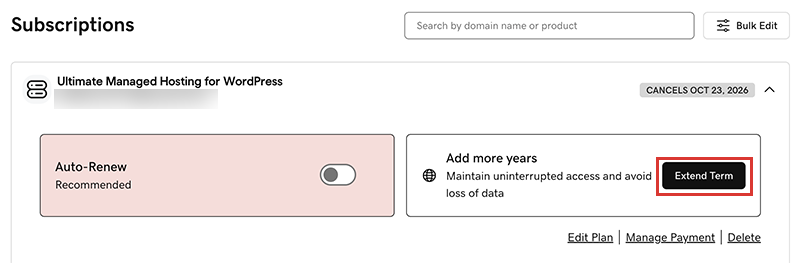
We'll take you to the Cart, where you can see the renewal price.Note: If you see Renew Now instead of Extend Plan, select Renew Now to confirm the payment method to use for the renewal. - ทำตามคำแนะนำเพื่อซื้อการต่ออายุให้เสร็จสิ้น
Note: Products auto-renew for the same length of time as their most recent manual renewal, instead of their original registration length. This also applies to domains that are manually renewed after July 16, 2020. For example, if a domain is manually renewed after July 16, 2020 for a three-year term, it will auto-renew for the same three-year term when the time comes. For full details, see our Domain Name Registration Agreement.
ขั้นตอนที่เกี่ยวข้อง
- โดยวิธีการต่ออายุโดเมนที่หมดอายุมีอยู่ดังนี้
- เปิดการต่ออายุอัตโนมัติ เพื่อที่คุณจะได้ไม่ต้องต่ออายุผลิตภัณฑ์ของคุณด้วยตนเอง
- Or, cancel a subscription to turn off auto-renewals.
ข้อมูลเพิ่มเติม
- อัพเดตข้อมูลการชำระเงินของคุณ: เปลี่ยนวันหมดอายุของบัตรเครดิตหรือที่อยู่สำหรับการเรียกเก็บเงิน