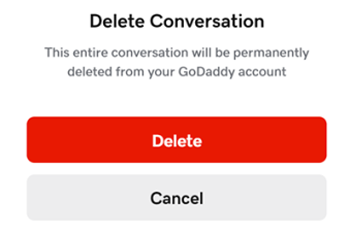
刪除GoDaddy Conversations中的主題
Note: The GoDaddy mobile app is not available with free Conversations plans.
Clear the clutter in your GoDaddy Conversations inbox by deleting chat, voice and text messages that you no longer need. You can also archive the conversation or social media message instead.
警告:
- 系統會永久刪除對話內容
- 您無法刪除對話串中的任何訊息,只能刪除整個對話
- 您目前無法刪除對社交媒體貼文的留言
- 您將無法刪除社交媒體對話內容
選擇您的裝置即可查看如何從收件匣內或對話群組中刪除對話。
- 透過網頁瀏覽器前往您的GoDaddy產品頁面。
如果您有Conversations的獨立版本,展開Conversations統一收件匣。點選Conversations方案右方的「網路收件匣」 。
或
如果您使用Websites + Marketing方案,請捲動到Websites + Marketing並點選網站旁邊的管理。在左側選單中,展開Conversations 。
- 點選「收件匣」 。系統會顯示未封存的對話清單。
從收件匣內刪除
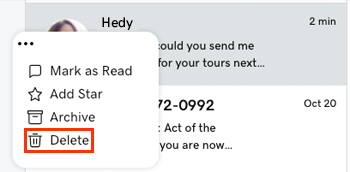
- 將滑鼠移到您想刪除的對話上。
- Next to the message, select
 More.
More. - 點選刪除。
在對話群組中刪除
如果您在對話群組中,也可以刪除對話內容:
- 選擇你想刪除的對話內容。
- 點選右上角的更多。
- 選取
 刪除。
刪除。 - 點選「刪除」進行確認。
- 登入您的GoDaddy行動應用程式。
- At the bottom of the screen, tap Conversations to see a list of all your unarchived conversations.

從收件匣內刪除
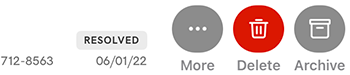
- 刪除您想刪除的對話內容後,向左輕掃。請注意:如果您不小心向左滑動,系統將會儲存對話內容。若要復原此操作,請從封存中還原對話。
- 輕按刪除。
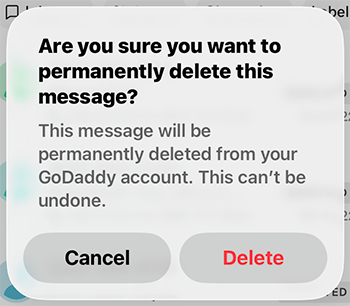
- 輕按[刪除]進行確認。
在對話群組中刪除
您也可以在對話群組中刪除對話內容。
- 點一下您想刪除的對話。
- 點一下右上角的刪除。
- 輕按[刪除]進行確認。
- 登入您的GoDaddy行動應用程式。
- At the bottom of the screen, tap Conversations to see a list of all your unarchived conversations.
- 點一下您想刪除的對話。
- 點一下右上角的刪除。
- 輕按[刪除]進行確認。