Applies to: 帳戶管理

帳戶管理 Help

手動續約產品或服務

您隨時都可以手動續約產品,即使已設定自動續約也沒問題。

Note: If you're looking to renew an expired domain, the steps are different.
  1. 前往「續約與帳單」頁面,點選「管理訂閱」。
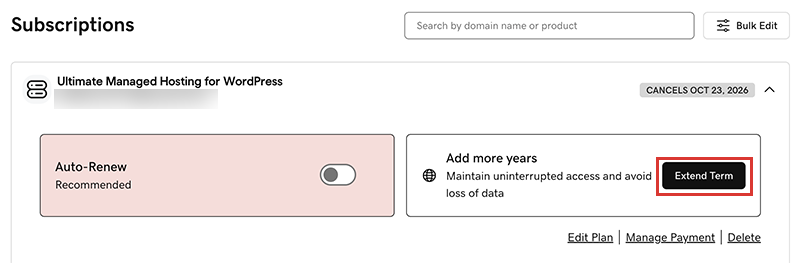
  2. In the Subscriptions list, select the product and then select Extend Term.
    select extend term
    We'll take you to the Cart, where you can see the renewal price.
    Note: If you see Renew Now instead of Extend Plan, select Renew Now to confirm the payment method to use for the renewal.
  3. 依照說明操作購買續約。
Note: Products auto-renew for the same length of time as their most recent manual renewal, instead of their original registration length. This also applies to domains that are manually renewed after July 16, 2020. For example, if a domain is manually renewed after July 16, 2020 for a three-year term, it will auto-renew for the same three-year term when the time comes. For full details, see our Domain Name Registration Agreement.

相關步驟

更多資訊