Set up or add money to my GoDaddy Cash account
If you have a paid product or service, you can set up a GoDaddy Cash account to pay for GoDaddy products.
需求:
- To start a new GoDaddy Cash account, we require a minimum deposit of USD$100. After your first transfer, the minimum deposit is USD$5.
- 您必須在「參考:客戶編號」欄位內附上客戶編號。如果您的客戶編號不包括在內,您帳戶的點數會無限期延遲。
- 對於API經銷商,此客戶編號為顯示在經銷商控制中心儀表板上的上級帳戶編號。
- To set up or add funds to a GoDaddy Cash account, you can either:
- Add funds with an online payment to your GoDaddy Cash account.
- Initiate a wire transfer from your bank to GoDaddy. Here's the information you need for the wire transfer:
收款銀行名稱:JPMorganChase Bank
銀行地址: 270 Park Avenue,New York,NY 10017
帳戶名稱: GoDaddy.com,LLC
帳戶號碼:580706823
繞線編號:021000021
ACH路由號碼:124001545
迅捷代碼:CHASUS33
參考:客戶編號
- After we receive the funds from your bank, the new GoDaddy Cash account appears in your Payment Methods page. If you added funds, the current balance is updated.
Required: If your current balance is more than USD$2000, you must verify your personal or business identity before you can spend the funds. Continue with the next step.
- In your Payment Methods page, select GoDaddy Cash.
- 點選「立即驗證」 。我們會要求您提供驗證個人或商業身份的資訊。請注意:我們的合作夥伴女神異聞錄會進行驗證,確認是否符合聯邦法規。若要了解更多,請參閱「角色」?
How do I check my GoDaddy Cash balance?
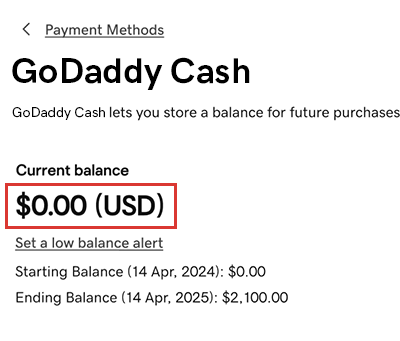
In your Payment Methods page, select GoDaddy Cash. The current balance is shown (in USD) on the GoDaddy Cash card.
更多資訊
- Add another payment method to your account, like a credit card or bank account.
- Return funds from and close my GoDaddy Cash account