在我的不同GoDaddy Conversations收件匣之間切換
如果您有多個公司連接至GoDaddy Conversations,您可以輕鬆在不同的Conversations統一收件匣之間切換,以便閱讀訊息。
Note: The GoDaddy mobile app is not available with free Conversations plans.
- Any time a customer sends a message through any of the channels you’ve connected to GoDaddy Conversations, you’ll receive a notification on your mobile phone. The notification will tell you which business it’s for and who it’s from.

- Tap the notification to be taken directly to the conversation thread in the GoDaddy mobile app, from where you can respond to the message.
- To switch to an inbox for a different venture, from your inbox, tap your business name at the top of the screen. A list of your businesses will show.
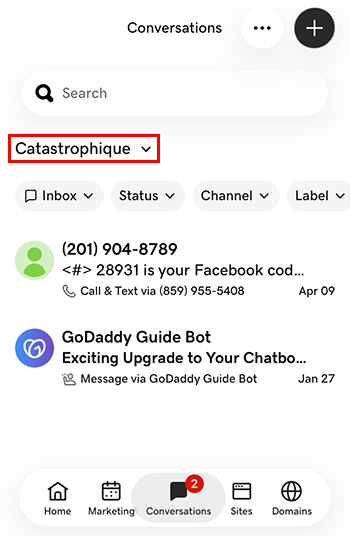
- 點選您想切換至的企業。系統會將您導向至該企業的收件匣。
- 透過網頁瀏覽器前往您的GoDaddy產品頁面。
如果您有Conversations的獨立版本,展開Conversations統一收件匣。點選Conversations方案右方的「網路收件匣」 。
或
如果您使用Websites + Marketing方案,請捲動到Websites + Marketing並點選網站旁邊的管理。在左側選單中,展開Conversations 。
- 點選「收件匣」 。系統會顯示未封存的對話清單。
- 選取訊息,以便直接帶到對話主題,您可以在該主題中回應訊息。
- To switch to an inbox for a different venture, on the far left of your screen, select the venture you want to switch to. You’ll be taken to the dashboard for that venture.
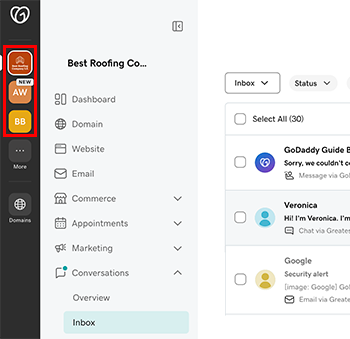
- 在左方的選單內展開「對話」 ,然後選擇「收件匣」並帶到該網站的收件匣內。