Fügen Sie eine lokale Zustelloption hinzu
Add a local delivery option to your Websites + Marketing online store to personally deliver orders to customers in your area, instead of using a shipping carrier.
- Gehen Sie zu Ihrer GoDaddy- Produktseite .
- Scrollen Sie nach unten, erweitern Sie Websites + Marketing und wählen Sie neben Ihrer Website die Option Verwalten .
- Erweitern Sie auf Ihrem Dashboard Shop und wählen Sie dann Einstellungen aus.
- Wählen Sie Versand .
- Under Delivery Methods, next to Local delivery, select

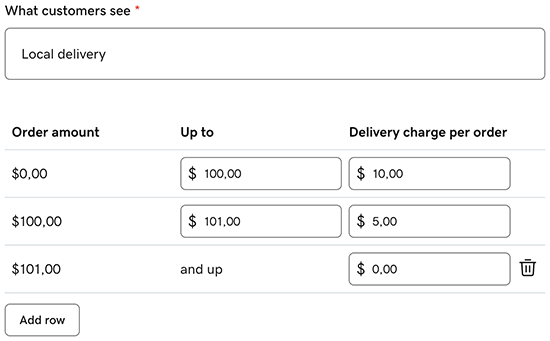
- Enter a name for this delivery option, like 'Local delivery'. Customers see this name at checkout, so it should help them understand the option.
- In the rate table, set your delivery charges by order amount. For example, you may want to offer free delivery for orders over a certain amount, or a lower amount for higher value orders.
- Enter an Order amount (minimum), an Up to amount (maximum) and a Delivery charge per order.
- To add another tier, select Add row.
- On the last row, Up to will read 'and up' and can't be edited. This means the rate applies to all orders with a value equal to or higher than the order amount set on the last row.
- Under Ship to these countries / regions, select the countries you deliver to from the dropdown list, and then select Apply.
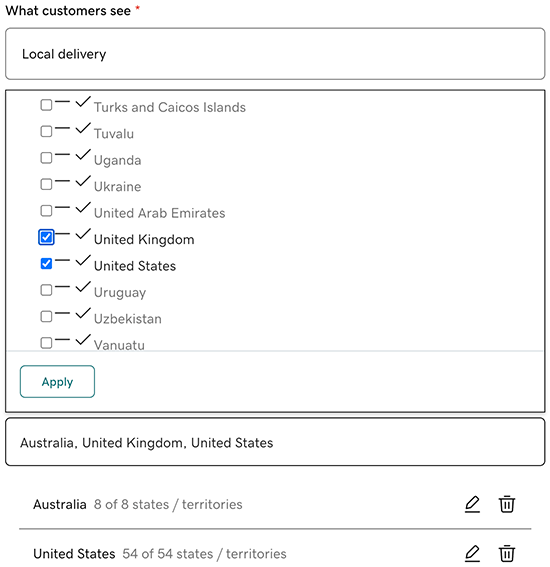
- (Optional) Limit delivery further by state or postal code.
- Next to the country you added in the previous step, select edit.
- Select the checkboxes for areas you deliver to, or switch the Only ship to certain postal codes toggle on, and then enter the specific postal codes, select Add for each one, and select Save when you've added all relevant postal codes.
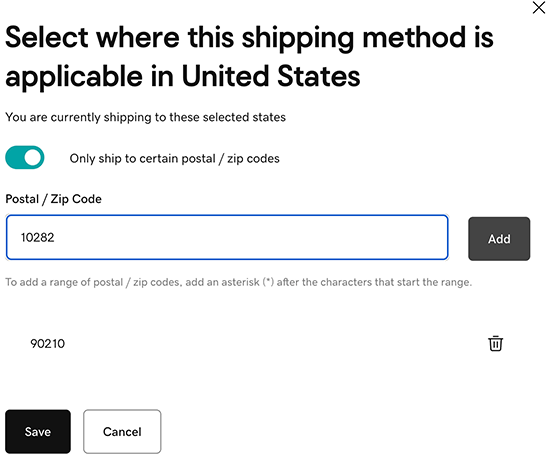 Note: You can also use a trailing asterisk as a wildcard, for example, "SW1*" matches all codes starting with SW1.
 - To change back to nationwide delivery, switch the Only ship to certain postal codes toggle off again. This will remove the postal code restrictions you added.
- Next to the country you added in the previous step, select
- Select Save, and then publish your site to make the changes live.
Your local delivery option will appear at checkout for customers whose delivery address falls within your defined area.