What is my customer ID number?
Your customer number is one way to confirm your identity when you contact our GoDaddy Guides. You don't need your customer number to sign in.
Note: If you can't sign in to your account but need your customer number, check an email sent from GoDaddy. Your customer number is usually listed at the top.
- Go to your GoDaddy Security page. You might be prompted to sign in.
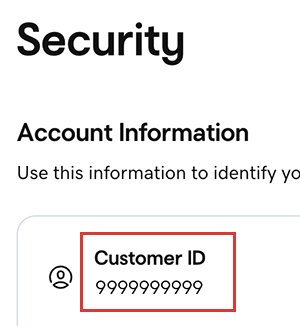
- In the Security list, below Account Information, find your Customer ID.
Related steps
- Now that you've got your customer number, you're ready to contact our GoDaddy Guides.
More info
- If you can't sign into your account, try our troubleshooting steps.
- For better account security, set up 2-step verification.
- If you no longer need a product, you can delete it from your account. You might also be able to request a refund for canceled products.