Create a discount code for my Airo AI Builder online store
Create a discount code that customers enter at checkout to get money off their order. You can set a minimum order value so the discount only applies to larger orders, offer free shipping on orders over a certain value, add an expiry date, or leave the code open with no end date.
Once your code is ready, share it with your customers however you like, such as in an email, a social post or a banner on your site. Customers enter the code at checkout and the discount comes off their order total before they pay.
Required: Online store checkout requires GoDaddy Payments.
Create a discount code
- Ve a tu página de aplicaciones de Airo AI Builder y luego selecciona tu aplicación o sitio.
- In the chat, ask Airo AI Builder to create a discount code. For example, "Create a discount coupon for my store so customers get a discount when checking out".
- Reply with the details Airo asks for: the discount amount or percentage, the code customers will enter and whether you want an expiry date or a minimum order value.
- To make sure it's live, publish your app or site.
Your discount code is now active and customers can use it at checkout.
Manage discount codes
You can manage discounts from the Commerce tab.
- Select Commerce. If it's not visible, select + New tab and then select Commerce.
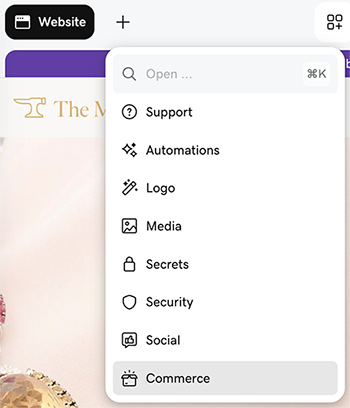
- Under Quick links, select View Settings.
- Select Discounts, then open the GoDaddy Discounts app to edit your discounts.