Passa da una casella di posta all'altra di GoDaddy Conversations
Se hai più di un’impresa collegata a GoDaddy Conversations, puoi passare facilmente da una casella di posta unificata all’altra di Conversations per leggere i messaggi relative a tale impresa.
Note: The GoDaddy mobile app is not available with free Conversations plans.
- Any time a customer sends a message through any of the channels you’ve connected to GoDaddy Conversations, you’ll receive a notification on your mobile phone. The notification will tell you which business it’s for and who it’s from.

- Tap the notification to be taken directly to the conversation thread in the GoDaddy mobile app, from where you can respond to the message.
- To switch to an inbox for a different venture, from your inbox, tap your business name at the top of the screen. A list of your businesses will show.
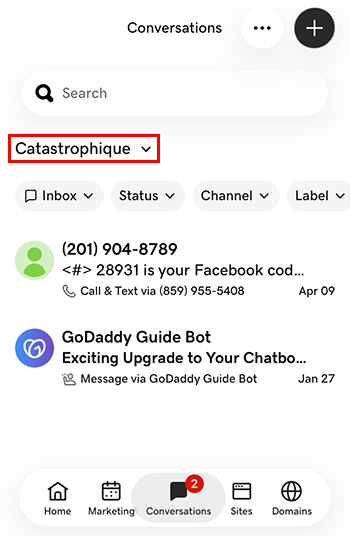
- Tocca l'impresa a cui vuoi passare. Verrai indirizzato alla casella di posta in arrivo di quell'impresa.
- In un browser web, vai alla tua prodotto GoDaddy.
Se disponi della versione standalone di Conversations, espandi Conversations Unified Inbox . A destra del tuo piano Conversations, seleziona Posta in arrivo web .
OPPURE
Se disponi di un piano Websites + Marketing, scorri fino a Websites + Marketing e seleziona Gestisci accanto al tuo sito. Nel menu a sinistra, espandi Conversations .
- Seleziona Posta in arrivo . Verrà visualizzato un elenco delle conversazioni non archiviate.
- Seleziona un messaggio da portare direttamente al thread di conversazione, da cui puoi rispondere al messaggio.
- To switch to an inbox for a different venture, on the far left of your screen, select the venture you want to switch to. You’ll be taken to the dashboard for that venture.
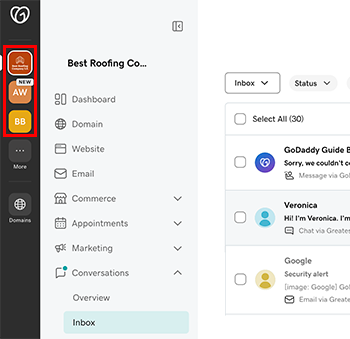
- Nel menu a sinistra, espandi Conversazioni , quindi seleziona Posta in arrivo per essere indirizzato alla casella di posta in arrivo dell'impresa in questione.