Add shipping weight and dimensions to my online store products
Weight-based and carrier-based shipping methods require the product's weight and dimensions to determine shipping costs. Measure the product itself, not the box you use to ship it. When customers order multiple items, shipping calculations combine the items' weight and size to determine the ideal box size, ensuring they ship together in a single package with accurate shipping rates at checkout.
- Przejdź do strony produktu GoDaddy.
- Przewiń w dół, rozwiń Websites + Marketing i wybierz opcję Zarządzaj obok swojej witryny.
- W panelu rozwiń sekcję Sklep, a następnie wybierz Produkty.
- Wybierz nazwę lub obraz produktu, aby go otworzyć.
- Select Shipping and enter the package weight and dimensions.
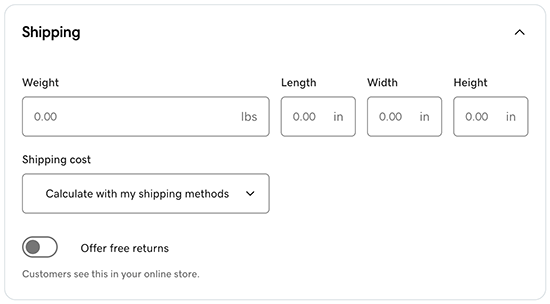 Note: To change between metric and imperial, go to
Store and select Settings. Under Regional Info, change the details for Measurement System. - Wybierz, w jaki sposób chcesz określić koszty wysyłki.
- Oblicz przy użyciu moich metod wysyłki: klienci będą wybierać wysyłkę na podstawie metod, które zostały przez Ciebie skonfigurowane podczas dodawania lub zmieniania metod wysyłki.
- Brak (bezpłatna wysyłka) lub Określ stałą kwotę: Te opcje będą miały zastosowanie do wszystkich osób na świecie, niezależnie od ograniczeń wysyłki, które dodasz w metodach wysyłki.
- Wybierz opcję Zapisz lub Zapisz i dodaj kolejny, aby zakończyć. Zmiany pojawią się w sklepie.