Understanding Premium Vulnerability Protection for Managed Hosting for WordPress
The Protection tab in your Security Scan gives you real-time, automated defense against known WordPress vulnerabilities and common attack methods. Once enabled, it works silently in the background, no configuration required, no performance impact, and no code changes to your site.
What is Premium Vulnerability Protection?
Premium Vulnerability Protection is a real-time security layer that shields your WordPress site from exploits at the PHP execution level. It works in two ways:
- Virtual patching: Blocks known vulnerabilities in WordPress core, plugins, and themes before updates are applied or even released. This gives you a critical window of protection when a vulnerability is discovered, but a fix isn't yet available.
- Security hardening rules: Automatically closes common security gaps that attackers and bots routinely probe, without touching your site's code or slowing it down.
- Basic Vulnerability Scanning (Included in all plans)
- Daily automated vulnerability scans
- Detailed vulnerability reports with severity ratings
- Update recommendations for each vulnerability
- Manual updates required to fix issues—you're responsible for applying patches
- Premium Vulnerability Protection (Additional fee per site)
- Everything in Basic: All the Basic features
- Real-time Virtual Patching: Automatically blocks exploit attempts even before you apply updates
- WordPress-Specific Hardening: Advanced security rules tailored to WordPress vulnerabilities and attack patterns
- Enterprise-Grade Protection: Professional-level security rules for your site, without installing or managing multiple plugins
- Zero Configuration: Activate and forget, no manual setup or technical expertise needed
What does it protect against?
| Protection feature | What it does | Why it matters |
|---|---|---|
| RapidMitigate | Deploys targeted mitigation rules for medium- and high-priority vulnerabilities | Stops exploits before you can update a plugin or theme |
| Advanced Hardening | Blocks common malicious request patterns against WordPress | Reduces the ways your site can be attacked |
| Community IP Blocklist | Blocks IPs known to exploit vulnerabilities | Prevents repeat offenders from reaching your site |
How it works
When Premium Vulnerability Protection is active on your site:
- A lightweight security module (powered by Patchstack) monitors your site at the PHP level
- Known vulnerabilities and attack patterns are blocked before they can be exploited
- Security rules are continuously updated from Patchstack's real-time vulnerability database, maintained by a dedicated team of researchers and ethical hackers
- No files are modified on your site, and there is zero impact on frontend performance
Understanding your Protection dashboard
Protection Summary
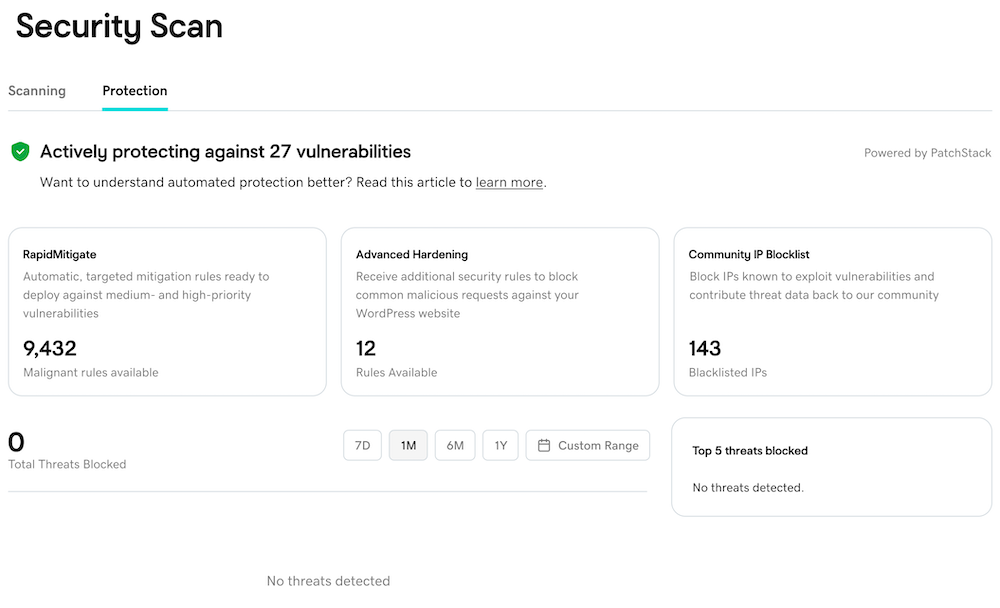
At the top of the Protection tab, you'll see a real-time status of the vulnerabilities your site is actively protected against (for example, "Actively protecting against 27 vulnerabilities").
Protection Modules
RapidMitigate shows the number of targeted mitigation rules currently available for known vulnerabilities. These rules are automatically deployed and continuously updated.
Advanced Hardening displays the number of active additional security rules for common malicious request types targeting WordPress.
Community IP Blocklist shows how many known malicious IPs are currently blocked from reaching your site.
Threats blocked over time
The chart in the lower section shows the total number of threats blocked across time. Use the time range selector to view activity over:
- 7D: The last 7 days
- 1M: The last month (default)
- 6M: The last 6 months
- 1Y: The last year
- Custom Range: Select a date range
Top 5 threats blocked
This module lists the most frequent attack types that have been stopped on your site. This gives you full transparency into the threats your site faces, and proof that they're being stopped.
Frequently asked questions
Will this slow down my website? No. The protection module runs at the PHP execution level and does not scan files or process large datasets. Performance impact is effectively zero.
What is Virtual Patching and why does it matter? Virtual patching blocks a known exploit at runtime, even if the affected plugin or theme hasn't been updated yet. It buys critical time to protect against a vulnerability between when it's discovered and when the developer patches it.
Do I need to configure anything? No. Protection is applied automatically once enabled. All rules are updated in the background, with no action required on your part.
Can I use this alongside other security tools? Yes. This protection layer is designed to be non-conflicting and complements hosting-level firewalls, monitoring tools, and other plugins.
How often are the protection rules updated? Continuously. Patchstack's vulnerability database is updated in real time by its dedicated security research team, and your site automatically receives the latest rules.
How is this different from Malware Scanning? These are two distinct but complementary layers of security. Malware Scanning detects and flags threats that have already reached your site. Vulnerability Scanning & Protection works proactively, blocking known attack patterns and vulnerabilities before they can cause any harm.
- Malware Scanning detects malicious code that has already infected your site and helps you clean it up.
- Premium Vulnerability Protection prevents known attacks and vulnerabilities from being exploited, so threats never get a foothold on your site.
Both work best together, but they solve different problems. If you only have one, you're only half protected.