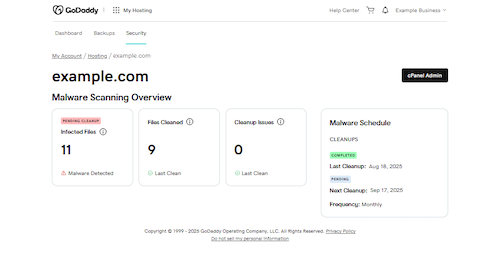
Security page overview
When malware is detected in your Web Hosting (cPanel) account, you'll receive notifications that link to the Security Page. Malware infections can disable your site, damage your reputation, and compromise your visitors' safety (General malware information).
Security Page Details
In the Malware Scanning Overview section, you can see the following details:
- Infected Files: The number of "bad" files detected since your last cleanup. Manual or other cleanups may not be reflected until the next scheduled cleanup.
- Files Cleaned: Number of infected files successfully cleaned during the last cleanup cycle.
- Files Not Cleaned: The number of files that could not be cleaned (e.g., due to a permission error or a change to the file). These files couldn't be cleaned automatically and require manual review.
- Malware Schedule: Details of the last cleanup performed, the date of the next one, and the frequency of cleanups.