Renouveler automatiquement mes produits ou services
Renouvelez manuellement vos produits à tout moment, même s’ils sont configurés pour être renouvelés automatiquement.
Remarque : Si vous souhaitez renouveler un domaine à validité expirée, les étapes à suivre sont un peu différentes.
- Allez à votre page Renouvellements et facturation et sélectionnez Gérer les abonnements.
- Dans la liste des Abonnements, sélectionnez le produit, puis Prolonger la durée.
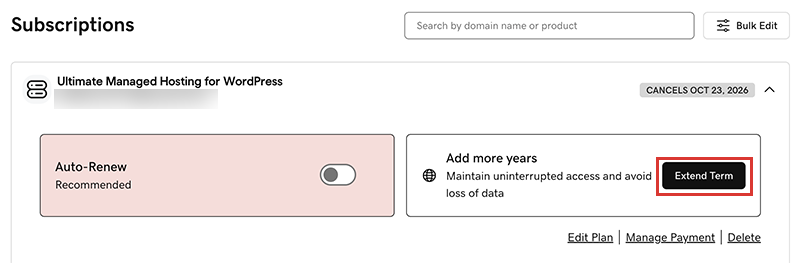
Nous vous dirigerons vers le panier, où vous pourrez consulter le prix du renouvellement.Remarque : Si vous voyez Renouveler maintenant au lieu de Prolonger la durée, sélectionnez Renouveler maintenant pour confirmer le mode de paiement à utiliser pour le renouvellement. - Suivez les instructions pour finaliser votre renouvellement.
Remarque : Le renouvellement automatique des produits s’effectue pour la durée définie le plus récemment via un renouvellement manuel, et non pour la durée d’enregistrement d’origine. Cela est également valable pour les domaines renouvelés manuellement après le 16 juillet 2020. Par exemple, si un domaine est renouvelé manuellement après le 16 juillet 2020 pour une durée de trois ans, il sera automatiquement renouvelé pour la même période de trois ans lorsqu’il arrivera à expiration. Pour plus de détails, consultez notre Contrat d'enregistrement nom de domaine.
Étapes associées
- Voici comment renouveler un domaine arrivé à expiration.
- Activez le renouvellement automatique pour éviter d’avoir à procéder manuellement au renouvellement de vos produits.
- Ou, annuler un abonnement pour désactiver les renouvellements automatiques.
En savoir plus
- Mettre à jour les informations de votre mode de paiement : cette option permet de modifier la date d’expiration de votre carte de crédit ou votre adresse de facturation.