登入您的 Managed Hosting for WordPress 網站
您可以透過 Managed Hosting for WordPress 方案內的任何網站存取 WordPress 儀表板。只要透過儀表板,您便可以隨時編輯網站。
- 前往您的GoDaddy產品頁面。
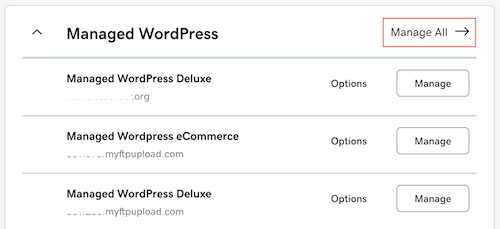
- 在「我的產品」頁面中,點一下「Managed Hosting for WordPress」旁的「管理全部」。
- 找到您想編輯的網站,然後點選
 選單內的「WP 管理員」。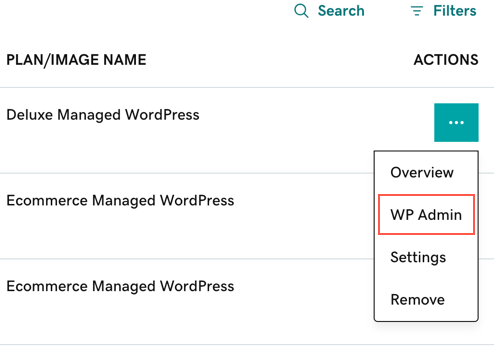
這樣做會啟動 WordPress 儀表板,您可以在此建立並編輯網站。
注意:如果網站正在變更網域中,您可能會有一段時間無法登入。
更多資訊
- 如果想瞭解透過無論哪種 WordPress 網站設定方式或位置都可以登入 WordPress 儀表板的方式,請參閱登入 WordPress。
- 建立我的WordPress網站