Connetti Conversations al mio indirizzo email Microsoft 365 da GoDaddy
Link your Microsoft 365 email address to Conversations to get your emails directly in your Conversations unified inbox. If you’re a Websites + Marketing subscriber and you’re using a chat widget or web forms on your website, messages from those sources will also show in your Conversations box, through this email address.
- Accedi alla tua app per dispositivi mobili GoDaddy.
- At the bottom of the screen, tap Conversations to see a list of all your unarchived conversations.

- In the top-right corner, tap
 more, and then tap Settings.
 - Tap Email. You may be asked to sign in to your GoDaddy account.
- Expand Email, and then tap Connect.
- Tap Microsoft 365, and then tap Next.
- Se disponi già di un indirizzo email Microsoft 365, verrà visualizzato sullo schermo. Se non lo fai, ti verrà chiesto di ottenerne uno prima di poter continuare con questi passaggi.
Seleziona l'indirizzo email che vuoi connettere a Conversations e poi tocca Continua .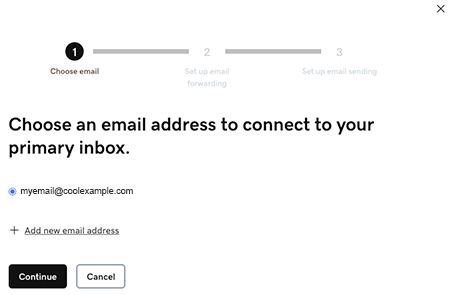
- Email forwarding will be set up for you. This could take up to 60 minutes, but you can continue setting up your email and we’ll let you know when forwarding is ready.
Sign in to the Microsoft 365 account you’re linking to Conversations. This must be the same account you used in Step 7.
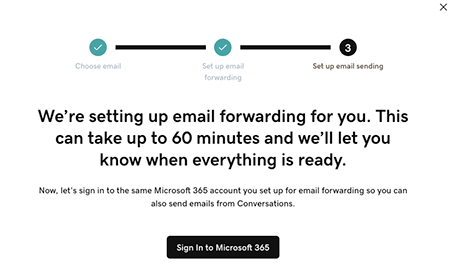
- Vedrai una schermata che spiega che la tua email è ancora in fase di configurazione.
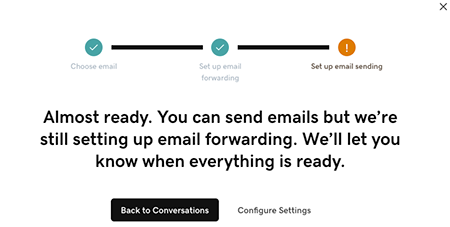
- Accedi alla tua app per dispositivi mobili GoDaddy.
- At the bottom of the screen, tap Conversations to see a list of all your unarchived conversations.
- In the top-right corner, tap
 settings.
 - Tap Email. You may be asked to sign in to your GoDaddy account.
- Expand Email, and then tap Connect.
- Tap Microsoft 365, and then tap Next.
- Se disponi già di un indirizzo email Microsoft 365, verrà visualizzato sullo schermo. Se non lo fai, ti verrà chiesto di ottenerne uno prima di poter continuare con questi passaggi.
Seleziona l'indirizzo email che vuoi connettere a Conversations e poi tocca Continua . - Email forwarding will be set up for you. This could take up to 60 minutes, but you can continue setting up your email and we’ll let you know when forwarding is ready.
Sign in to the Microsoft 365 account you’re linking to Conversations. This must be the same account you used in Step 7.
- Vedrai una schermata che spiega che la tua email è ancora in fase di configurazione.
- In un browser web, vai alla tua prodotto GoDaddy.
Se disponi della versione standalone di Conversations, espandi Conversations Unified Inbox . A destra del tuo piano Conversations, seleziona Posta in arrivo web .
OPPURE
Se disponi di un piano Websites + Marketing, scorri fino a Websites + Marketing e seleziona Gestisci accanto al tuo sito. Nel menu a sinistra, espandi Conversations .
- Seleziona Impostazioni.
- Select Channels.
- Expand Email, and then tap Connect.
- Select Microsoft 365, and then tap Next.
- Se disponi già di un indirizzo email Microsoft 365, verrà visualizzato sullo schermo. Se non lo fai, ti verrà chiesto di ottenerne uno prima di poter continuare con questi passaggi.
Seleziona l'indirizzo email che vuoi connettere a Conversations e poi tocca Continua . - Email forwarding will be set up for you. This could take up to 60 minutes, but you can continue setting up your email and we’ll let you know when forwarding is ready.
Sign in to the Microsoft 365 account you’re linking to Conversations. This must be the same account you used in Step 7.
- Vedrai una schermata che spiega che la tua email è ancora in fase di configurazione.
Congratulazioni! Hai collegato correttamente il tuo indirizzo email a GoDaddy Conversations. Una volta finalizzato l'inoltro, inizierai a ricevere i messaggi email direttamente nella tua casella di posta Conversations.