Ręczne odnawianie produktów i usług
Możesz ręcznie odnowić swoje produkty w dowolnym momencie, nawet gdy skonfigurowano dla nich automatyczne odnawianie.
Note: If you're looking to renew an expired domain, the steps are different.
- Przejdź do strony Odnowienia i rozliczenia i wybierz Zarządzaj subskrypcjami.
- In the Subscriptions list, select the product and then select Extend Term.
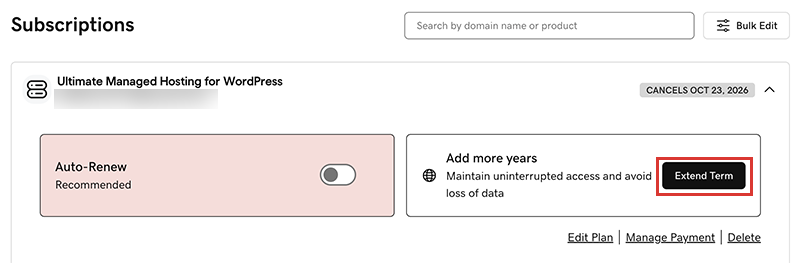
We'll take you to the Cart, where you can see the renewal price.Note: If you see Renew Now instead of Extend Plan, select Renew Now to confirm the payment method to use for the renewal. - Postępuj zgodnie z monitami, aby dokończyć zakup odnowienia.
Note: Products auto-renew for the same length of time as their most recent manual renewal, instead of their original registration length. This also applies to domains that are manually renewed after July 16, 2020. For example, if a domain is manually renewed after July 16, 2020 for a three-year term, it will auto-renew for the same three-year term when the time comes. For full details, see our Domain Name Registration Agreement.
Powiązane czynności
- Tu znajdziesz instrukcję, jak odnowić wygasłą domenę.
- Włącz automatyczne odnawianie, aby nie musieć odnawiać produktów ręcznie
- Or, cancel a subscription to turn off auto-renewals.
Więcej informacji
- Zaktualizuj metodę płatności: Zmień datę ważności karty kredytowej lub adres do faktury.