
Got an idea for a game people can't put down? You no longer need a team of developers or years of coding experience to bring it to life. AI-powered tools and no-code platforms have made game creation more accessible than ever, helping creators turn ideas into playable experiences in a fraction of the time.
Ready to hit start on your game development journey? Follow these six steps to learn how to build a game app in 2026 with tools like Airo AI Builder — from idea to launch.
What type of game should you build?
One of the biggest mistakes new creators make is starting too big. That massive open-world multiplayer game might sound exciting, but it can quickly become overwhelming when it's your first project.
A better approach is to pick a concept that fits your current skills, resources and timeline. You can always add new features or build a more ambitious sequel down the track.
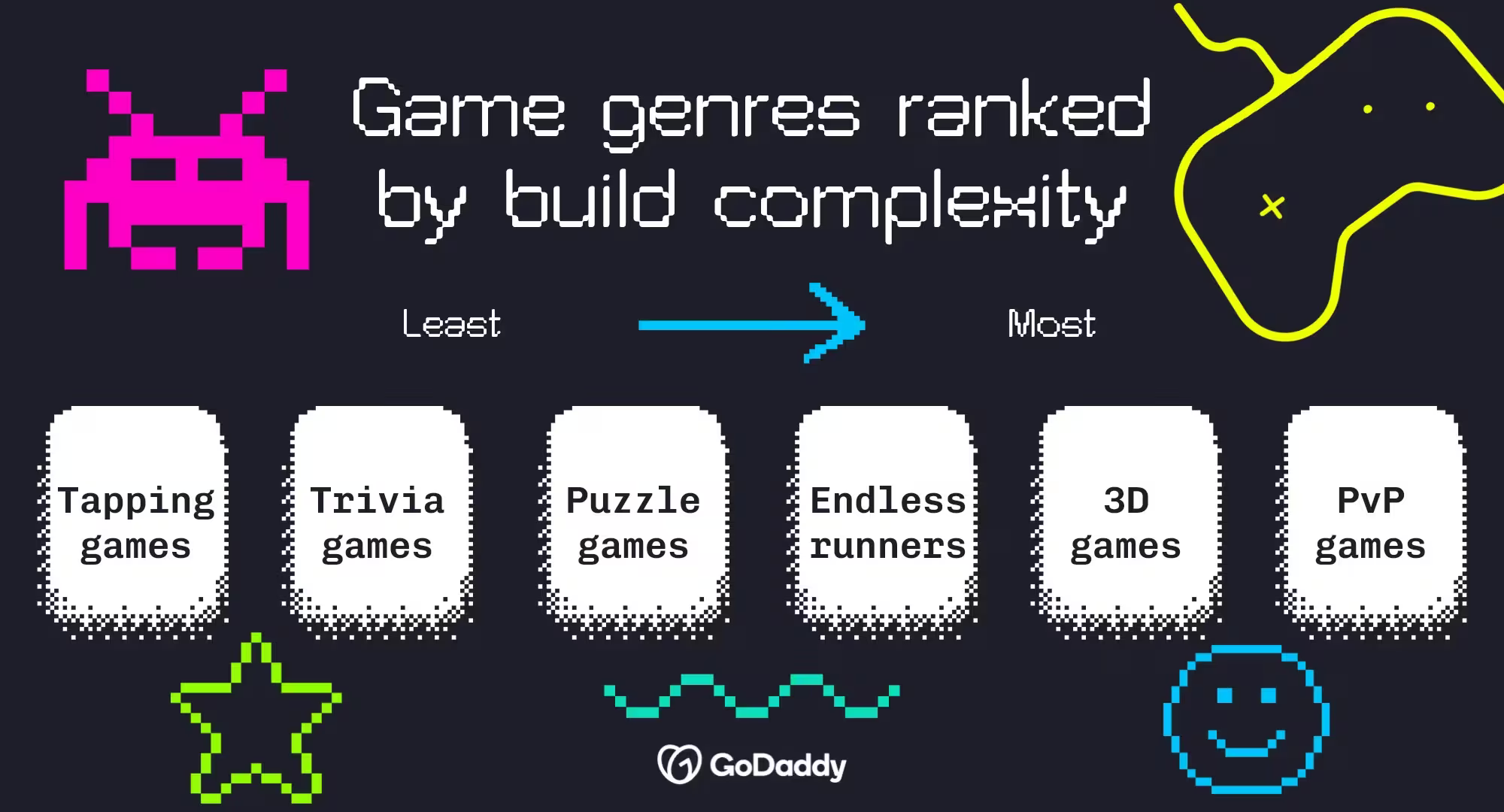
Here are a few common game types, ranked roughly from simplest to most complex:
- Tapping games: Simple gameplay built around clicks, taps and upgrades.
- Trivia games: Question-and-answer experiences that are easy to build and customise.
- Puzzle games: Challenge players with logic, strategy or pattern-solving mechanics.
- Endless runners: Fast-paced games where players dodge obstacles and chase high scores.
- Platformers: Level-based games that need more design, animation and testing.
- Simulation games: Digital versions of real-world activities, businesses or systems.
- 3D games: More immersive experiences that usually require extra assets and technical know-how.
- Multiplayer/PvP games: Games that connect players online and often demand the biggest investment of time and resources.
For your first project, simplicity is a competitive advantage. The faster you can turn an idea into a playable game, the sooner you can gather feedback and start building an audience. And if you're a gamer who's been looking at different ways to make money with AI, this is a great place to start.
Step 1: Define your game concept and core mechanic
It's tempting to dive straight into game app development, but the strongest games start with a clear concept and a simple core mechanic.
Your game concept is the experience you're creating. Your core mechanic is the action players will repeat again and again. Take Tetris, for example. The concept is arranging falling blocks to clear lines. The core mechanic is rotating and placing pieces. In Flappy Bird, the concept is navigating obstacles, while the core mechanic is tapping to keep the bird in the air.
Before you open a single tool, work out what players do, what their goal is and what makes the experience fun. A clear core mechanic will guide every decision that follows.
Core mechanic checklist:
- What action will players repeat most often?
- What is the player's main objective?
- How do players succeed or fail?
- Can you explain the gameplay in one sentence?
- Does the idea still sound fun after five minutes of play?
Step 2: Choose the right platform for your project
Now that you've got a game concept, it's time to decide how you'll build it.
The right platform depends on your goals, technical experience and the type of game you're making. Traditional game engines offer heaps of customisation but often come with a steeper learning curve. AI-powered builders and no-code tools can help you move much faster, making them a great fit for first-time creators and entrepreneurs who want to validate an idea quickly.
Have a think about how much time you want to spend learning development tools versus actually building and testing your game.
How GoDaddy Airo AI Builder lets you build a game or app without coding
If your goal is to create a simple web-based game without learning how to code, GoDaddy Airo AI Builder can help you get moving quickly. Describe what you want to create in plain language, and Airo AI Builder generates a working web app based on your prompt. Instead of building every screen and interaction from scratch, you start with an AI-generated foundation and customise it from there.
Have a look at this learning game built in Airo AI Builder to get a feel for how our AI app builder works:
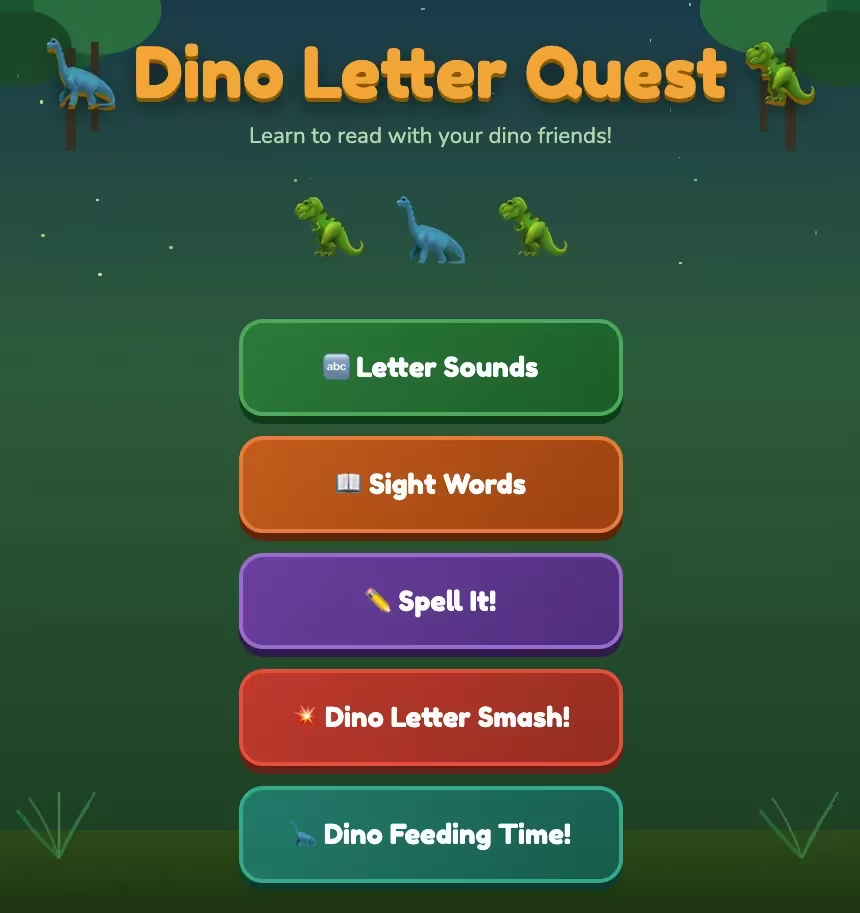
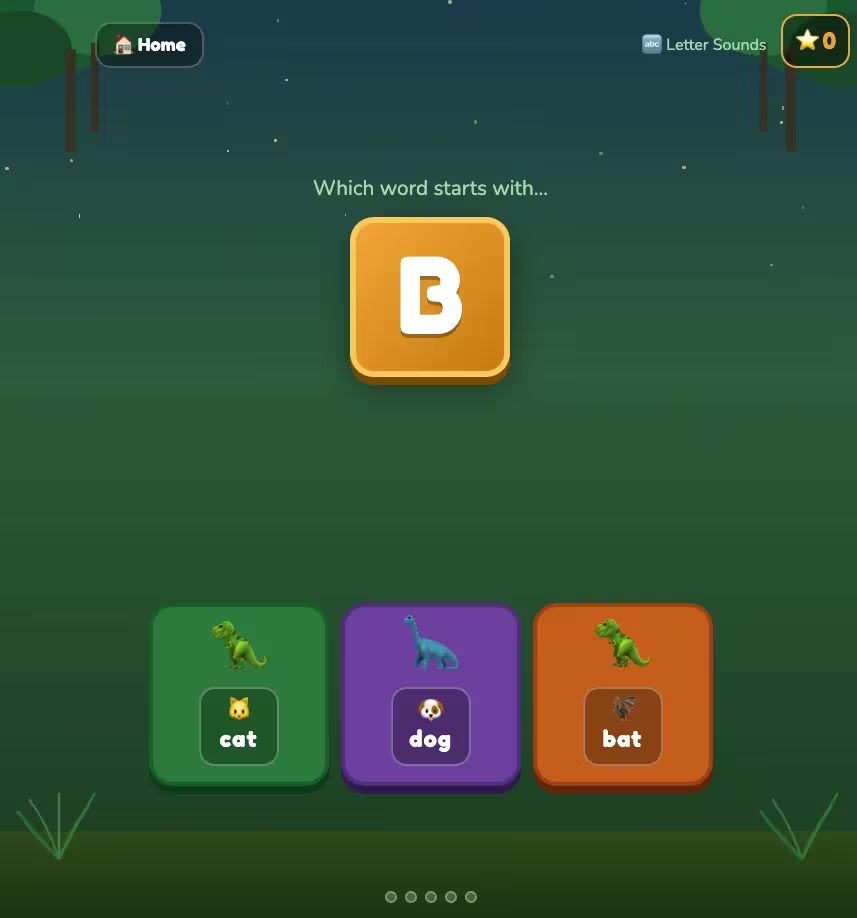
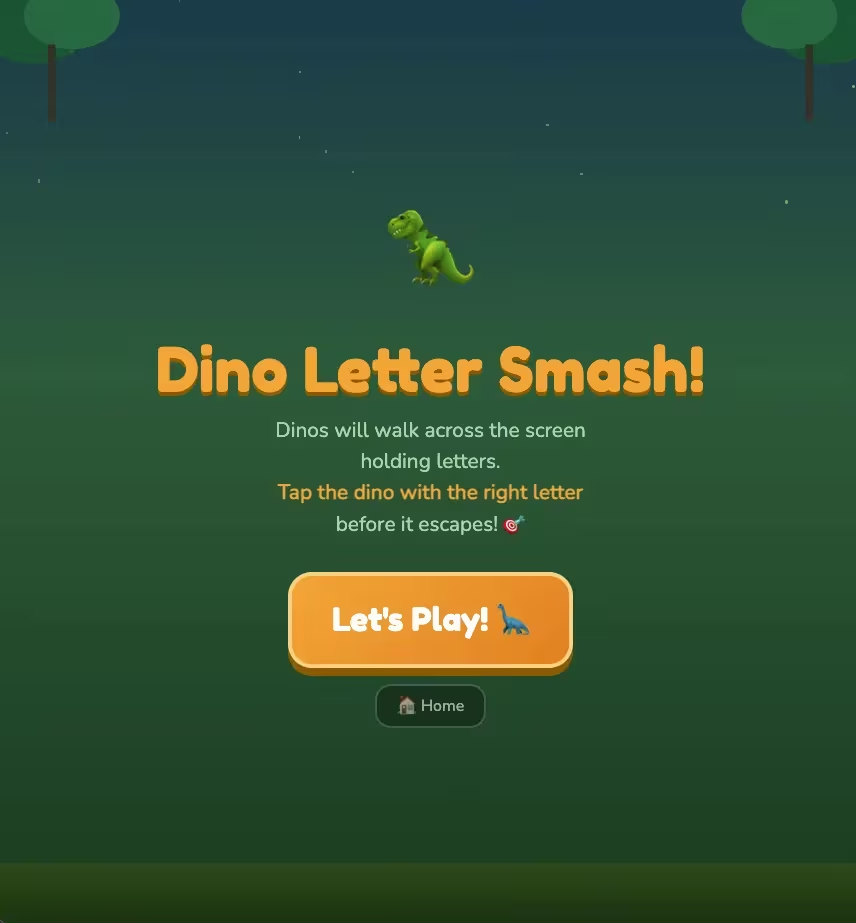
Airo AI Builder generated a playable web-based experience that could then be refined and expanded.
Worth noting: Airo AI Builder creates web apps and web games, not native mobile apps. That makes it a great option for testing ideas and sharing your game online without the complexity of traditional game app development. You can find out more about what Airo AI Builder offers in this article.
GoDaddy Airo AI Builder
Describe your idea. We'll build your live website in minutes.
With a few prompts, Airo AI Builder generates your website, web app, pages, databases and logic in minutes — no coding required. Start for free with 50 AI credits a month. No credit card required.
Build for FreeStep 3: Get your tools ready
A bit of prep makes game app development much easier. Before you start creating levels, characters or gameplay mechanics, gather the tools, assets and accounts you'll need to keep things moving.
What you need before writing a single line (or no line) of code
Use this checklist to guide your quest:
- A clear game concept and core mechanic
- A target audience and player goal
- Your chosen platform or game-building tool
- A basic art style or visual direction
- Sound and music requirements
- A game title (working titles are fine)
- Accounts set up for any tools you'll use
- A place to publish or share your game
- A domain name for your game's website
Free asset resources (art, sound, UI)
Not every game developer is an artist, musician and designer rolled into one. The good news is you don't have to be. Plenty of free resources can help you create a polished game without building every asset yourself.
Art
- Kenney: Free collections of sprites, icons, characters and game environments.
- OpenGameArt: Community-created artwork, animations and textures for a wide range of game styles.
- itch.io: Thousands of free asset packs from independent artists.
Sound
- Freesound: User-generated sound effects for everything from footsteps to explosions.
- Pixabay: Royalty-free music tracks and audio effects.
- ZapSplat: Large library of free sound effects for games and apps.
UI
- Kenney UI Packs: Ready-made menus, buttons and interface elements.
- itch.io UI Assets: Free user interface kits for different game genres.
- Figma Community: Free design resources that can be adapted into game interfaces.
Pro tip: pick a visual style and stick with it. Pixel-art characters, realistic backgrounds and cartoon menus rarely look like they belong in the same game.
Set up a domain for your game
Because your game lives online, players need a reliable way to find it. A dedicated domain gives your project a professional home where players can learn about your game, sign up for updates and share it with mates. It also helps establish your brand early — even if your game is still a work in progress.
When choosing a domain, keep it short, memorable and closely tied to your game's name. A .com.au extension signals you're an Australian creator, while .com works well if you're targeting a global audience. There are plenty of other options too, including .games and .io — both popular with indie game developers.
To get your domain:
- Brainstorm a few domain names based on your game title.
- Check availability through GoDaddy.
- Register the best option before someone else claims it.
- Connect your domain to your game's website or landing page.
- Start sharing it everywhere you promote your game.
If you've never done anything like this before, check out this article on how to start a website.
Step 4: Build your MVP and core game loop
Resist the urge to build every level, character and feature straight away. Start with an MVP (minimum viable product) — the smallest playable version of your game that proves your core mechanic is fun.
If you're building a puzzle game, your MVP might be a single level. If you're creating an endless runner, it could be one character, one obstacle type and a score counter.
Focus on your core game loop — the sequence of actions players repeat throughout the game. Once players can understand and play the loop, you're ready to gather feedback and build on the experience.
Step 5: Test your game (on real devices)
Your game might run perfectly on the device you built it on, but that doesn't mean it'll work perfectly for everyone else. Testing across multiple real devices helps you spot issues that are easy to miss during development, like slow load times, confusing gameplay, broken interactions and layout problems.
The goal isn't to make your game perfect. It's to catch the biggest frustrations before your players ever run into them.
Device testing and performance checklist
Don't share your game with the world until you've worked through this checklist:
- Test your game on both iPhone and Android devices.
- Check that the game loads quickly on mobile and desktop.
- Play through every level, screen and game mode.
- Test every button, menu and interactive element.
- Verify that scores, progress and game states behave as expected.
- Check the text is readable on smaller screens.
- Confirm that images, animations and sound effects load correctly.
- Test your game's web link across multiple browsers.
- Ask at least a few people who haven't seen the game before to give it a go.
Common beginner mistakes to fix before publishing
Even great game ideas can lose players because of a few avoidable mistakes.
- Skipping real-world testing: Get feedback from actual players, not just mates who helped build the game.
- Ignoring load times: Faster experiences tend to keep players engaged longer.
- Making onboarding too complicated: Players should understand how to play within the first minute.
- Overloading the first version with features: Nail a great core experience before you expand.
- Using inconsistent visuals: Stick to a cohesive art style and interface design.
- Hiding important buttons or instructions: Make navigation and gameplay goals obvious.
- Waiting too long to gather feedback: Early player input can save weeks of unnecessary work.
Remember, testing isn't the final level — it's part of the game development loop. The more feedback you gather now, the stronger your launch will be.
Step 6: Plan your monetisation strategy
If your goal is to make money from your game, don't wait until launch day to think about monetisation. The best monetisation strategies feel like a natural part of the player experience, not a surprise that pops up once the game is finished. As you build, think about how your game will generate revenue and where those opportunities fit into the experience.
For web-based games, monetisation often happens on the website where the game is published. Depending on your audience and goals, that could include advertising, memberships, sponsorships, donations, affiliate partnerships or selling digital products related to your game.
How to add monetisation without ruining the user experience
Players don't mind monetisation nearly as much as they mind interruptions. The trick is creating value first and monetising second.
- Earn attention before you ask for anything. Let players experience the game before hitting them with offers or promotions.
- Keep ads out of core gameplay. Avoid disrupting active play sessions with intrusive placements.
- Offer optional upgrades. Bonus content, extra levels or cosmetic enhancements usually feel better than paywalls.
- Use your website strategically. Place ads, newsletter signups or offers around the game rather than inside critical gameplay moments.
- Check player feedback regularly. If monetisation is causing players to drop off, adjust before you scale traffic.
A good example is Wordle. The game became a global hit because the experience stayed simple and enjoyable. Monetisation and growth opportunities never overshadowed the core gameplay, which is what kept players coming back day after day.
Build your game today with GoDaddy Airo AI Builder
You've got the roadmap. Now it's time to start building.
GoDaddy Airo AI Builder helps you move from concept to playable web game faster, using simple prompts instead of complex coding. Create, customise and launch your game today.
GoDaddy Airo AI Builder
Describe your idea. We'll build your live website in minutes.
With a few prompts, Airo AI Builder generates your website, web app, pages, databases and logic in minutes — no coding required. Start for free with 50 AI credits a month. No credit card required.
Build for FreeFrequently asked questions
Do I need coding experience to develop a game app?
No. Modern AI-powered and no-code tools have made game creation much more accessible. If you're building a simple web-based game, tools like GoDaddy Airo AI Builder can help you create a playable experience without writing code. A basic understanding of game design and user experience is still handy, but coding is no longer a requirement to get started.
How long does it take to build a game app?
The timeline depends on how complex your project is. A simple trivia game, puzzle game or web-based game can be built in a matter of hours or days, especially with AI-assisted tools. More advanced games with custom artwork, multiple levels and complex mechanics can take weeks or months.
Can I build a game app for free?
Yes. Many game development tools, asset libraries and AI platforms offer free plans or free resources. You can find free artwork, sound effects and UI kits online, then use those assets to build your game. Keep in mind that publishing, premium features, custom domains or advanced functionality may involve extra costs as your project grows. For a deeper breakdown of the typical cost to create an app, check out this guide.
What's the easiest game to build as a beginner?
Trivia games, tapping games, simple puzzle games and basic endless runners are usually the easiest options for first-time creators. These game types typically need fewer mechanics, assets and development resources than multiplayer or 3D games. Starting with a simple concept lets you learn the process, launch faster and build confidence before you tackle more ambitious projects.