Додавання або оновлення мого плану Domain Protection
Додайте або оновіть Domain Protection, щоб підвищити рівень безпеки своїх доменів. Domain Protection забезпечує підвищений захист від онлайн-загроз, надсилаючи сповіщення про внесення змін до вашого домену та запобігаючи випадковому закінченню терміну дії. Деякі розширення доменів не відповідають певним функціям Domain Protection.
- Увійдіть у Портфоліо доменів GoDaddy. (Потрібна допомога зі входом? Знайдіть своє ім’я користувача або пароль.)
- Установіть прапорці біля доменів, які потрібно оновлювати. Або встановіть прапорець біля пункту Ім'я домену , а потім виберіть Вибрати все .
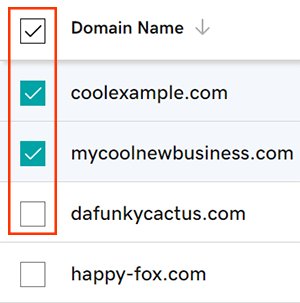
- У меню дій виберіть Плани захисту , а потім виберіть Оновити плани захисту .
- Залежно від розміру вашого екрана, можливо, вам буде потрібно натиснути меню Додатково й прокрутити вниз до пункту Плани захисту.
- Виберіть бажаний план Domain Protection із доступних варіантів.
- Виберіть Оформити замовлення , щоб завершити замовлення.
Автоматичне поновлення вмикається автоматично після додавання або оновлення Domain Protection.
Пов’язані дії
- Змініть параметр Domain Privacy для своїх доменів.
- Перевірте контактну інформацію вашого домену й переконайтеся, що всі відомості правильні й чинні.
Додаткові відомості
- Налаштуйте двоетапну перевірку, щоб забезпечити найкращий захист своїх доменів та облікового запису.