Перемикатися між різними поштовими скриньками GoDaddy Conversations
Якщо до GoDaddy Conversations підключено кілька підприємств, ви можете легко перемикатися між різними уніфікованими поштовими скриньками Conversations, щоб читати повідомлення для цього підприємства.
Note: The GoDaddy mobile app is not available with free Conversations plans.
- Any time a customer sends a message through any of the channels you’ve connected to GoDaddy Conversations, you’ll receive a notification on your mobile phone. The notification will tell you which business it’s for and who it’s from.

- Tap the notification to be taken directly to the conversation thread in the GoDaddy mobile app, from where you can respond to the message.
- To switch to an inbox for a different venture, from your inbox, tap your business name at the top of the screen. A list of your businesses will show.
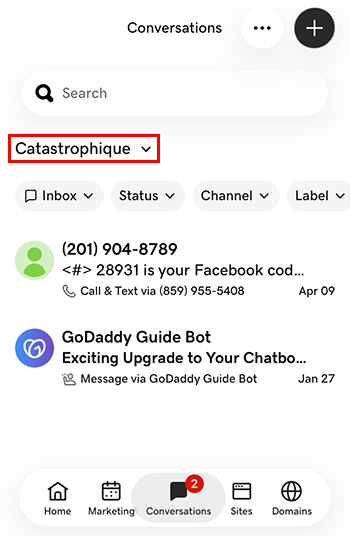
- Натисніть на підприємство, на яке ви хочете перейти. Ви перейдете до папки "Вхідні" для цього підприємства.
- У веб-браузері перейдіть на GoDaddy .
Якщо у вас окрема версія Conversations, розгорніть уніфіковану поштову скриньку Conversations . Праворуч від плану Conversations виберіть Web Inbox .
АБО
Якщо ви маєте план Websites + Marketing, прокрутіть сторінку до розділу Websites + Marketing і натисніть кнопку Керування поруч із вашим сайтом. У меню ліворуч розгорніть Conversations .
- Виберіть Вхідні . Відобразиться список неархівованих бесід.
- Виберіть повідомлення, яке потрібно передати безпосередньо до ланцюжка розмови, звідки ви зможете відповісти на повідомлення.
- To switch to an inbox for a different venture, on the far left of your screen, select the venture you want to switch to. You’ll be taken to the dashboard for that venture.
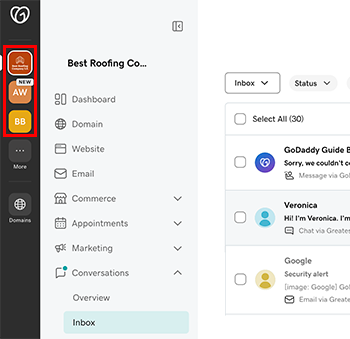
- У меню ліворуч розгорніть Розмови , а потім виберіть Вхідні , щоб перейти до папки "Вхідні" для цього підприємства.