Add email subscribers to my list from my website
Here are 2 great ways to allow people to join your email marketing list in Websites + Marketing. Choose one method or both.
Each of these sections gives you an overview of this strategy and provides links to more detailed information.
- Subscribe section
- Contact Us section
Remember to publish your site when you're finished so your changes are visible to your site visitors.
Subscribe section
When you’re in your website editor, add a section and choose the Subscribe section.
After you choose the layout and add the section, customize the words and button text, and customize the thank you message customers see after they subscribe to your list.

Contact Us section
When you’re in your website editor, add a section and choose the Contact Us section. (Or customize a Contact Us section that’s already in your site.)
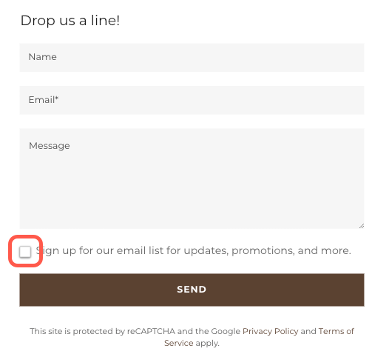
In the section settings, select Contact Form. One of the settings of your contact form is a Show Email Opt-In toggle.
When your email opt-in is on, you’ll see a checkbox added to the Contact Us section on your website. Customize the email opt-in message if you wish and then select add a section.
More info
- In addition to letting people sign up on your list, you are also able to add email subscribers manually and import email subscribers from another list or CSV file.
- Once you have email subscribers, create and send marketing emails.