USD $ - 美国美元
您的币种显示为 美国美元。
立即更改
域名
查找域名
搜索域名
转移域名
gTLD 域名后缀
.AI 热门趋势
域名投资
域名交易
评估域名价值
特惠域名俱乐部
域名工具和服务
查找域名所有者 (WHOIS)
生成域名
批量搜索域名
网站
GoDaddy 建站神器
建站神器
免费试用
创建免费网站,还自带营销工具。
网站模板
数百种惊艳且可定制的网站设计任你选。
人工智能生成器
Airo AI 建站助手
全新
您的对话式商务伙伴,可在几分钟内构建定制网站和 Web 应用程序。
Airo for WordPress
NEW
用 AI 几分钟就能创建 WordPress 网站。
电子邮件
主机
主机
虚拟主机
享受快速、可靠、安全的虚拟主机服务。
WordPress 主机
省心无忧,WordPress 托管全搞定。
虚拟专用服务器
拥有 root 权限和专属资源,全面掌控一切。
所有主机选项
适用于代理商的工具
GoDaddy 代理商合作伙伴计划
用我们的值得信赖的合作伙伴计划,助力你的代理机构发展壮大。
营销
营销工具
数字营销
徽标制作器
GoDaddy 应用
GoDaddy Airo®
Airo
用域名、徽标和社交媒体营销,快速启动你的品牌。
安全
Web 安全
SSL 证书
向访问者展示您的网站已经过加密,值得信赖。
网站安全
全方位安全防护,助您的网站抵御各类威胁。
所有 Web 安全选项
Airo AI 建站助手
定价
交易
帮助中心
账户
购物篮
帮助
联系我们
65 3106 4771
登录
已注册用户
已经有账户?立即登录。
登录
新客户
初次使用 GoDaddy?创建账户,立即开始。
创建账户
收件箱链接
登录 Office 365 云邮
登录 GoDaddy 云邮
帮助中心
|
帮助
操作方法 视频
联系我们
系统状态
Applies to:
账户管理
账户管理 帮助
更改我的订阅付款方式
无论是启用自动续费,还是为产品手动续费,您都可以更改产品的指定付款方式。
转到您的
续费和结算
页面,然后选择
管理订阅
。
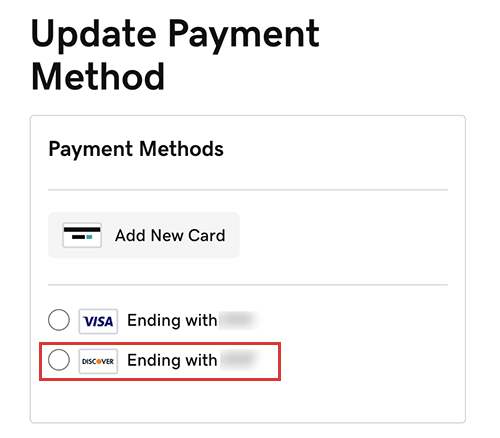
选择您想要更改付款方式的产品,然后选择付款方式账号。
在
付款方式
下方,从列表中选择一个不同的付款方式。
如果您需要为账户添加新的付款方式,请选择
添加新卡
,输入卡信息,然后选择
保存
。
选择
保存付款方式
。
注意:
针对设置为自动续费的商品:如果在结算时无法从您选定的支付方式中扣款,我们可能会尝试使用您此前成功使用过的其他支付方式进行扣款。
更多信息
更新
或
删除
过时的付款方式。