Applies to: 账户管理

账户管理 Help

手动续订产品或服务

即使将产品设置为自动续费,也可以随时手动为产品续费。

Note: If you're looking to renew an expired domain, the steps are different.
  1. 转到您的续费和结算页面,然后选择管理订阅。
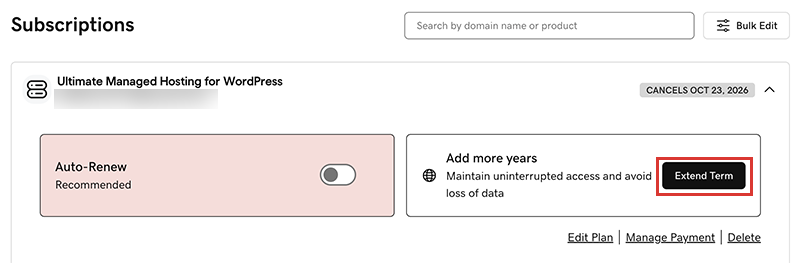
  2. In the Subscriptions list, select the product and then select Extend Term.
    select extend term
    We'll take you to the Cart, where you can see the renewal price.
    Note: If you see Renew Now instead of Extend Plan, select Renew Now to confirm the payment method to use for the renewal.
  3. 按照提示完成续费购买。
Note: Products auto-renew for the same length of time as their most recent manual renewal, instead of their original registration length. This also applies to domains that are manually renewed after July 16, 2020. For example, if a domain is manually renewed after July 16, 2020 for a three-year term, it will auto-renew for the same three-year term when the time comes. For full details, see our Domain Name Registration Agreement.

相关步骤

更多信息