使用 FTP 和 FileZilla 移动我的 cPanel 网站
您可以通过文件传输协议 (FTP),在计算机和您的 Web Hosting (cPanel) 账户之间移动文件副本来上传或备份您的网站。大多数 FTP 客户端应用程序都可以使用,这些步骤说明了如何使用 FileZilla。
在开始之前,您需要以下信息:
获得了所有这些信息?现在开始吧!
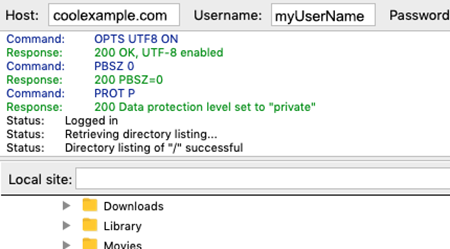
- 开启 FileZilla 并填写以下字段:
字段 输入内容... 主机 您的 IP 地址或域名 用户名 您的 FTP 用户名 Password(密码) 您的 FTP 密码 Port(端口) 21 - 选择 Quickconnect(快速连接)。FileZilla 连接到您的主机账户。
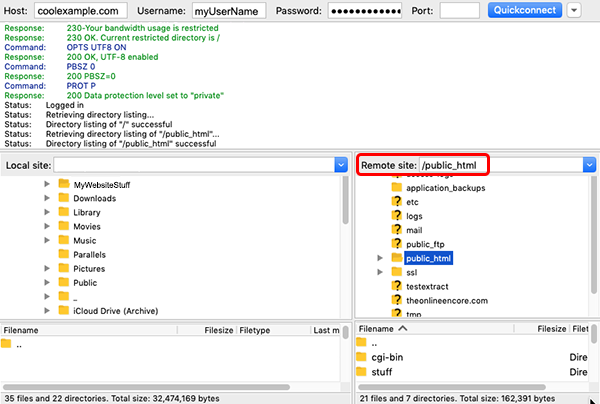
- 在远程站点部分中,打开您网站的根目录。在您的主域名中,该文件夹为 public_html 文件夹。辅助域名或附加域名的根目录可能不同。
- 在本地站点分区中,打开计算机上本地存储网站文件的位置。
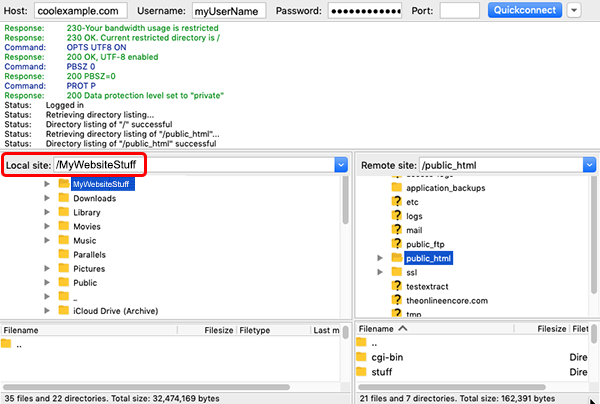
要上传您的文件:在“本地站点”部分,选中您网站的所有文件和目录,然后将它们拖拽到“远程站点”部分。文件上传完成后,您的网站即可上线。
或者,下载您的文件:在远程站点区域中,选择网站的所有文件和目录,然后将它们拖到本地站点区域中。文件移动后,您的网站备份将保存在计算机上。
注意:上传和下载您的网站或整个主机账户可能需要一段时间,具体取决于您的网站大小和您的互联网连接。
更多信息
- 以下是查找辅助或附加域名的根目录的方法。
- 如果您的网站使用数据库(例如 MySQL 或 MSSQL),确保您也对这些数据库进行备份,以创建完整备份。
注意:我们特别附送了有关如何使用某些第三方产品的信息,但我们并不建议使用第三方产品,也不为第三方产品提供直接支持。对于这些产品的功能或可靠性,我们不承担任何责任。第三方标记和徽标均为其各自所有者的注册商标。保留所有权利。