搜索对话
Note: The GoDaddy mobile app is not available with free Conversations plans.
使用GoDaddy Conversations收件箱中的搜索工具,快速查找您与客户的对话。
成功搜索的提示:
- 搜索将应用于所有邮件,无论它们是处于活动状态,已存档还是标记为垃圾邮件。
- 当进行搜索时,请使用完整字词,例如找到“ Jennabelle”的名称,并输入完整名称,不仅仅是“ Jenna”。
- 如果您在移动应用上进行搜索,则您的搜索短语应至少包含2个字符,如果您在网上使用会话,则应包含4个字符。
- 我们排除了“ and”,“ the”和“ hi”等常见词语,因此搜索这些词语不会返回任何结果。
- 您可以搜索联系人姓名或关键字。
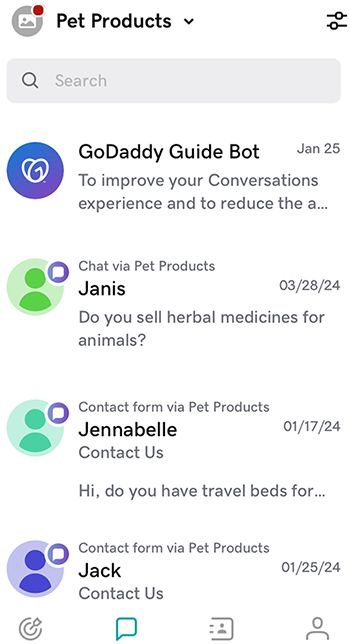
- 登录到您的GoDaddy移动应用程序。
- At the bottom of the screen, tap Conversations to see a list of all your unarchived conversations.

- In the search bar, enter a keyword or search phrase. If the term exists in any of your message folders, the conversation will be returned and you can tap it to read the details.
- 在网络浏览器中,转到GoDaddy产品页面。
如果您拥有Conversations的独立版本,请展开Conversations Unified Inbox(Conversations统一收件箱) 。在您的Conversations套餐右侧,选择Web Inbox(网络收件箱) 。
或
如果您拥有Websites + Marketing套餐,请滚动到Websites + Marketing ,然后选择网站旁边的Manage(管理) 。在左侧菜单中,展开Conversations 。
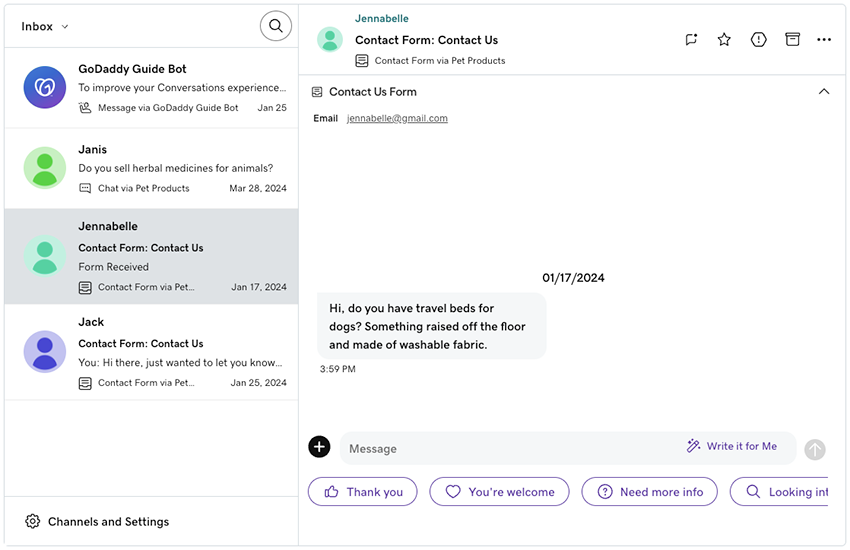
- 选择Inbox(收件箱) 。系统将显示您未存档的会话列表。
- Select Search to expand the search bar.

- Enter a keyword or search phrase using 4 letters or more. If the term exists in any of your message folders, the conversation will be returned and you can tap it to read the details.