Agregar o actualizar mi plan Domain Protection
Agrega o actualiza Domain Protection para aumentar la seguridad de tus dominios. Domain Protection ofrece una mayor seguridad contra las amenazas en línea al enviar alertas cuando se realizan cambios en tu dominio y prevenir la expiración accidental. Algunas extensiones de dominio no son elegibles para determinadas funciones de Domain Protection.
- Inicia sesión en tu Cartera de productos de dominio de GoDaddy. (¿Necesitas ayuda para iniciar sesión? Encuentra tu nombre de usuario o contraseña).
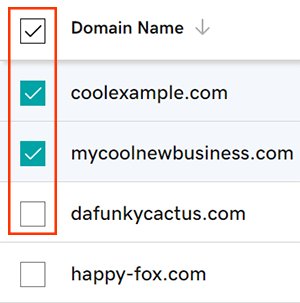
- Selecciona las casillas de verificación junto a los dominios que actualizarás. O selecciona la casilla de verificación junto a Nombre de dominio y luego elige Seleccionar todo .
- En el menú de acciones, selecciona Planes de protección y luego selecciona Actualizar planes de protección .
- Según el tamaño de tu pantalla, es posible que debas seleccionar el menú Más y desplazarte hacia abajo para ver la opción Planes de protección.
- Elige tu plan Domain Protection preferido de las opciones disponibles.
- Selecciona Pago para completar tu pedido.
La renovación automática se activará automáticamente cuando agregues o actualices Domain Protection.
Pasos relacionados
- Cambia la configuración de Domain Privacy para tus dominios.
- Revisa la información de contacto de dominio para asegurarte de que tus detalles son precisos y están actualizados.
Más información
- Configura la verificación de 2 pasos para la mejor seguridad en tus dominios y cuenta.