Create marketing campaigns with Airo AI Builder
Tell Airo AI Builder what you want to promote, and it will build a full multichannel campaign around that goal. Depending on what you're promoting, it may recommend a campaign landing page, one or more blog posts and one or more Facebook posts, all launching together as a single campaign. Review and adjust the recommended plan before launching.
- Ve a tu página de aplicaciones de Airo AI Builder y luego selecciona tu aplicación o sitio.
- Select Marketing. If this is your first time, select + New tab and then select Marketing.
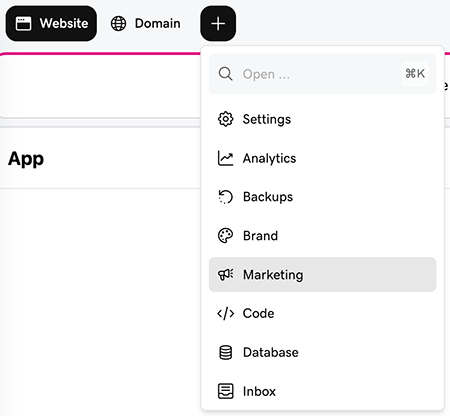
- To start the conversation, select Ask Airo to create a marketing campaign.
- Set up the campaign. In the chat, Airo will guide you through describing your campaign's purpose and details.
- Review the proposed plan. Airo AI Builder recommends which channels to use and explains why, along with what to expect. You can approve the plan as is or ask for changes before any content gets created.
- Review your content. Airo AI Builder generates the content for each recommended channel. Everything is saved as a draft so you can review and edit before anything goes out.
- When you're ready, select Approve and launch. Airo AI Builder publishes your site changes and posts your content. Nothing goes live until you take this step.
Note: Once a campaign is launched, only Facebook posts can be edited. Everything else is locked and can't be changed. To cancel a launched campaign, you'll need to delete it.