Esportazione del database del sito
Passaggio 2 della serie Trasferimento di un sito Managed Hosting for WordPress a un account WordPress non gestito.
Esporta una copia del database MySQL a cui il tuo sito Managed Hosting for WordPress è collegato.
- Nella pagina I miei prodotti, accanto a Managed Hosting for WordPress, seleziona Gestisci tutto.
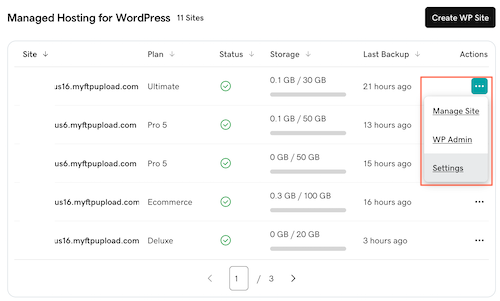
- Per il sito web di cui vuoi eseguire la migrazione seleziona Impostazioni nel menu
 .
.
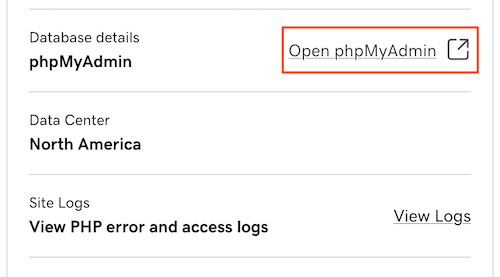
- Sotto Sito di produzione, accanto a Dettagli database, seleziona Apri phpMyAdmin.
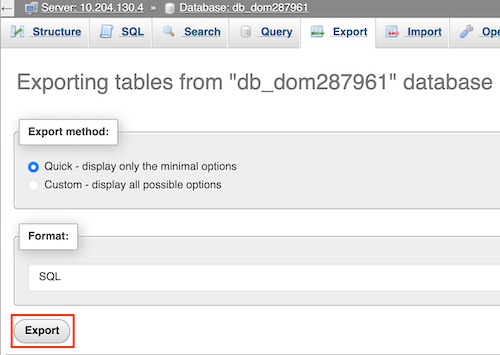
- Seleziona Esporta.

- In Metodo di esportazione, seleziona il metodo che preferisci. L'opzione predefinita è Rapido, che mostra solo le opzioni essenziali. (Opzionale) L'opzione Personalizzato mostra tutte le opzioni disponibili per personalizzare l'esportazione.
- Seleziona Esporta per scaricare il file .sql sul tuo computer. La posizione di salvataggio varia a seconda del browser utilizzato.
Altre informazioni
- Ulteriori informazioni su phpMyAdmin.
- Per ulteriori informazioni, fai riferimento a WordPress.org.