Verbind Conversations met mijn Microsoft 365 van GoDaddy e -mailadres
Link your Microsoft 365 email address to Conversations to get your emails directly in your Conversations unified inbox. If you’re a Websites + Marketing subscriber and you’re using a chat widget or web forms on your website, messages from those sources will also show in your Conversations box, through this email address.
- Meld je aan bij je GoDaddy mobiele app.
- At the bottom of the screen, tap Conversations to see a list of all your unarchived conversations.

- In the top-right corner, tap
 more, and then tap Settings.
 - Tap Email. You may be asked to sign in to your GoDaddy account.
- Expand Email, and then tap Connect.
- Tap Microsoft 365, and then tap Next.
- Als je al een Microsoft 365 -e -mailadres hebt, wordt dit op het scherm weergegeven. Als je dat niet doet, wordt je gevraagd om er een aan te schaffen voordat je door kunt gaan met deze stappen.
Selecteer het e -mailadres dat je wilt verbinden met Conversations en tik op Doorgaan .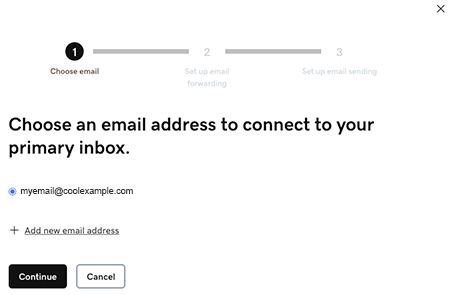
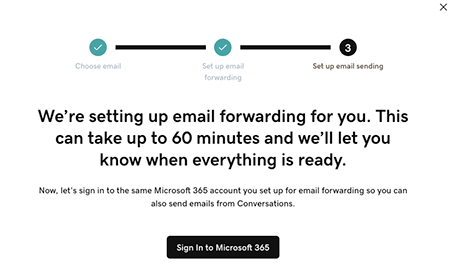
- Email forwarding will be set up for you. This could take up to 60 minutes, but you can continue setting up your email and we’ll let you know when forwarding is ready.
Sign in to the Microsoft 365 account you’re linking to Conversations. This must be the same account you used in Step 7.
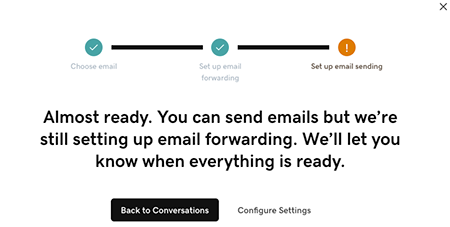
- Je ziet een scherm waarin wordt uitgelegd dat je e -mail nog steeds wordt ingesteld.
- Meld je aan bij je GoDaddy mobiele app.
- At the bottom of the screen, tap Conversations to see a list of all your unarchived conversations.
- In the top-right corner, tap
 settings.
 - Tap Email. You may be asked to sign in to your GoDaddy account.
- Expand Email, and then tap Connect.
- Tap Microsoft 365, and then tap Next.
- Als je al een Microsoft 365 -e -mailadres hebt, wordt dit op het scherm weergegeven. Als je dat niet doet, wordt je gevraagd om er een aan te schaffen voordat je door kunt gaan met deze stappen.
Selecteer het e -mailadres dat je wilt verbinden met Conversations en tik op Doorgaan . - Email forwarding will be set up for you. This could take up to 60 minutes, but you can continue setting up your email and we’ll let you know when forwarding is ready.
Sign in to the Microsoft 365 account you’re linking to Conversations. This must be the same account you used in Step 7.
- Je ziet een scherm waarin wordt uitgelegd dat je e -mail nog steeds wordt ingesteld.
- Ga in een webbrowser naar van je GoDaddy -productpagina .
Als je de standalone versie van Conversations hebt, vouw je Conversations Unified Inbox uit. Selecteer Webinbox aan de rechterkant van je Conversations -abonnement.
OF
Als je een Websites + Marketing -abonnement hebt, scrol je naar Websites + Marketing en selecteer je Beheren naast je site. Vouw Conversations uit in het linkermenu.
- Selecteer Instellingen.
- Select Channels.
- Expand Email, and then tap Connect.
- Select Microsoft 365, and then tap Next.
- Als je al een Microsoft 365 -e -mailadres hebt, wordt dit op het scherm weergegeven. Als je dat niet doet, wordt je gevraagd om er een aan te schaffen voordat je door kunt gaan met deze stappen.
Selecteer het e -mailadres dat je wilt verbinden met Conversations en tik op Doorgaan . - Email forwarding will be set up for you. This could take up to 60 minutes, but you can continue setting up your email and we’ll let you know when forwarding is ready.
Sign in to the Microsoft 365 account you’re linking to Conversations. This must be the same account you used in Step 7.
- Je ziet een scherm waarin wordt uitgelegd dat je e -mail nog steeds wordt ingesteld.
Gefeliciteerd! Je hebt je e -mailadres gekoppeld aan GoDaddy Conversations. Zodra het doorsturen is voltooid, ontvang je je e -mailberichten rechtstreeks in je Conversations -inbox.