Remove a connection from my domain
Remove your domain connection to other sites, such as Instagram or Squarespace, to use your domain with a different product or service. You'll need to remove the connection before you can edit your A record or set up domain forwarding, because connecting your domain to another site will lock those DNS records.
- Sign in to your GoDaddy Domain Portfolio. (Need help logging in? Find your username or password.)
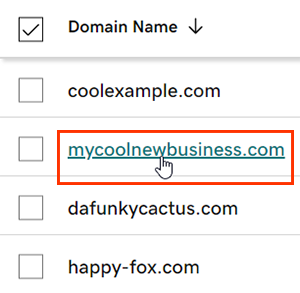
- Select an individual domain to access the Domain Settings page.
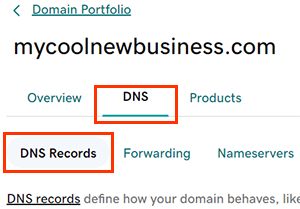
- Select DNS to view your DNS records.
- Above your records table, select Remove next to your template name (e.g., Squarespace or Instagram).
- Confirm removal by selecting Yes, let's do it!.
Most DNS changes take effect within an hour but could take up to 48 hours to update globally. View the global update status by selecting the world icon  in the Propagation column for the DNS record.
Related step
- Change your A record to connect to your hosting account, or forward your domain to another site.
- Create a new Websites + Marketing website and get connected with professional email.
More info
- Make sure you turn on auto-renew to continue your domain registration uninterrupted.
- We recommend setting up 2-step verification for the best security on your domains and account.