Renovar manualmente os meus produtos ou serviços
Renove manualmente os seus produtos em qualquer altura, mesmo que estejam definidos para a renovação automática.
Note: If you're looking to renew an expired domain, the steps are different.
- Aceda à sua página de Renovações e cobrança e selecione Gerir subscrições.
- In the Subscriptions list, select the product and then select Extend Term.
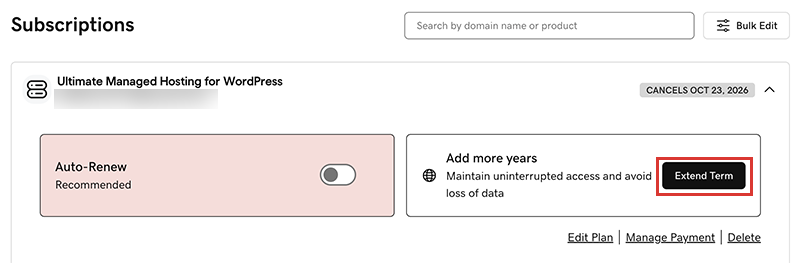
We'll take you to the Cart, where you can see the renewal price.Note: If you see Renew Now instead of Extend Plan, select Renew Now to confirm the payment method to use for the renewal. - Siga as instruções para concluir a sua compra da renovação.
Note: Products auto-renew for the same length of time as their most recent manual renewal, instead of their original registration length. This also applies to domains that are manually renewed after July 16, 2020. For example, if a domain is manually renewed after July 16, 2020 for a three-year term, it will auto-renew for the same three-year term when the time comes. For full details, see our Domain Name Registration Agreement.
Passos relacionados
- Saiba aqui como renovar um domínio expirado.
- Ative a renovação automática para não ter de renovar manualmente os seus produtos.
- Or, cancel a subscription to turn off auto-renewals.
Mais informações
- Atualize as informações da sua forma de pagamento: Altere a data de expiração do cartão de crédito ou a morada de faturação.