Artificial intelligence (AI) is reshaping web design in a big way. AI tools are changing how we design and interact with websites, making the whole process faster, smarter and far more intuitive.
In this guide, we'll walk through what AI-powered web design can really do — and how you can use it to build a website that stands out.
What is an AI website builder?
An AI website builder uses artificial intelligence to create a website's layout, copy, images and structure from a simple text prompt.
Until recently, website-building tools offered a narrow set of templates with equally limited customisation options. If you needed something more sophisticated, custom web development was the only route.
Now, with AI on your side, you're not stuck starting from a blank page or making do with off-the-shelf designs.
Why use GoDaddy Airo AI Builder?
With GoDaddy Airo AI Builder, you can get your website online today — no code and no developers required. And it goes far beyond website building: you can spin up web apps or launch an online shop, all through a conversational AI chat interface (text or voice — your choice).
It's your whole business, built in one conversation.
GoDaddy Airo AI Builder
Describe your idea. We'll build your live website in minutes.
With a few prompts, Airo AI Builder generates your website, web app, pages, databases and logic in minutes — no coding required. Start for free with 50 AI credits a month. No credit card required.
Build for FreeAdvantages of using AI to create your website
For anyone comfortable with AI prompts, AI website-building technology brings some genuinely useful advantages. That said, there are limitations worth knowing about too. Let's look at both.
Your website is essentially the shop window of your business, so a strong online presence matters. But building one can feel daunting, especially if you don't have coding skills or a technical background.
Enter AI.
The ability to create a website with AI is already changing the web design industry. Here are a few of the benefits it brings:
- Faster, simpler builds: Traditional website building can take weeks — sometimes months — to get every detail right. With AI, you can have a functional, visually appealing website up and running in a fraction of the time. AI-powered builders use intelligent algorithms to work at pace, automatically selecting colour schemes, fonts and layouts based on your preferences. That frees you up to focus on the other parts of your business. With features like drag-and-drop design and pre-made templates, these builders make the whole process far more approachable.
- No coding required: Traditional website design relies on languages like HTML, CSS and JavaScript. AI removes that barrier. You don't need to know a single line of code to create a striking website. These platforms use sophisticated algorithms to turn your design choices into working code, making website creation accessible to everyone.
- A cost-effective design solution: AI can also be far more affordable than traditional web design. Hiring a professional designer or agency can push the cost of a website up significantly. AI website builders typically come with a modest monthly or annual subscription, giving small businesses a more budget-friendly alternative.
Things to consider before choosing AI for your business
With those benefits in mind, it's still worth being clear about your business needs and how much work the project will involve.
Businesses/websites requiring lower effort (and fewer AI credits)
- Small businesses and sole traders
- Portfolio websites for creatives
- Side-hustlers
- Anyone needing to launch quickly on a budget
Businesses/websites requiring higher effort (and more AI credits)
- Brands that need a bespoke design system
- Companies that need highly complex web applications
- Enterprises with deep custom integrations
How to build a website with GoDaddy Airo AI Builder: step-by-step
GoDaddy Airo AI Builder is conversational, quick and doesn't require any technical know-how to build a good-looking, functional website. In this guide, we'll walk through each step in detail so you know exactly what to expect before you get started.
Before you start: what to prepare
Building your website with GoDaddy Airo AI Builder is straightforward, but a bit of prep before you begin will make the experience smoother. Here are a few things to sort out first:
Define your website's goal and target audience
Knowing where you want your website to end up — and who it's for — will help you craft sharper prompts.
Gather your brand assets
Brand assets include your logo, brand colours and photos. If you don't yet have a logo or brand colour palette, don't worry. GoDaddy Airo AI Builder can help you with both.
Decide which pages you need
Does your website need a blog? Do you offer services and want to showcase your previous work? Working this out ahead of time will speed up the build, because you can prompt for it early.
Write a strong first prompt
Once you've got your requirements in hand, it's time to craft a well-rounded first prompt to kick off your build. The more specific the prompt, the better GoDaddy Airo AI Builder performs.
Here's an example of what a good starting prompt looks like:
Create a modern website for a local photography business. Include Home, About, Portfolio, Pricing and Contact pages. Use a clean black-and-white style with large images and a simple contact form.
Step 1: Access Airo AI Builder and describe your vision
- Go to the GoDaddy Airo AI Builder page.
- Enter the prompt you've prepared and click the Start Building for Free button.
- Log in to your GoDaddy account, or create one if you haven't got one already (no card details required).
Note: Free plans from GoDaddy Airo AI Builder include 50 credits per month, so you can build your website before paying anything. Bear in mind that you'll need to upgrade to a paid plan to publish.
Airo AI Builder will now build the first pass of your website using the prompt you entered.
Step 2: Review your AI-generated design
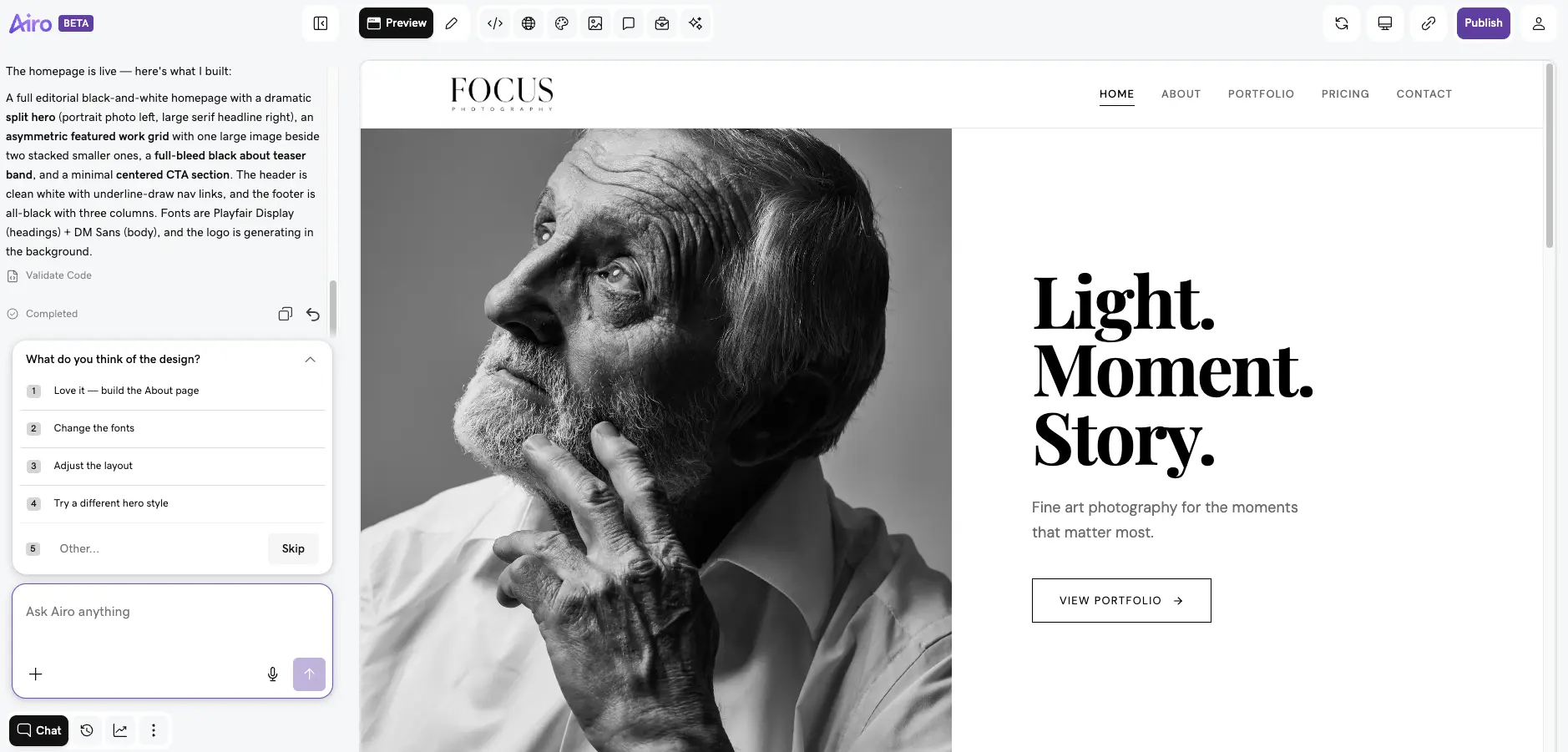
GoDaddy Airo AI Builder will create your home page, navigation and overall design. Once the initial build has finished, you'll be prompted to give feedback.
You can either pick from the list of next steps Airo AI Builder suggests in the chat window, or type your own request into the text box below.
At this stage, it's worth checking that the design actually matches your goals and audience. Is the layout right for your type of business? Does the navigation make sense? Will the design appeal to the people you're trying to reach?
Step 3: Refine your design and content
If there are features or design choices you'd like to change, now's the time to tell Airo AI Builder. This is the starting point, not the finish line — so don't hold back.
If the hero section isn't quite right, for example, you can prompt Airo AI Builder to adjust it:
Swap the image in the hero section to the right side instead of the left.
Keep refining your home page and overall theme using the chat interface at the bottom left of your screen. Replace generic AI text placeholders with your own brand language, swap out stock images for your own photography, add your logo and brand colours, and change the navigation if the suggested layout doesn't suit your business.
You're in control. Describe what you need, and GoDaddy Airo AI Builder will build it.
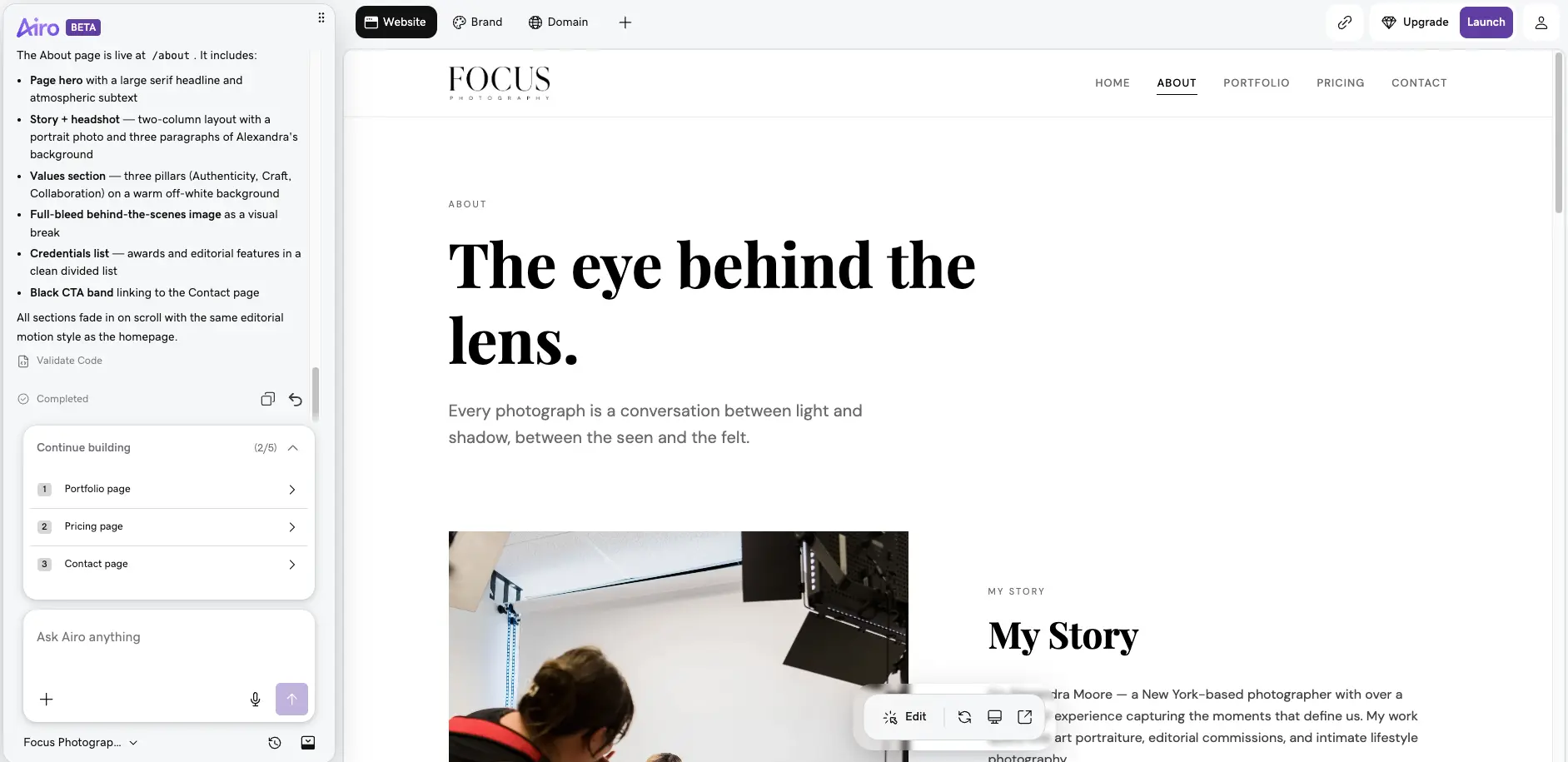
Step 4: Build out your specific pages
Once you're happy with the overall design, it's time to flesh out your pages. Airo AI Builder gives you a solid head start with general website wireframes, but each page should be tailored to your business.
Here are some tips for the most common page types:
- Home page: A strong headline, a clear value proposition and an obvious call to action.
- About page: Your brand story, team details and contact information.
- Services/Products page: Clear descriptions, transparent pricing and a call to action.
- Contact page: Contact form, location, opening hours and social media links.
Step 5: Check your SEO and AEO
AI site builders are designed to give you a head start on optimising your website for search. Airo AI Builder, for example, creates server-side rendered websites that search bots can crawl easily. If you want to be sure your site is fully optimised, you can prompt Airo AI Builder to run an SEO/AEO check and flag any issues.
Beyond the technical side, a few SEO fundamentals should be in place:
- A custom domain name: You can publish an Airo AI Builder website without a custom domain, but having one is essential for good SEO.
- Original, valuable content on every page: AI is great at generating placeholder content, but generic copy needs to be replaced with useful, targeted information if you want to rank well.
- Clear, easy-to-follow navigation: AI website builders generally follow best practice, but it's worth double-checking that both users and search crawlers can find their way around your site.
Step 6: Check mobile view and performance
With more than half of all website traffic coming from mobile devices, making sure your site displays properly on mobile is essential.
Airo AI Builder includes built-in mobile optimisation and runs on GoDaddy's fast, reliable hosting platform to serve your site up quickly.
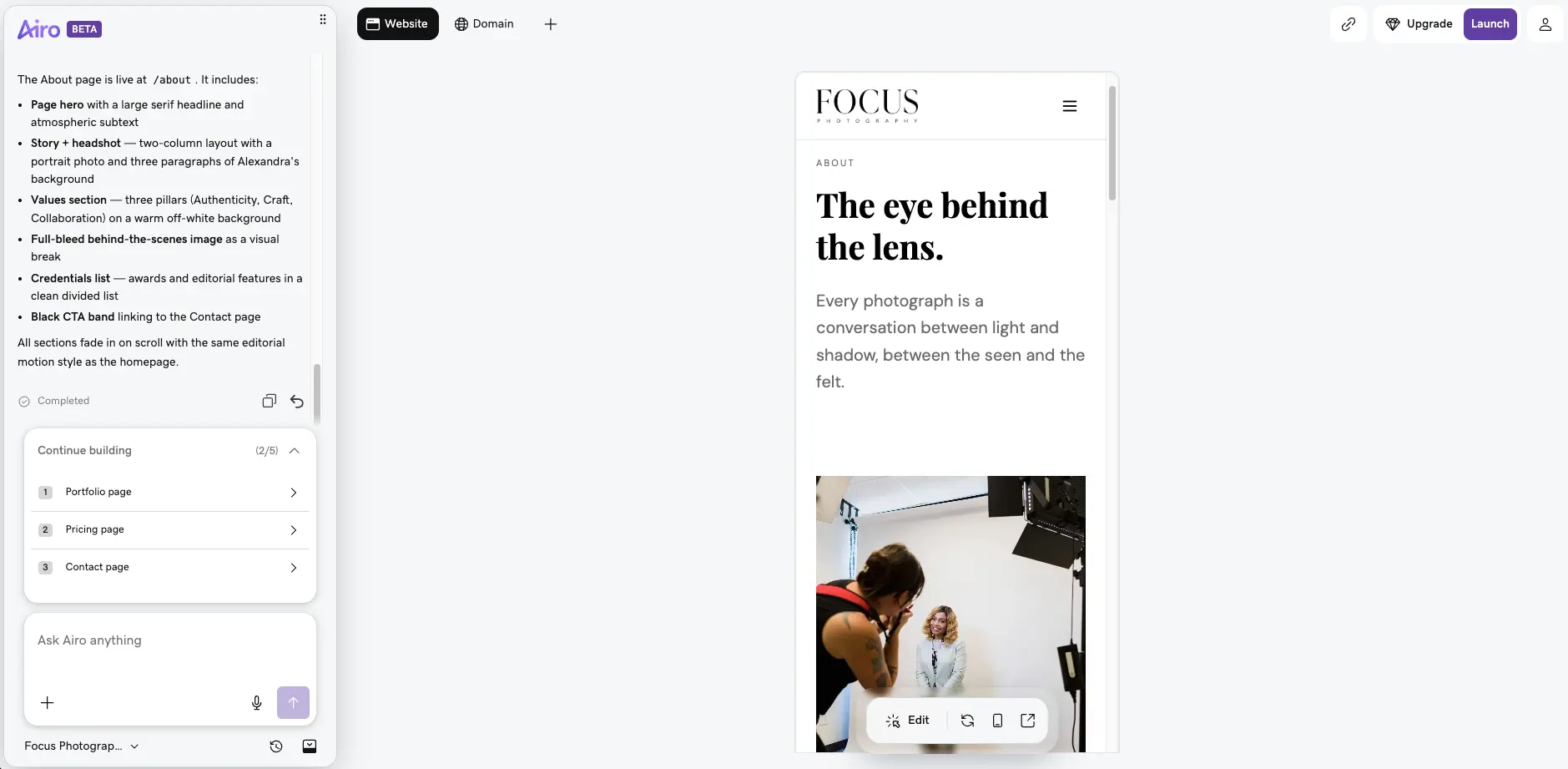
If you want to see how your website looks on mobile before publishing, Airo AI Builder has a toggle at the bottom of the page for previewing.
It's also worth testing your site every so often once it's live. Adding new images or features can noticeably change how your site loads. Have a look at our full guide on how to run a responsive website test for free tool recommendations.
Step 7: Connect business tools and integrations
If your business needs specific tools or features, Airo AI Builder lets you plug them in. External tools might include:
- Third-party analytics tools
- Marketing platforms
- Payment systems
- Booking platforms
- Custom APIs
Every GoDaddy Airo AI Builder plan includes these features as standard:
- Hosting
- SSL certificate
- SEO/AEO
- DDoS protection
- Form builders
- Site analytics
The integrations you choose will depend heavily on what your business does. Airo AI Builder makes it easy to connect with the tools you're already using, or to set up equivalent functionality internally.
For a list of best practices when setting up integrations, take a look at our help guide.
Step 8: Pre-launch checklist
Ready to push your site live? Here are some final checks to run through before you hit publish:
- All text copy reviewed and personalised
- Real photos added (where needed)
- Mobile layout checked
- SEO tests completed (Airo AI Builder can do this for you)
- Mobile layout checked
- SEO tests completed (Airo AI Builder can do this for you)
- Contact form tested
- Internal links working
- Tools and integrations added
It might be tempting to skip the pre-checks, but a quick five-minute review will save you a lot of hassle further down the line.
Step 9: Publish and grow
Now that you've worked through your pre-publish checklist, it's time to go live. Once you've upgraded to the paid plan of your choice, hit publish and let GoDaddy's award-winning hosting take it from there.
Publishing your website isn't the end of the journey, though. Once you're live, it's worth:
- Monitoring your site analytics: This data tells you which parts of your website are working and which aren't. Keeping an eye on visitor behaviour lets you make quick tweaks and improve the user experience.
- Updating your content regularly: Adding a blog is a straightforward way to keep fresh content flowing. Airo AI Builder includes AI tools that help you both set up a blog and write posts, making it easier to build awareness through content.
- Continuing to scale your site: As your business grows, your site can grow with it. Adding new features like booking platforms, event calendars or a CRM levels up your website's functionality — and Airo AI Builder can help you add them whenever you're ready.
If your site keeps growing, Airo AI Builder will grow with you. You can upgrade your plan as your needs change, so don't worry if you find you need something bigger down the line.
Other AI features that can benefit your business
We've covered how AI can help you get a professional website up and running quickly. Now let's look at some of the other ways AI can support your business.
Find business name ideas
Coming up with a business name that's both original and memorable is tough. This business name generator can save you hours of brainstorming and help your name stand out from the crowd. Once you've settled on one you like, it'll also check domain availability for you.
After you've locked in your domain, you can set up email using your custom domain.
Quickly set up your limited company
Setting up a limited company can feel like a complicated process, but AI can simplify it. AI tools walk you through each step, making sure you understand and complete the paperwork correctly. That saves you time and potentially some legal fees, letting you focus on what you do best: running your business.
Create an AI-generated logo
Your logo is the face of your business, and AI can help you design one that's spot-on for your brand. An AI-driven logo maker generates unique designs based on your business type and style preferences. You can tweak and refine until you land on the one that best represents you.
Publish a personalised coming soon page
Building buzz before your website goes live is important. With AI, you can create a personalised coming soon page to get your audience engaged. The AI will suggest templates and content that match your brand, making it easy to put together a page that builds anticipation ahead of launch.
As AI technology develops, expect web design to become even more intuitive and personalised. The future is likely to bring real-time customisation, conversational interfaces, dynamic graphic generation and self-healing code.
What kinds of websites can be designed with the help of AI?
AI website builders are seriously versatile, making it easy to create sites for just about any purpose. Whether you run a business, work as a creative, sell online or write a blog, AI puts professional web design within everyone's reach.
AI solutions for creating a business website
AI can do the heavy lifting when it's time to build a business website, automatically including essential features like contact forms, service pages and booking systems. You can also rely on it to handle the finer details — like a genuinely effective business homepage.
These platforms are built to scale and offer business-focused integrations too, so it's easy to add new services, manage appointments or connect marketing tools as your business grows.
Portfolio design using AI
For artists, designers and other professionals, AI tools make it easy to create striking portfolios by suggesting visually appealing layouts and streamlining the upload process.
These platforms make it simple to organise and present your work beautifully, helping you attract clients and show off your style and talent with minimal effort. With AI on your side, your online presence can stand out as one of the strongest examples of a portfolio website.
Build a personal blog with AI
If you're ready to start a blog, it's easier than ever with AI tools. They can generate topic ideas, help with personal branding and build in SEO optimisation from the start.
That gives you a real boost when it comes to creating engaging content, growing your online visibility and building an audience — all with minimal effort and no technical expertise required.
Business directories and marketplaces
A business directory is an organised catalogue of businesses, sorted by industry, location or product/service type. Examples in the UK include Yell, TripAdvisor and Trustpilot. Marketplaces include sites like Amazon, eBay and Etsy.
Airo AI Builder lets business owners create their own directories or marketplaces without needing to hire a developer.
Web apps and custom dashboards
Airo AI Builder can also help you quickly build web apps and custom dashboards, going well beyond straightforward website creation. If your business needs features like client portals, booking systems or data trackers, these can be built without any coding — and the backend comes built in, saving you time and replacing manual processes.
How does GoDaddy Airo AI Builder compare to other AI website builders?
GoDaddy Airo AI Builder is a robust website builder that also includes powerful integrations competitors don't offer, including:
- Web app builder
- Custom dashboard builder
- Full code export capabilities
- Built-in hosting and SSL
- Multi-language support
- Analytics dashboard
- Website security
Paired with GoDaddy's trusted hosting ecosystem, these features make it easy to create a modern app or website — no coding or developers required.
Best practice for building a website with AI
When you're looking to create a website with AI, choosing the right tool is key. You'll want something that's both capable and suited to your specific needs. Once you've picked your AI website builder, it's crucial to give it accurate information about your business — that's what allows the AI to generate a genuine, representative version of your brand online.
Remember, AI is only as good as the data you feed it, and it can still hallucinate information, so always double-check the details.
The real beauty of AI is how quickly it can build. It's a fast, easy and efficient way to establish your online presence — so make the most of it and stay ahead of the curve.
Common mistakes to avoid when using an AI website builder
We've covered best practice, so here's a quick list of common mistakes to watch out for when building your website:
- Publishing your website without reviewing or personalising the AI output.
- Using only stock or AI images with no real brand photography.
- Ignoring the mobile layout.
- Skipping SEO best practice before going live.
- Writing vague, general prompts within the builder.
- Not using a custom domain name.
FAQs about creating a website with AI
Does GoDaddy have an AI website builder?
Yes — GoDaddy Airo AI Builder makes it easy for anyone to create a professional website. The intuitive AI-driven platform generates layouts, content and branding in minutes. With built-in SEO, ecommerce tools and customisation options, Airo AI Builder helps businesses, creatives and entrepreneurs launch and grow their online presence with minimal fuss.
Do I need coding experience to use Airo AI Builder?
No — coding experience isn't required to use GoDaddy Airo AI Builder. Using the chat interface, you simply describe the feature you'd like to build, and Airo AI Builder handles the rest.
How do I get the best results from an AI website builder?
The secret to great results is writing clear, specific prompts. Instead of vague requests like "fix my site," describe the exact issue, your desired outcome, and your industry or niche for context. List all the pages or sections you need up front, reference any sites you like for inspiration, and provide your real business name, services and prices rather than leaving the AI to guess. Finally, stick to one focused task per prompt. The more clarity and detail you provide, the less time you'll spend on revisions — and the better your end result will be.
What types of websites can I create with AI?
AI website builders like Airo AI Builder are versatile enough to handle almost any type of website. They work particularly well for service-based businesses (salons, gyms, law firms, garages), manufacturing businesses, beauty and wellness sites, online shops, restaurants, non-profits, charities, personal sites and portfolios. AI website builders generate a polished, professional starting point — all you need to do is provide the initial prompt.
How long does it take to build a website with Airo AI Builder?
Airo AI Builder lets you create a website within minutes. Once you've tailored it to your needs, just hit publish and your business is online the same day.
Can I customise my website after AI generates it?
Yes. With Airo AI Builder, you have full customisation control both after your site is generated and after it's published, so you're never locked into the initial output. You can keep refining and updating your site at any time to keep it looking and working exactly the way you want. And if you need more credits or resources further down the line, you can upgrade to a higher tier whenever it suits you.
Can AI help improve an existing website?
Yes. Airo AI Builder makes it easy to improve an existing website rather than starting from scratch. You can rebuild from a URL by simply pasting in your current site's link, allowing the AI to keep what's already working while making improvements. You can also attach files directly to your first prompt — whether that's a document, image, HTML file or zip folder — giving the AI everything it needs to understand your current site and suggest changes.
Can I use my own images and brand assets?
Yes. While Airo AI Builder offers Getty stock images for websites, you can replace any of them within the builder with your own assets.
How do I create content for my website using AI?
Creating website content with Airo AI Builder is simple and intuitive. You can share your ideas through either text or voice in a prompt-first experience — no dragging blocks about or wrestling with complicated site editors. From there, you can refine your content through conversation, describing changes or additions in natural language until everything looks and reads exactly how you want. For online shops, Airo AI Builder also generates AI-powered product descriptions, taking the hassle out of writing compelling copy for every item in your catalogue.
Who owns the code and content I create?
Code created within Airo AI Builder belongs to you and can be downloaded from within the builder. Airo AI Builder also allows you to edit your code directly, if you'd like to.
Can I connect my own domain?
Yes — you can use your own domain name with Airo AI Builder.
How do I create content for my website using AI?
GoDaddy Airo AI Builder includes content creation tools to help you generate content quickly. Just input your topic, keywords or a brief description, and it will help you create unique, SEO-optimised content. Always remember to review and personalise the AI-generated content to make sure it matches your brand voice and meets your business objectives.
How do I use AI for social media marketing?
AI can support your social media strategy by automating content creation, scheduling posts and providing useful analytics. Tools like Buffer and Hootsuite offer automated scheduling and analytics, while AI-powered platforms like Lately use machine learning to create optimised posts from your existing content. AI chatbots can also improve customer interaction on social media by providing instant responses to user queries.
How secure are AI-generated websites?
Websites built with Airo AI Builder run on GoDaddy's enterprise-grade infrastructure — one of the most trusted hosting platforms in the world. Every site automatically includes SSL encryption and built-in DDoS protection to shield it from malicious attacks, while automatic backups make sure your content is never lost. Airo AI Builder also applies best-practice security hardening across the board. Combined with 99.9% uptime and global edge hosting, you can focus on growing your site without worrying about vulnerabilities or downtime.
Disclaimer: When using AI tools, avoid entering sensitive information and always review output for accuracy.