Conversations’yu GoDaddy e-posta adresimden Microsoft 365’e bağla
Link your Microsoft 365 email address to Conversations to get your emails directly in your Conversations unified inbox. If you’re a Websites + Marketing subscriber and you’re using a chat widget or web forms on your website, messages from those sources will also show in your Conversations box, through this email address.
- GoDaddy mobil uygulamanıza giriş yapın.
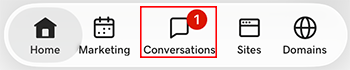
- At the bottom of the screen, tap Conversations to see a list of all your unarchived conversations.
- In the top-right corner, tap
 more, and then tap Settings.
- Tap Email. You may be asked to sign in to your GoDaddy account.
- Expand Email, and then tap Connect.
- Tap Microsoft 365, and then tap Next.
- Zaten bir Microsoft 365 e-posta adresiniz varsa, ekranda görüntülenir. Yoksa bu adımlara devam etmeden önce bir tane edinmeniz istenir.
Conversations'ya bağlanmak istediğiniz e-posta adresini seçin ve ardından Devam seçeneğine dokunun.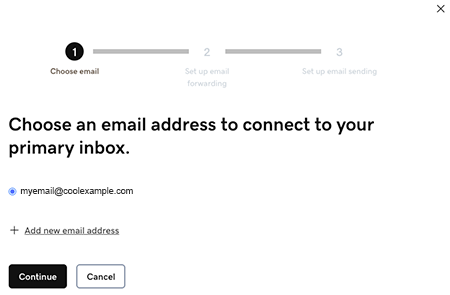
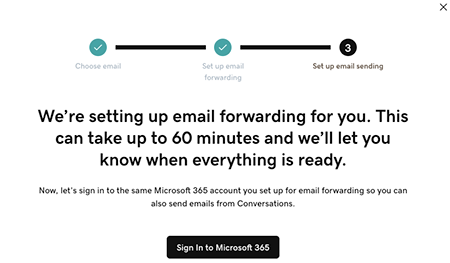
- Email forwarding will be set up for you. This could take up to 60 minutes, but you can continue setting up your email and we’ll let you know when forwarding is ready.
Sign in to the Microsoft 365 account you’re linking to Conversations. This must be the same account you used in Step 7.
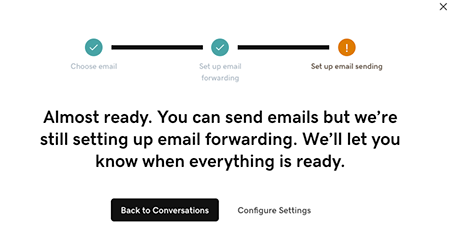
- E-postanızın hala kurulmakta olduğunu açıklayan bir ekran göreceksiniz.
- GoDaddy mobil uygulamanıza giriş yapın.
- At the bottom of the screen, tap Conversations to see a list of all your unarchived conversations.
- In the top-right corner, tap
 settings.
- Tap Email. You may be asked to sign in to your GoDaddy account.
- Expand Email, and then tap Connect.
- Tap Microsoft 365, and then tap Next.
- Zaten bir Microsoft 365 e-posta adresiniz varsa, ekranda görüntülenir. Yoksa bu adımlara devam etmeden önce bir tane edinmeniz istenir.
Conversations'ya bağlanmak istediğiniz e-posta adresini seçin ve ardından Devam seçeneğine dokunun. - Email forwarding will be set up for you. This could take up to 60 minutes, but you can continue setting up your email and we’ll let you know when forwarding is ready.
Sign in to the Microsoft 365 account you’re linking to Conversations. This must be the same account you used in Step 7.
- E-postanızın hala kurulmakta olduğunu açıklayan bir ekran göreceksiniz.
- Bir web tarayıcısında GoDaddy ürün sayfası gidin.
Conversations'nun bağımsız sürümüne sahipseniz, Conversations Unified Inbox'ı genişletin. Conversations planınızın sağındaki Web Gelen Kutusu öğesini seçin.
VEYA
Websites + Marketing planınız varsa, sayfayı Websites + Marketing seçeneğine kaydırın ve sitenizin yanındaki Yönet seçeneğini belirleyin. Soldaki menüde Conversations’yu genişletin.
- Ayarlar öğesini seçin.
- Select Channels.
- Expand Email, and then tap Connect.
- Select Microsoft 365, and then tap Next.
- Zaten bir Microsoft 365 e-posta adresiniz varsa, ekranda görüntülenir. Yoksa bu adımlara devam etmeden önce bir tane edinmeniz istenir.
Conversations'ya bağlanmak istediğiniz e-posta adresini seçin ve ardından Devam seçeneğine dokunun. - Email forwarding will be set up for you. This could take up to 60 minutes, but you can continue setting up your email and we’ll let you know when forwarding is ready.
Sign in to the Microsoft 365 account you’re linking to Conversations. This must be the same account you used in Step 7.
- E-postanızın hala kurulmakta olduğunu açıklayan bir ekran göreceksiniz.
Tebrikler! E-posta adresinizi başarıyla GoDaddy Conversations'ya bağladınız. Yönlendirme tamamlandığında, e-posta mesajlarınızı doğrudan Conversations gelen kutunuza almaya başlayacaksınız.