Подовження терміну дії продуктів або послуг вручну
Ви можете поновити свої продукти вручну будь-коли, навіть якщо для них установлено автоматичне поновлення.
Примітка. Якщо ви хочете поновити прострочений домен, необхідно виконати інші дії.
- Перейдіть на сторінку Поновлення й рахунки та виберіть Керування підписками.
- У списку Підписки виберіть продукт і натисніть Продовжити термін.
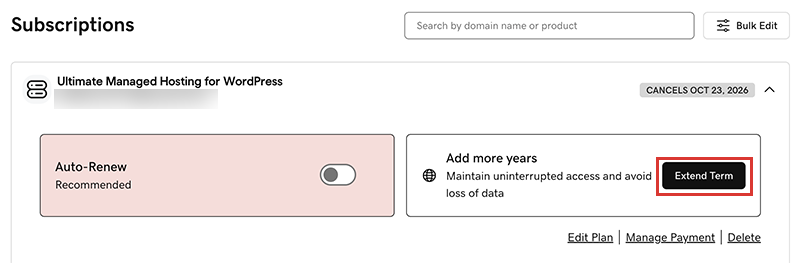
Вас буде переспрямовано до кошика, де ви дізнаєтеся, скільки коштує поновлення.Примітка. Якщо параметр Поновити зараз відображається замість параметра Продовжити план, натисніть Поновити зараз для підтвердження способу оплати, який використовуватиметься для поновлення. - Виконуйте вказівки, щоб завершити купівлю поновлення.
Примітка. Продукти автоматично поновлюються на період останнього поновлення вручну, а не на початковий проміжок часу після реєстрації. Це також стосується доменів, які поновлюються вручну після 16 липня 2020 року. Наприклад, якщо домен поновлено вручну після 16 липня 2020 року на трирічний термін, він буде автоматично поновлений на той самий трирічний термін, коли для цього настане час. Докладнішу інформацію див. у нашій Угоді про реєстрацію доменних імен.
Пов’язані дії
- Ось як можна поновити прострочений домен.
- Увімкніть автоматичне поновлення, щоб вам не потрібно було поновлювати свої продукти вручну.
- Або скасуйте підписку, щоб вимкнути автоматичне поновлення.
Додаткові відомості
- Оновіть відомості про свій спосіб оплати. Змініть термін дії кредитної картки або розрахункову адресу.