阅读并回复GoDaddy Conversations邮件
设置GoDaddy Conversations和与客户联系系列的第步4
您将通过几种不同的方式阅读并回复您的GoDaddy Conversations消息:
- 在您收到的电子邮件通知中
- Through the GoDaddy mobile app (not available with free Conversations plans)
- 在网上通过Conversations统一收件箱
- 在网络上,通过Websites + Marketing控制面板
- 在网络上,通过建站神器
从电子邮件通知中
当客户在与GoDaddy Conversations连接的任何通信渠道上向您发送邮件时,您将收到电子邮件通知。您可以直接从电子邮件中回复。
默认情况下,您的电子邮件通知将发送到与您的GoDaddy账户关联的主电子邮件地址。在设置中,您可以更改此电子邮件地址。
Through the GoDaddy mobile app
注意: GoDaddy移动应用程序不适用于免费的Conversations套餐。
If you haven't already, download and install the GoDaddy mobile app.
- 登录到您的GoDaddy移动应用程序。
- At the bottom of the screen, tap Conversations to see a list of all your unarchived conversations.

- 要阅读列表中的会话,请轻触它。
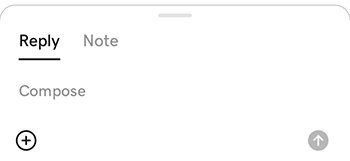
- To respond to the message, type in the Reply field, and then select
 Send.
在网上通过Conversations统一收件箱
这适用于购买独立Conversations的客户。
- 转到 GoDaddy 产品页面。
- 滚动到对话统一收件箱,然后选择右侧的Web收件箱。
- 从顶部顶部的菜单中,选择对话以访问您的收件箱。

- 要阅读对话,请从列表中将其选中。
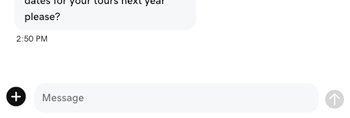
- 要回复邮件,请键入邮件字段,然后选择发送。
在网络上,通过Websites + Marketing控制面板
这适用于订阅Websites + Marketing的客户。
- 转到 GoDaddy 产品页面。
- 滚动到Websites + Marketing ,然后选择您想要查看其Conversations邮件的网站旁边的Manage(管理) 。
- 从左侧菜单中,选择会话,然后选择收件箱。
- 要阅读对话,请从列表中将其选中。
- 要回复邮件,请键入邮件字段,然后选择发送。
在Web上建站神器
这适用于订阅Websites + Marketing的客户。
- 转到 GoDaddy 产品页面。
- 滚动到Websites + Marketing ,然后选择您想要查看其Conversations邮件的网站旁边的Manage(管理) 。
- 在右侧,选择Edit Website (编辑网站)。
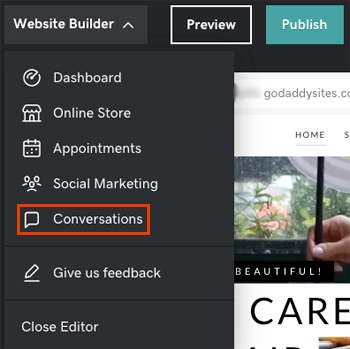
- 在左上角,选择建站神器将其展开,然后选择对话。
- 要阅读对话,请从列表中将其选中。
- 要回复邮件,请键入邮件字段,然后选择发送。